


👋 This is a bi-monthly free edition of MKT1 Newsletter brought to you by our MKT1 MCP Showcase partners: Zapier, Framer, Softr, Attio, Airtable, Profound & Mutiny.
🔌 MKT1-ify your LLM with the MKT1 MCP: Bring ~40 skills we built for B2B Startup marketers to Claude Chat, Cowork, or Code. Add it to Claude in 1 click →
⬆️ Upgrade to a paid MKT1 subscription for: Full access to our MKT1 MCP | 100+ templates & resources | Post to MKT1 Job Board | MKT1 Newsletter Archive | $40K+ in discounts in the MKT1 Perk Stack
We’ve entered the MCP era of AI at work, and there’s no turning back. You can’t build a truly AI-native system for work without connecting it to the rest of your stack.
Why? While Claude’s pretty useful on its own, when you connect it to other tools in your GTM stack it becomes infinitely more useful. And every GTM product worth its salt already has a robust MCP or CLI (command-line interface).
All of this can be overwhelming. Many marketers are still getting comfortable breaking out of ChatGPT or Claude Chat and moving into Cowork, Code, or Codex, so adding connectors is a whole other can of worms. Whether you’ve never used an MCP, have 20 connected, or are running MCPs and CLIs in Claude Code all day, it can be hard to know if you’re doing it right. Don’t worry, I’ll define all these acronyms and terms in the MCP 201 section below.
If you've been in this marketing-startup game for a while, you'll remember when “platform” and “integrations” swept SaaS tools. That's now happening with AI, and MCPs are the mechanism. We’ve seen this before!
With this in mind, we hosted an MKT1 MCP Showcase on 7/29, with 7 GTM tools live demoing their MCPs in Claude. The goal was to skip the fluff and demo workflows you can try right now.
So let's get to it. I'll break down what you need to know to get the most out of MCPs, define the other ways to connect your tools, and then get into the workflows from our 7 GTM tools (including video replays from the event to bring it all to life).
In this newsletter:
MCP 201: Ways to connect Claude to other tools, get more out of your MCPs, and solve your most common LLM complaints.
21 workflows from 7 GTM tools: How to implement each one, plus video replays of the live demos from our MCP Showcase
Featuring: Zapier | Framer | Softr | Attio | Airtable | Profound | Mutiny
3 workflows using the MKT1 MCP: Add MKT1's B2B marketing skills to your Claude workflows, from hiring and campaign briefs to auditing your finished work
Some “inside baseball” for my most loyal MKT1 readers: Last edition I kicked off a 3-part series on multiplayer Claude. This newsletter isn’t part 2, it’s more of a first cousin to that series, as you can’t build a multiplayer system without MCPs. Part 2 will be out in 2 weeks though!
Watch the full replay
We’ve also broken down the replay into chapters for each presenter throughout the newsletter if you’d prefer to watch that way.
Thanks to our Showcase partners
Here's who presented and what they demoed:
Zapier MCP: Run actions across any app you connect in Zapier, including tools with no MCP of their own. Learn more →
Framer CLI: Edit and publish your Framer site from Claude.
Offer: 30% off annual Pro with the code MKT1. Learn more →
Softr MCP: Create and update Softr databases and live apps from Claude. Learn more →
Offer: 2 free months of the Business plan for new users with the code MKT1-2MO.
Attio MCP: Query your CRM records, run reports on deal data, and mine insights from calls, all from Claude. Learn more →
Offer: 15% off your first year, using this link.
Airtable MCP: Bring your bases into Claude to query records, build tables and interfaces, and automate processes. Learn more →
Profound MCP: Analyze your AI search data and run Profound Agents from inside Claude. Free AEO report for MKT1 readers. Learn more →
Mutiny MCP: Build branded landing pages, deal rooms, and decks from Claude. Learn more →
The companies in this showcase and newsletter were hand-selected by me. I use their MCPs and think they’re valuable to my audience of marketers. In full disclosure, they also paid to participate (which makes events like this possible).
MCP 201: How to get the most out of Connectors
Connecting an MCP is just the start. Once connected, you can embed the functionality of these tools into everything you’re already doing in your LLM or AI harness. Before we jump into the workflows, I’ll explain how all of this works so they feel easier to understand and implement.
If you're already comfortable with MCPs, skip on down to the first set of workflows, from Zapier.
1. Ways to connect to Claude to other tools
Let's get some definitions out of the way first:
MCP (aka MCP Server aka Model Context Protocol Server aka Claude Connector): How a tool tells Claude what it can do, so Claude can use that tool on your behalf. An MCP is essentially a bundle of actions, like send a Slack Message or pull AEO data from Profound.
AI Harness (Claude Cowork, Claude Code, or Codex): Think of a harness as an infrastructure layer that wraps an AI model and gives it the ability to interact with other things outside the LLM.
How it fits together: The MCP tells Claude what a tool can do, and the harness is what goes and does it.
No MCP, no problem!
There are other ways to bring tools into your AI system, and sometimes they give you even more functionality than an MCP would.
Once you have an AI harness and/or are willing to run a few slightly more advanced prompts, you can connect to tools that don’t have an MCP yet or go beyond what their MCP supports.
Note: For the rest of this newsletter, I’ll use Claude Code as my default AI harness for simplicity, but you can do much of this in other AI harnesses, from Claude Cowork to Codex.
Here are the main ways to connect your tools to Claude:
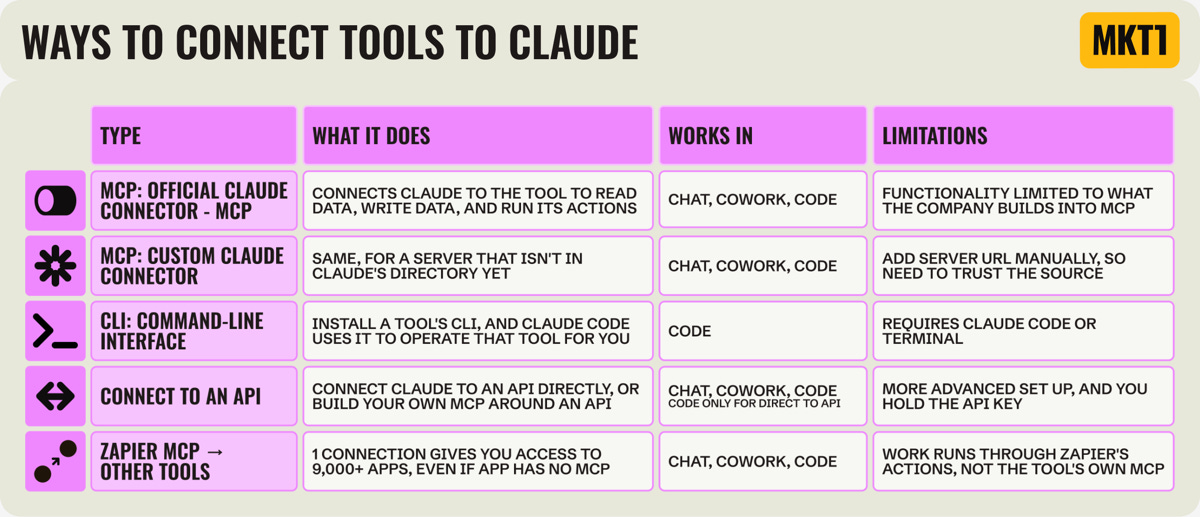
2. How to get more out of your MCPs
Skills + MCPs + routines = magic in Claude. Well, most of the time.
You may have connected a bunch of MCPs already (though be careful how many, since they can slow things down). But a lot of people stop there and never really incorporate them into their workflows.
3 concepts will help you get much more out of your connectors: using multiple MCPs in the same session, wrapping a skill around an MCP so it works your way every time, and putting workflows on a schedule so they run without you.
Once you get a handle (or a harness?!) on all of this, it can genuinely change how you work. Claude starts to become a command center for your whole workday.
Here’s how each of these 3 concepts works:
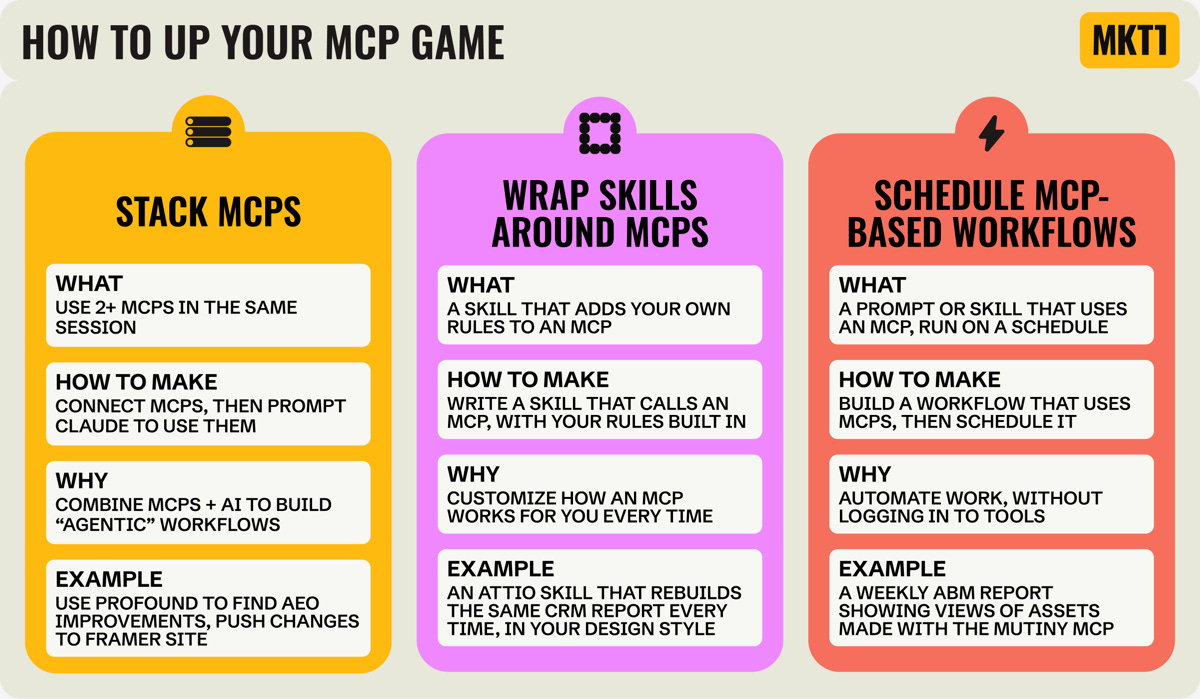
3. How MCPs solve your most common LLM complaints
When helping each company choose workflows to demo, and then watching all 7 demos live, the same handful of patterns kept coming up. MCPs and CLIs solve many of the limitations you run into when using an LLM on its own.
Here’s how connectors help at a high level, across workflows:
Avoiding slop
The problem: Working from a prompt alone, Claude produces generic output. It doesn't know your product, your customers, or your standards, so what comes back could have been made for any company.
How MCPs solve it: By connecting Claude to the context that already lives in your tools (e.g. positioning guides in a doc, design guidelines in Figma), it can pull that knowledge directly into your sessions, workflows, and skills instead of relying on the prompt alone.
Examples: When Claude has your web design guidelines from Framer, it can move much faster making new pages.
Adding a source of truth
There are two distinct use cases here worth separating:
Consolidating reporting from many sources
The problem: Ask Claude to do analysis without a source of truth to lean on, and it can hallucinate numbers entirely. There's a lot it can do once real data is in front of it, but getting it there by CSV is kind of silly at this point.
How MCPs solve it: Claude can read real numbers straight out of each tool, write results back where your team already looks, and build dashboards that combine several sources. Save this process as a skill that calls MCPs and run it on a schedule, and you're really cooking with gas.
Examples: Pull data from Attio, Google Analytics (the MKT1 MCP has a skill to help you connect it!), and Profound. Claude combines it, pushes it to Airtable as your source of truth, and builds you a custom dashboard.
Turning unstructured notes into insights
The problem: A huge amount of what you know is unstructured: calls, threads, notes, half-written docs. Without those tools connected, Claude can't reach any of it, and cleaning it up yourself or sharing files with Claude manually means it gets stale quickly.
How MCPs solve it: Claude can search each tool where the information already sits and find the context you need quickly. It can also tag and enrich info as it comes in, then pass it back to other tools as more structured data.
Examples: Connect to the Zapier MCP to get access to Asana, Slack, meeting notes, docs, etc. Then have Claude tag it and store it in a Softr database via MCP, so you and/or Claude can find this info anytime you need it.
Permission control
The problem: Making Claude truly multiplayer is tough, which is why I covered this in my last newsletter. Your context lives in your session and local skills, and even if you share those, there's no clean way to restrict what people see, so you either don't share or you hand over more than you meant to.
How MCPs solve it: GTM tools already have robust permissioning and even agent sharing. Let them be your “shared layer,” since their MCPs usually preserve the data and functionality access you've already set up.
Examples: Set permissions on Softr apps and Airtable interfaces so people get only the project context they need in Claude. Use Mutiny templates to set brand rules once, so sellers work inside them when building Mutiny assets in Claude. Build Profound agents from Claude, and let Profound handle who can see and run them.
Zooming out, two takeaways to keep in mind as you implement these workflows:
MCPs are essential to building a multiplayer AI system
Adding connectors (MCPs or CLIs) to the mix gives your team optionality to work how they want to work. If someone likes being in a traditional SaaS UI, great. If they like using an agent or assistant in a GTM product, great. If they want to work out of Claude Cowork or Code most of the day, that works too. One of you can spend 20% of your day in Claude and someone else 80%. Everything still stays in sync between the tools when using MCPs.
Build versus buy
But wait, do I still need my GTM stack at all? Can't I just build all these tools? Maybe, but, purpose-built products have deep functionality, and rebuilding them is a distraction from your core work. Also, MCPs can make tools in your GTM stack more valuable, not less (at least this is the case for MKT1). I get more out of the subscriptions I already pay for, because Claude can combine capabilities across tools to build more robust workflows and complete more complex tasks.

I opened the Showcase with a presentation about MCPs, and you can run through it yourself, it’s a free skill in the MKT1 MCP. It’s 19 “slides” you move through by prompting, and you can stop and ask Claude questions as you go. A presentation about MCPs in Claude should be made in an MCP in Claude, right?!
You can also watch me run through this at the Showcase starting at :22 seconds in the video →
The workflows and the live demos
The Zapier MCP
About Zapier & their MCP
Zapier gives AI agents safe access to the apps teams already use, with managed connections across 9,000+ apps.
Their MCP lets Claude run actions across any app you connect in Zapier, including tools that have no official connector.
Zapier MCP is platform-agnostic and works with whatever LLM or harness you use, including Claude, ChatGPT, and Cursor.
Zapier is an official Claude Connector, add it in Claude: Customize > Add > Browse connectors. Install instructions here.
Wade Burrell, Senior Product Marketing Manager, demoed the MCP.
“You actually mentioned pasting API keys into Claude. Don’t ever do that if you don’t have to. The idea would be to connect Zapier and connect all the authentication through there, through that managed portal that we offer.”
Wade demoed 3 workflows:
Zapier Workflow 1: Build a campaign brief with assigned tasks from scattered docs
Key concept: Turning source material into a plan with tasks is the easy half with Zapier MCP. But making the plan stronger is what people skip: Also ask Claude what's missing from your context, have it flag the gaps, and get its help filling them in.
Context: With Zapier you can connect Claude to more than 9,000 apps through one connection, so the doc you're reading from and the task manager you're writing to don't each need their own MCP.
How to run this workflow:
Connect Google Docs and Notion through Zapier MCP, then point Claude at the doc that holds your launch context: who you're targeting, what the product is, etc.
Ask for three things at once: a structured brief, a list of tasks, and any context Claude is missing
Have it write the brief into Notion, with the tasks as an inline database (in this case a task table) on the same page
If Zapier has no predefined action for something, in this case building an inline database, just ask Claude to build it. It can write new actions for you
Zapier Workflow 2: Turn messy internal context into a launch update
Key concept: You don't have to sit and watch Claude work through a long job like this. Start the recap, go back to what you were doing, and have it Slack you or your team when it's done.
Context: Setting up read and write connections to your tools through Zapier MCP is easy. Claude can pull from any of them and post back into any of them, which is what makes a workflow like this possible.
How to run this workflow:
Connect Slack, Notion, and Google through Zapier MCP
Ask Claude to find any notes, results, details, etc. across these tools to help you recap a campaign
Have it write a clean internal recap and show you anything it's unsure about before it posts
Push it to the channel once it's ready
Zapier Workflow 3: Use an app Claude doesn't connect to natively
Key concept: Many tools you use every day don't have an MCP yet, or have MCPs with limited functionality, but that doesn't put them out of reach. Zapier connects to a lot of them, but when a ready-made action doesn't exist, it goes to the tool's API instead. No API keys on your end.
Context: Once you connect Zapier MCP to Claude, every other tool connection happens on Zapier's side: which apps are on, which are authenticated, which actions exist. That makes managing connections across a team easier, and gives you more tools and actions to work with.
How to run this workflow:
Ask Claude to make a sales and customer success enablement deck in Google Slides
Google Slides has no official Claude connector, and while Zapier's pre-built Slides actions can do some actions for you it can’t build slides “out of the box”
But all is not lost! Zapier can access the Google Slides API instead and builds the functionality you need—in this case building slides.
now you can make the slides and its all setup for future decks. And you didn’t have to wrestle with an api key yourself because the authentication is sits in zapier
I personally use Zapier MCP for all my Google connections at MKT1 too. There are way more actions and it's smoother than anything Google gives you natively. I also love the QuickBooks connection through Zapier, since they have no MCP, the product UI is horrible, and my accountants make me use it.
The Framer Agent
About Framer & their agent
“When you vibe code in Claude, you’re vibecoding in a black box. You’re hoping your output is what you describe in your prompt, but let’s be honest, it almost never is.” – Kimmie Glass, Head of GTM at Framer
Framer is the web design agent and site builder that gets design.
Their connector lets you edit and publish to your Framer site from Claude: make copy edits, clone pages, and make CMS updates.
Framer connects to Claude Code via their CLI and a skill, not an MCP. But it works in a very similar way! Install instructions here.
Kimmie Glass, Head of GTM, demoed the CLI.
Offer for MKT1 readers: 30% off annual Pro with the code MKT1.
Kimmie demoed 3 workflows:
Framer Workflow 1: Update your homepage with a new site section for customer stories
Key concept: Adding new content to your website that fits your existing site and follows your style guide is hard with Claude alone, but a whole lot smoother and easier with a site builder like Framer and their agents.
Context: There are 2 ways to build on Framer agentically: 1. Their in-app agent, side by side with the canvas that shows your site. This works well if you want to see the design change in real time without toggling back and forth. 2. Claude Code via Framer's CLI, use this when you want to use Framer + Claude's skills and/or your other tools.
How to run this workflow:
Copy any project link for a site in Framer into Claude Code
If making copy or content updates, point Claude at the source, in this case a Google Doc with 3 customer stories, or ask Claude to help you create new content or copy
Ask Claude what to build and give specific instructions, e.g. reuse the component from this page, or copy what's in this screenshot of my site. In this case, cards on the homepage built from the customer stories
Publish to a branch and you'll see each customer card on your homepage. If all is good, publish to production!
Framer Workflow 2: Build a CMS page for each customer story
Key concept: Building a bunch of similar pages one at a time is fine until you want to change something, and then you're editing every single one. With a CMS, every page follows a template and you can build the whole set in a few prompts.
Context: A Framer CMS is a collection of related items and a page for each item. Building that structure yourself in a Claude-generated site is hard, especially at scale.
How to run this workflow:
Ask Claude to make a new CMS collection for your customer stories, and to make the template page
Review the template, then ask Claude to make a page for each customer story
Fill in the content for each story, from a doc, from another tool via MCP, and/or by asking Claude to help fill it in
Publish to a branch, then to production, and every customer story is its own live page. You can add another any time and it will look the same
Framer Workflow 3: Optimize the new pages for SEO
Key concept: We often don't update SEO fields as regularly as we should, because doing it one by one, page by page, is cumbersome. But Claude can write and update them for you in a single batch when you use Framer and their CLI in Claude Code.
Context: In the demo there are only 3 customer stories to add SEO details to, but customer pages can balloon quickly. At hundreds of pages, the fact that Framer stores SEO fields as easily updatable settings in a CMS is a major time saver.
How to run this workflow:
Give Claude Code this prompt: optimize all these customer pages for SEO, improve the page title, the meta description, the headings and on-page content for each story
Claude fills in all the SEO fields for every CMS page, writing them from the content already in each customer story. You could ask Claude to review them first before pushing, too
Every SEO update gets pushed to a branch, a cloned copy of your website, so you can review before anything is live. When ready, publish to production from either Framer or Claude. Framer's publishing permissions still apply, so nobody ships anything by accident
A couple more “site-changing” things you can do with Framer + Claude Code
Full site migrations with a few prompts, so if you're ready to switch to Framer, it's very easy!
Full site QA: Ask Claude to flag broken links, stylistic inconsistencies, and grammatical errors. I ran one of these recently on mkt1.co and it caught so much stuff!
The Softr MCP
About Softr & their MCP
“If you have external clients or subcontractors you’re working with and you want them to access a Softr app or Softr database without being able to see all the data, you can also do that through MCP.” – Shiran Brodie, Head of Marketing at Softr
Softr helps you build secure business apps with AI that your teams actually log into—with database, permissions, and logic built in.
Their MCP lets you work with Softr databases and Softr apps inside Claude: create and manage databases, tables, and records, and access and update live Softr apps.
Softr is a custom Claude Connector, add it in Claude: Customize > Add > Add custom connector, using this server URL: mcp.softr.io/mcp. Install instructions here.
Shiran Brodie, Head of Marketing, demoed the MCP.
Offer for MKT1 readers: 2 free months of the Business plan for new users with the code MKT1-2MO, through 2026.
Shiran demoed 3 workflows:
Softr Workflow 1: Pull data out of a live Softr app with its permissions intact
Key concept: Making sure the right people on your team access the right information in Claude is challenging with Claude natively. You can build apps for critical processes in Softr and this is automatically built in. The settings you have in Softr carry over to the Softr MCP.
Context: Softr lets you build any internal app with a prompt, with security, permissions, logins, and databases all built in. You can do this for anything, like managing your event calendar and logistics.
How to run this workflow:
Build an app in Softr. Shiran’s demo uses an event management app holding conference details
Have you and everyone manaing the event add the Softr MCP
Ask Claude about your event details from anywhere, and Claude answers based on what’s in the event management app.
Permissions from the app will apply, so only the right people can see the right info.
Softr Workflow 2: Cross-reference influencer videos against citation data and save to a Softr database
Key concept: Combining data from two disparate sources can take forever, but Claude can do it all for you if it has a clear place to pull from, a clear way to combine the data, and a place to push it back to.
Context: Softr databases can store whatever you want, and you can build apps on top of that data. That makes it a great source of truth!
How to run this workflow:
Track influencer activity across posts or videos, storing the links with publish dates in a Softr database
Ask Claude to pull the published videos and cross-reference them against Profound's data on which URLs LLMs are citing in AI answers, for the categories you care about
Have it write citation counts for each link back into the Softr database
Build a dashboard in Softr on top of that data, so your whole team can log in and track citations against your OKRs
Softr Workflow 3: Make a sales calls database
Key concept: Having Claude tag unstructured data and store it makes it much easier for Claude to filter and find the exact context you need later. You save tokens, and you stop getting vague, high-level answers.
Context: Softr databases can hold your transcripts alongside the tags Claude writes for them, so the filtering happens before anything gets read. This works for any pile of text you keep going back to, like support tickets or user interviews.
How to run this workflow:
Have Claude pull meeting transcripts from your tool of choice: Fathom, Granola, Attio
Set up a Softr workflow that tags and enriches each call as it lands. Claude will then use those tags to narrow down what it has to mine through, which makes Claude faster and saves on credits and tokens
Push this taxonomy and the raw transcripts into a Softr database
Write a voice-of-customer skill that tells Claude to filter by those tags before reading anything
Shiran wrote up all the details of this workflow in her own newsletter, “How I built my own Gong with Claude,” read it here ➜
The Attio MCP
About Attio & their MCP
Attio is the agentic CRM that runs the work behind every win.
Their MCP brings your CRM into Claude: query account and people record, run SQL reports on deal data, and mine insights from calls, emails, and notes.
Attio is an official Claude Connector, add it in Claude: Customize > Add > Browse connectors. Install instructions here.
James Mulholland, Senior Product Engineer, demoed the MCP.
Offer for MKT1 readers: 15% off your first year, via this link.
James demoed 3 workflows:
Attio Workflow 1: Find customer quotes inside call recordings
Key concept: Your call recordings are packed with useful details for your work, but they're hard to parse. Claude can scan them every time you ask, but tagging and saving relevant information to the right places makes it much easier and faster later.
Context: Attio has its own AI call recorder that joins every call and transcribes it, so the transcripts live in the CRM next to the company record they belong to. You can also bring in notes from other recorders through a direct integration or another MCP, like Granola.
How to run this workflow:
Ask the Attio MCP in Claude for moments from call recordings where customers said something positive about the product. You can narrow the search to a list of people and companies, or to any attribute in Attio
Through the MCP, Claude uses Attio's semantic search and “Universal Context,” which means it searches by meaning not just keyword, so you can always find the right moment
Ask Claude to store quotes on the right person or company record in Attio
Then tell Claude to build a list (or add to your existing list) with every record that has a quote; you now have a customer quote database
Attio Workflow 2: Build a visual report from CRM and marketing performance data
“We’ve got this line that we’ve been throwing around internally: Skills are the new dashboards… Encoding a report workflow in a skill is a really nice way to have a reusable dashboard that you can run just in time when you need the data.”
– James Mulholland, Senior Product Engineer at Attio
Key concept: Keeping your CRM connected to campaign, attribution, and spend data can be a challenge, but with MCPs Claude can help you join data, and tell you how it actually performed down funnel.
Context: Attio's MCP can access all your deal data directly, and combine it with a report (e.g. ad performance). If you work in Cowork or Code (a harness!) Claude can also read CSV files sitting on your computer. Attio also lets agents write SQL directly, which makes big reports run faster and more reliably.
How to run this workflow:
Ask Claude to access any CSV or report on your desktop, or connect through another MCP. In the demo, the ad spend CSV lived on the desktop
Each person in Attio already has UTM campaign data on their record from the inbound form they filled out. Your spreadsheet has spend for each of those same campaigns, so ask Claude to match them up
Ask Claude how each campaign is performing down funnel by looking at what happened to those users
Prompt Claude “translate these results into an HTML artifact” to get something visual rather than a wall of numbers
Ask Claude to write a skill based on this process that wraps the Attio MCP, so you can run it for every new report
Attio Workflow 3: Build a guest list from the contacts already in Attio
Key concept: Finding real humans for an invite list from your CRM takes a shockingly long time. But when Claude + your CRM's MCP does the filtering, it goes a lot faster.
Context: In Attio and their MCP you can make lists of companies or people for an event (or anything else). Those lists keep all the account and person record details. It's also easy to pull up previous lists and use what worked to build the next one.
How to run this workflow:
Make an events custom object in Attio that stores details like date and location, and links to the people who attended
Give Claude a prompt to make an invite list, something like: I'm running a New York Finance Leaders Dinner on 8/20, look at all the contacts in the CRM, find what went well with the San Francisco dinner, and get me a mix of prospects and customers
Review the list, and have it push the final version back to Attio. Later update who attended, etc. from the MCP
The Airtable MCP
About Airtable & their MCP
Airtable is the shared data and workflow system for humans and agents to work together.
Their MCP brings your bases into Claude: query and update records, build tables and interfaces, and automate processes across your data.
Airtable is an official Claude Connector, add it in Claude: Customize > Add > Browse connectors. Install instructions here.
Victoria Plummer, Builder Evangelist, demoed the MCP.
“I created this entire base using the MCP. You can create tables, you can create bases, you can create automations now, even. So you can build your brain, you can add content to your brain, and then you can read from your brain all from Claude with the Airtable MCP.” – Victoria Plummer, Builder Evangelist at Airtable
Victoria demoed 3 workflows:
Airtable Workflow 1: Turn a strategy brief into a campaign plan in Airtable
Key concept: Making a source of truth for marketing work is half the battle. Using it regularly to guide that work is the other half, and it's the one that usually gets skipped. Put the plan in Airtable, give Claude read and write access through the MCP, and you can call on it any time you're working on that project.
Context: You can make Airtable the hub for campaign planning, where the brief, the calendar, the statuses, and the results all live in one base, and even build a visual front end for it in Airtable too.
How to run this workflow:
Start from a GACCS brief, MKT1's own framework covering goals, audience, creative, channels, and stakeholders. Templates here
Use a content calendar skill and tell Claude to read the brief, build the campaign with tasks and dates, and store it in Airtable
It writes the whole campaign: content matching your voice, statuses, links back to goals, audience segments
Airtable Workflow 2: Consolidate performance data from other tools
Key concept: Pulling performance data from multiple sources with Claude feels powerful, but Claude can lose its way and hallucinate. Pair Claude's ability to combine and analyze data with a real source of truth to store that data in, and it all goes much smoother (and more accurately)
Context: Claude can read your base's schema, meaning the tables you have, the columns in them, and what kind of data each column holds. Because of this it can add numbers with the right structure easily.
How to run this workflow:
Ask Claude to pull performance data through your other connectors, in the demo that's Databricks, Google, Google Analytics, and the CRM
Ask it to structure that data. Share a past report (call one from Airtable or include one from any source), or work out an ideal structure with Claude and save it as a template
Ask Claude to write that table into Airtable
Pull the data and build reports any time in Claude or in Airtable based on this
Airtable Workflow 3: Build a marketing requests system that works for everyone
Key concept: Filling out a form to get marketing work done often means the process gets skipped altogether. But if you allow people to also submit requests via a prompt (plus a skill) in Claude or pull in requests automatically from conversations, and return the data in the same output the form would give, everyone can do this their own way.
Context: Airtable forms sit in front of a base and trigger the automations behind it, so the form is the front door. But you can have a prompt or a skill fill out that form for you, based on unstructured data.
How to run this workflow:
Have the Airtable MCP fill out your intake form, rather than requiring someone to add a record directly
For example, Victoria shows it pulling requests out of Granola meeting notes (via MCP of course), then structuring those and filling out the form for you
After the form “is submitted” no matter the original source of the request, every automation your team built on top of that form still fires
Then ask Claude to review incoming requests, prioritize them, check for conflicts, and so on. You can even save this as a skill and run it on a daily routine
The Profound MCP
About Profound & their MCP
”The Profound MCP lets you interact with Profound data in a different format, a different way. There’s kind of two types of people now. There’s people who like using UIs and the browser. And then there’s people like me and Emily, who prefer doing everything in Claude Code. So wherever you are, Profound can meet you there.”
– Nick Lafferty, Founding Marketing Engineer at Profound
Profound is the AI visibility platform that thinks like a marketer. They help you understand, control, and scale how you show up in AI search.
Their MCP lets you analyze AI search data and act on it with Profound Agents, from inside Claude.
Profound is an official Claude Connector, add it in Claude: Customize > Add > Browse connectors. Install instructions here.
Nick Lafferty, Founding Marketing Engineer, demoed the MCP.
Offer for MKT1 readers: a free AEO report showing how your brand is performing in AI search, and where you can outpace competitors, via this link.
Nick demoed 3 workflows:
Profound Workflow 1: Run a competitive AEO teardown by platform and topic
Key concept: So many GTM tools have dashboards, and they are just another place to look that often gets skipped. Pulling AEO data into Claude instead means you can choose the format and combine it with any other data.
Context: Profound tracks how often you and your competitors get mentioned when people ask LLMs about your product category, broken out by AI engine and topic. A category includes the questions people ask LLMs about your space.
How to run this workflow:
Tell Claude which product category you operate in and name your competitors
You get data back on how often you and your competitors show up in AI answers, broken out by engine and topic
Ask Claude to build it into a dashboard in your brand colors, pulling from any design skills you already have in Claude
This data can also inform which competitive assets you focus on making. You could even have Mutiny's MCP spin that up for you (MCP stacking opportunity!)
Profound Workflow 2: Fact check citations showing up in LLMs and identify the source of the error
Key concept: Some projects are only feasible because Claude can now do the legwork; we'd never have done them by hand. But when an MCP does it, it's totally worth it. Example: reading through thousands of AI answers and checking claims.
Context: Profound's new FactCheck feature, which you can use through the MCP, extracts the specific claims AI models make about your brand, checks each one against your own source of truth, and shows you which citation URLs are feeding the wrong information.
How to run this workflow:
Ask Claude to find the prompts worth checking and tag them for you. These work best on questions with a truly “correct” answer, e.g. pricing, specs, features, availability
Make sure your company's Knowledge Base in Profound is up to date in advance. It's the ground truth every claim gets checked against. Claude can help!
FactCheck returns results in Claude, which details the wrong claims, the sources, and how many times they show up—grouped by theme
You can then ask Claude to build a Profound Agent that drafts outreach to the publisher, ready for someone on your team to send (more on Profound Agents below)
Profound Workflow 3: Build an AI visibility agent your whole team can run
Key concept: Building agents that live inside other tools, in this case Profound Agents, can be a faster path to repeatable AI workflows for your team.
Context: You can build these in Profound itself or in Claude, and either way they “live” inside Profound. You can also set permissions on a Profound Agent, so teammates reach it through the MCP at the right level of access.
How to run this workflow:
Ask Claude to build a Profound Agent and describe what it should do. In the demo, Nick asks for the top-cited domains and pages within a product category
Claude shows you a visualization of how the agent works, so you can make sure the flow is right. It also checks whether you already built a similar agent before making a duplicate
Anyone on your team can trigger the agent from Profound or through the MCP, and it works the same way every time
The Mutiny MCP
About Mutiny & their MCP
“To date, AI has been great at all the admin work around all the go-to-market workflows that most people are doing, CRM updates, pulling data, stuff like that. But the burden of execution to create anything that you would feel proud and excited to send to customers is where it flops.”
– Matt Ratchford, Growth Marketing Lead at Mutiny
Mutiny is the GTM assistant built for customer-facing work.
Their MCP creates branded assets straight from Claude: personalized landing pages, deal rooms, and decks built from the context across your entire stack.
Mutiny is a custom Claude Connector, add it in Claude: Customize > Add > Add custom connector, using this server URL: mcp.mutinyhq.com/mcp. Install instructions here.
Matt Ratchford, Growth Marketing Lead, demoed the MCP. You may remember Matt’s name, we featured his newsletter here in MKT1 Newsletter earlier this summer.
Matt demoed 3 workflows:
Mutiny Workflow 1: Create branded landing pages for target accounts
Key concept: Personalizing assets can get really time consuming, especially if Claude is going off the rails with a new design for each one.
Context: Mutiny reads your brand and images off your company URL once and stores them. You can go a step further and build templates too. This way everything looks professional, consistent, and on brand.
How to run this workflow:
Drop a list of target accounts into Claude, or pull an account list from another MCP or source
Ask for a one-to-one landing page for each account on the list
Mutiny creates all the personalized pages in parallel, using your template, your brand, and your library of images
From there, marketing can run paid ads against the pages, or sales can use them as personalized collateral for outreach
Mutiny Workflow 2: Build on-brand decks for prospects from saved templates
Key concept: Building a personalized deck for a prospect takes research, customizing content, and design, which is why most people end up sending the same generic deck to everyone. With the Mutiny MCP plus Claude, it happens all in one quick session.
Context: Blueprints are Mutiny's ready-made assets with go-to-market best practices already in them, for things like a pitch deck or a case study. You start from one instead of a blank page, and can even save your own changes as a custom template to start from every time.
How to run this workflow:
After a meeting is booked, ask Claude to research the account and people on an upcoming call
Build a personalized deck for that call based on the research, using the Mutiny MCP
You can tell Claude to start with a Mutiny Blueprint, make it yours with a template, and even build custom components that repeat across slides
Keep working on the deck in Mutiny if you want to edit anything by hand. Your Claude convo will show up as a continuous thread right inside the product too!
The deck is then yours to send in advance or present live
Mutiny Workflow 3: Turn engagement data into an ABM report
Key concept: Typically when GTM teams send things out to individual accounts, they have disjointed data on who looked at what, or no data at all. If you use a purpose-built tool like Mutiny, this gets done for you and is available in Claude.
Context: Mutiny has analytics built in on everything it makes. All of it is accessible through the MCP, so you can pull it into Claude and build reports there.
How to run this workflow:
Ask the Mutiny MCP which accounts viewed which assets to get a simple list, or ask who is heating up, cooling down, and who needs attention
Mutiny tracks data at both the account and person level, so you see how many people engaged with the asset inside a target account and when
On gated assets you get names, so you can see the person, their company, what they looked at, and how long they stayed
As with the other MCPs and reports in this newsletter, you can combine this with data from other tools and have Claude style the report however you want
The MKT1 MCP
“We have an MCP at MKT1. It brings in newsletters, a bunch of skills that we’ve created, the ability to search our job board, a bunch of content. And basically, MKT1-ifies your Claude. That’s a word I just started saying this morning. I think I like it.”
– Me at [8:00] in the Showcase video
I can’t write a whole newsletter about MCPs without plugging our own MCP! The MKT1 MCP makes nearly everything you do in Claude as a B2B startup marketer easier. Plus, many of our ~40 (and counting) skills pair well with the workflows our 7 presenters demoed.
I didn't demo these skills live at the Showcase, but I did demo our MCP at our Buildathon this past spring, watch it here >>
Install the MKT1 MCP
Anyone who installs the MKT1 MCP gets basic skills, like newsletter and job board search, plus the mkt1_mcp_showcase_presentation. Paid newsletter subscribers get access to all ~40 skills.
MKT1 is a custom Claude Connector. Install it in one click, or add it in Claude Desktop by following these steps: Customize > Add > Add custom connector, type in this server URL: mcp.mkt1.co/mcp.
Sign in with your Substack subscription email, not your Claude email, so we can find give you the proper access-level! Get a paid MKT1 Subscription →
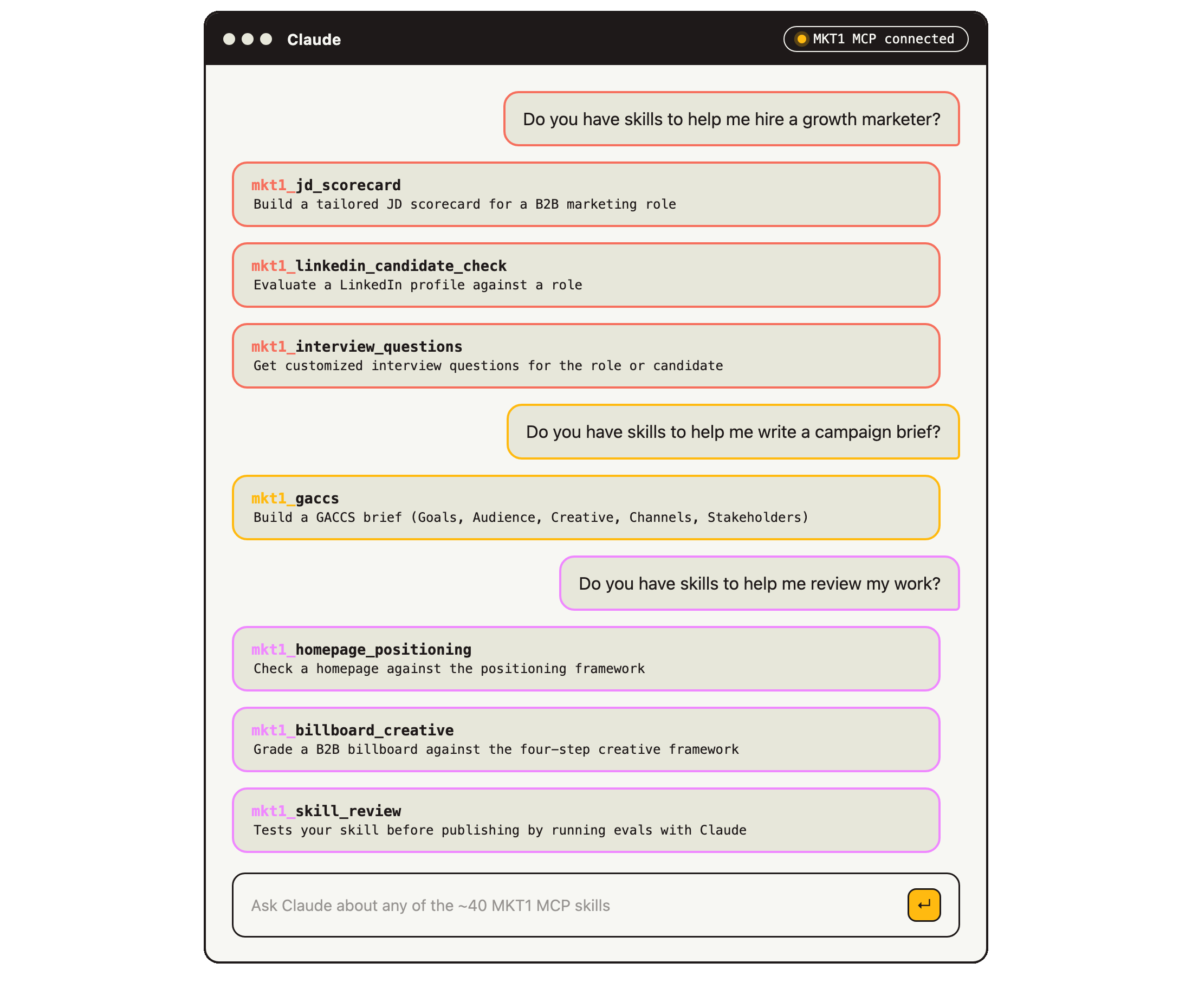
MKT1 MCP Workflow 1: Manage the hiring process
Key concept: Hiring a marketer means writing a job description, a scorecard, screening candidate LinkedIns against that rubric, and then developing interview questions. This is usually done in a very disjointed way, but our MCP brings it all together.
Context: We have multiple recruiting and hiring skills, including a free skill to search our job board, but these 3 skills all work off a scorecard for the role.
How to run these skills and workflows:
Run mkt1_jd_scorecard and give it anything you have about the role: the title, relevant roles from other companies, job description notes, meeting notes talking about the role, etc. It builds the rubric with you, stack ranking the skills and picking the must-haves
Paste a candidate's LinkedIn URL into mkt1_linkedin_candidate_check, or a batch of them, and it evaluates them based on your scorecard, paying close attention to the must-haves. A batch gives you a comparison table. Note: LinkedIn has no API, so this one reads profiles through Claude in Chrome
mkt1_interview_questions reads what the LinkedIn review flagged and pulls 8 to 12 questions from MKT1's bank, weighted to those gaps and to the role's level and stage
MKT1 MCP Workflow 2: Build a GACCS brief that your prompts, skills, and other MCPs reference
Key concept: Even if you spend the time writing a brief for all of your projects, initiatives, and campaigns (and you should), most teams never look at it again. The brief is not fed as context into the work itself, the review process, or the post-campaign analysis. But if you write a brief and it lives somewhere Claude can read, every skill and MCP you use after that can work off it.
Context: GACCS is MKT1's brief framework: goals, audience, creative, channels, and stakeholders. The GACCS skill walks you through making a brief section by section, and can even start with your unstructured notes.
How to run this skill and workflow:
Run mkt1_gaccs and give it whatever you have, a one-line idea, meeting notes, or an existing brief to reformat. You can even pull these in using other MCPs!
Tell Claude the scope of the project so you can make the right size brief. A quick version of the GACCS covers the essentials, a full version goes into 30 different fields including budgets and dependencies. Choose your own adventure!
Claude asks where the brief should live. Push it into a connected tool like Asana, Airtable, Softr, or Notion, wherever makes sense for your team, so every skill and MCP you use after that can reference it
Where a GACCS brief fits into the demos above
Victoria uses this exact brief template in her Airtable demo.
Zapier builds a brief from scattered docs in the first workflow they showed, and could have applied this structure to it.
The Framer customer stories could have started from a GACCS brief too, instead of a basic doc. Everything should start with a GACCS!
MKT1 MCP Workflow 3: Run audits on your work
Key concept: Claude is good at making things and less good at telling you the thing you made isn't good—or something like that. It will happily hand you a homepage, a billboard, or a skill and never mention that it's mediocre. An audit or “eval” can help with this, so we are making lots of MKT1 MCP skills like this.
Context: These three skills all do the same job, applied to a pretty wide range of things. They all take finished work and grade it against an MKT1 framework, in this case to homepage copy, billboard creative, or a skill you built.
How to run these skills and workflows:
Give mkt1_homepage_positioning your homepage URL and Claude will evaluate it against MKT1's positioning framework. It will spit out an honest read on if it says who it's for, what it is, and why it's better, plus a letter grade
Upload an image of a billboard design and ask the mkt1_billboard_creative skill to critique it against our four-step framework: catch the ICP, nail the message, make it legible, and bring the magic. It's also fun to do this for random billboards you see, to get validation that no, it's not just you, this really is a big waste of money on really bad copy
Even skills themselves need reviews. Run mkt1_skill_review in Claude Code (it only works there) on a skill you built, and it runs the skill on at least three real inputs, then evaluates the output with your help
What now?
Go get some MCPs installed, stack them up, write skills around them, and schedule some routines to put it on semi-auto-pilot.
More on each presenter: Go to our showcase pages, built with Framer's CLI, naturally: Zapier, Framer, Softr, Attio, Airtable, Profound, Mutiny
Have more questions about MCPs? So did our live watchers. See me answer them unscripted, starting at 1:15:00 in the video
Want to see how a presentation that was made entirely and runs entirely in Claude works? Run my MCP presentation yourself with the mkt1_mcp_showcase_presentation skill. This is a free skill in our MCP, just install it to access the full preso
That’s all for this edition.
I’m back in 2 weeks with part 2 of the multiplayer Claude series, featuring the setups of Langchain, Buffer, and Mintlify. Subscribe so you don’t miss it!
More from MKT1
🙏 This special MCP-edition of MKT1 newsletter Brought to you by: Zapier, Framer, Softr, Attio, Airtable, Profound, and Mutiny.
💬 Bring this newsletter to Claude: Chat with this newsletter with this pre-built prompt—use it as background for Claude to help you connect these GTM tools.
🤖 MKT1 MCP Server: Add MKT1 skills to your LLMs. Paid subscribers get our full library of ~40 skills and templates, including the multiplayer skills featured in this newsletter.
🧑🚀 MKT1 job board: Jobs from the MKT1 community (it’s free to post as a paid subscriber). And our candidate form if you’re looking for a new role (option to remain anonymous included!). Also available in the MKT1 MCP, just ask to search the MKT1 Job Board.
🥞 MKT1 Perk Stack: Exclusive discounts worth $40K+ on our favorite GTM tools. For annual & superfan paid subscribers only.
🧰 Template & resource library: We have 100+ templates and resources available to paid subscribers in our template & tool library.
You could actually use the Leapd.ai GTM stack and skip all the drama! Give your website, it set up email campaign, Meta ads, LinkedIn lead monitoring and outreach campaign, AI visibility, backlinks, and more!