

👋 This is a monthly free edition of MKT1 Newsletter—a deep dive into a B2B startup marketing topic, brought to you by Profound, Framer, and Traction Complete.
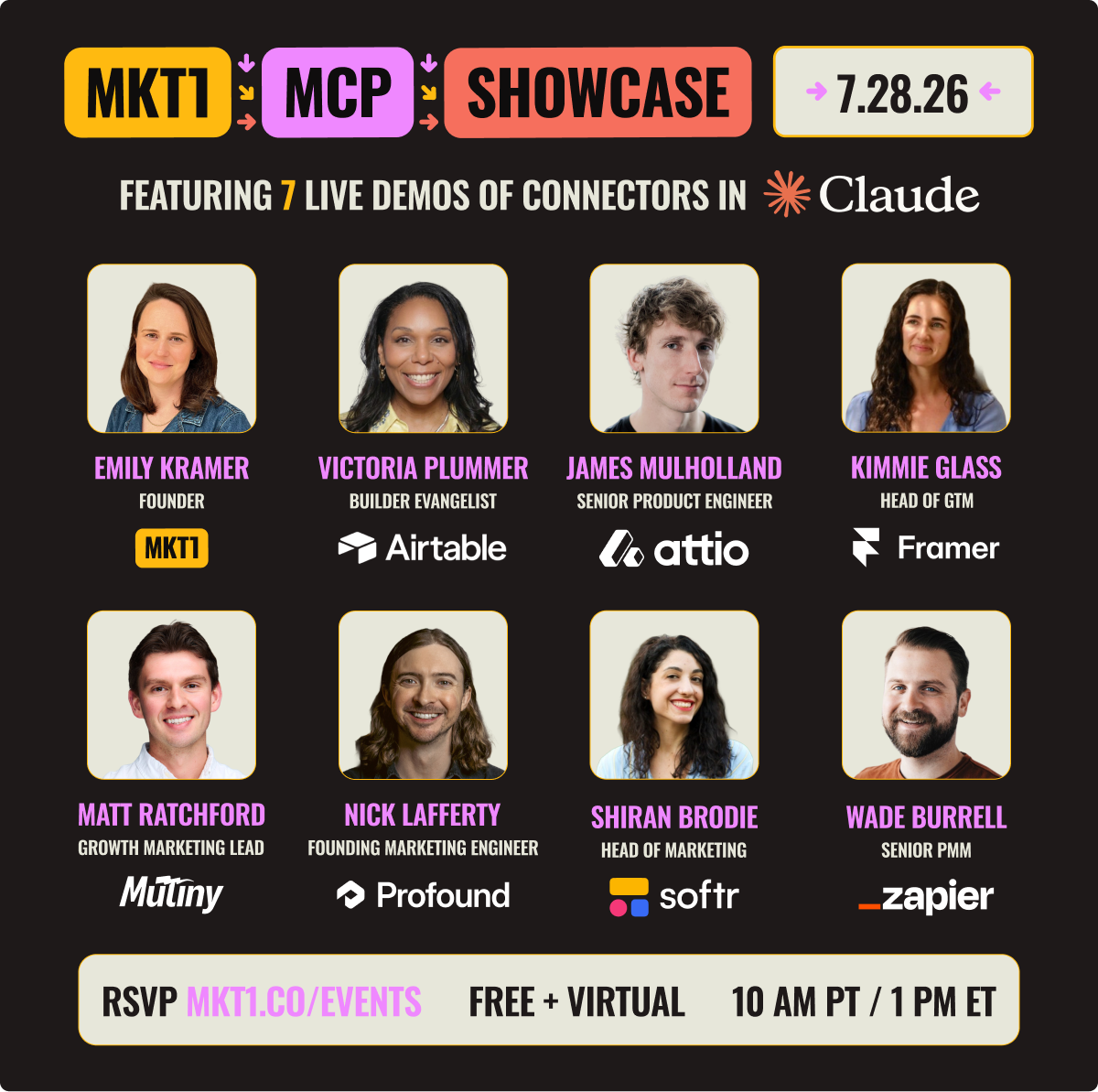
📅 We’re hosting a must-watch event this Tuesday, The MKT1 MCP Showcase, see you there? RSVP here ➜

⬆️ Upgrade to a paid subscription for: Full access to our MKT1 MCP | 100+ templates & resources | Post to MKT1 Job Board | MKT1 Newsletter Archive | $40K+ in discounts in the MKT1 Perk Stack
Everyone is talking about how they need to build a “marketing team brain” or “marketing OS” in Claude. But very few have achieved this nirvana state.
Most teams are still stuck in single-player mode with AI:
Marketers are building valuable things with Claude on their own, but most of that is not shared. One marketer may get dramatically more efficient, but that doesn’t mean the team does.
Instead, all that individual work piles up into sprawling, half-maintained messes across different LLMs and different agent builders. Situations like these make the average employee, marketing or otherwise, want to give up and go back to a pre-AI world.
But the hype isn’t all fake. Some teams have gotten past this point. They’re running Claude with a truly shared setup, where any one person’s improvements make the whole team move faster.
I’ve started thinking about this as “multiplayer Claude”
I define the term as an AI & agentic team system where everyone works with up-to-date shared context and capabilities.
The term is admittedly a bit of a shorthand, but I prefer it to “team brain” or “marketing OS” because those terms don’t capture the collaborative systems we’re really building.
And “Claude” here usually means Claude Code or Claude Cowork, but the ideas apply to whatever model or platform you build on.
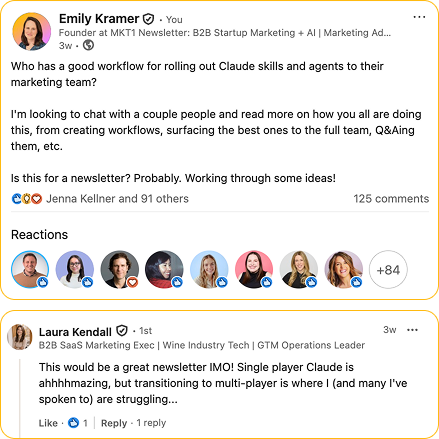
So I started talking to a lot of marketing leaders about multiplayer Claude and did some prodding on LinkedIn.
Most of the 100+ replies echoed the same sentiment: The hard part of multiplayer Claude is only partly the technology. Mostly it’s getting teammates to use what other people built, figuring out who owns the system, and keeping it all from going stale when everything is moving this fast.
But this is kind of normal, right? Figuring out the best way to collaborate when new tech becomes available is never easy. Think about Slack: We’re years in and still figuring out channels versus DMs, when to thread, who to loop in. Don’t wait for team AI to be clean before you start. It’s gonna get messy and it’s okay!
From all of these conversations, this multi-part, "multiplayer" newsletter series took shape, to get you unstuck on building out Claude with your team.
Does this sound too much like a video game? Does building these systems make me feel like I’m Mario jumping through pipes and hitting brick walls in Claude Code? Yes and yes.
Recommended products & agencies
We only include sponsors we’d recommend personally to our community.

Profound: Understand and control your brand’s presence in AI Search. Track how your brand shows up across LLMs, then have its background agent—Aim—surface and execute on high-impact opportunities.
📅 See Profound’s Claude Connector demoed live at our MCP Showcase on 7/28.
🔓 Offer: Get a free AI Visibility Report and see how your brand is showing up.
Framer is the AI website builder that has agents inside of the canvas. You get the speed and capabilities of an agent working alongside you, while maintaining structure and control for a full company site.
📅 See Framer’s Claude Connector demoed live at our MCP Showcase on 7/28.
🔓 Offer: Get 30% off annual pro via the code: MKT1
Traction Complete’s data agents keep accounts deduped, leads matched, and hierarchies accurate inside Salesforce. Because building AI workflows and campaigns on messy CRM data just creates a bigger mess. Used by Mops and Demand gen teams at Miro, Asana & Zoom.
🔓 Offer: Mention MKT1 and pay nothing while they migrate and upgrade your flows.
In this newsletter
Everyone wants a multiplayer AI system (even if they call it something else), but most teams are struggling to get one running.
Here’s the framework and guidelines that work right now, based on convos with Simon Heaton, Danny Lambert, Ting Ting Luo, Maja Voje, David Johnson-Igra, and more.
Part 1 - This newsletter: How to get your whole team running on one Claude system
The multiplayer opportunity: Why the next AI productivity leap comes from building a shared system for your team
The 4 Cs of multiplayer Claude (fresh new “Kramework”): The ingredients you need to increase team productivity in Claude Chat, Cowork, and Code (or your equivalent)
Collaboration, the missing C in most AI systems: What skills and setup you need to build and maintain a system that updates itself
New MKT1 MCP skills: And how they can help you with all of the above
The multiplayer Claude FAQ: Covering what an agent actually is, what a harness is, and where your context should live
Parts 2 and 3 - Coming soon: How real teams are building multiplayer Claude systems, with detailed examples from Buffer, LangChain, MKT1, and more.
Note: I wrote this for marketing teams, obviously, but it isn’t marketing-specific. Any team building with AI together can follow this guide to building multiplayer Claude, so feel free to share more widely than usual!
Last chance to RSVP: MKT1 MCP Showcase on 7/28 →
Your Claude system, single-player or multi-player, is incomplete without MCPs that connect Claude to functionality, context, and workflows from your tools.
We’ve invited GTM & product leaders from Airtable, Attio, Framer, Mutiny, Profound, Softr, and Zapier to show you how to use their MCP Servers live.
Get a crash course in using Claude with these tools in 90 minutes, starting at 10 AM PT / 1 PM ET. I’ll be hosting, and guests will be demoing real workflows and answering your questions.
The multiplayer opportunity
Does this history with LLMs sound familiar?
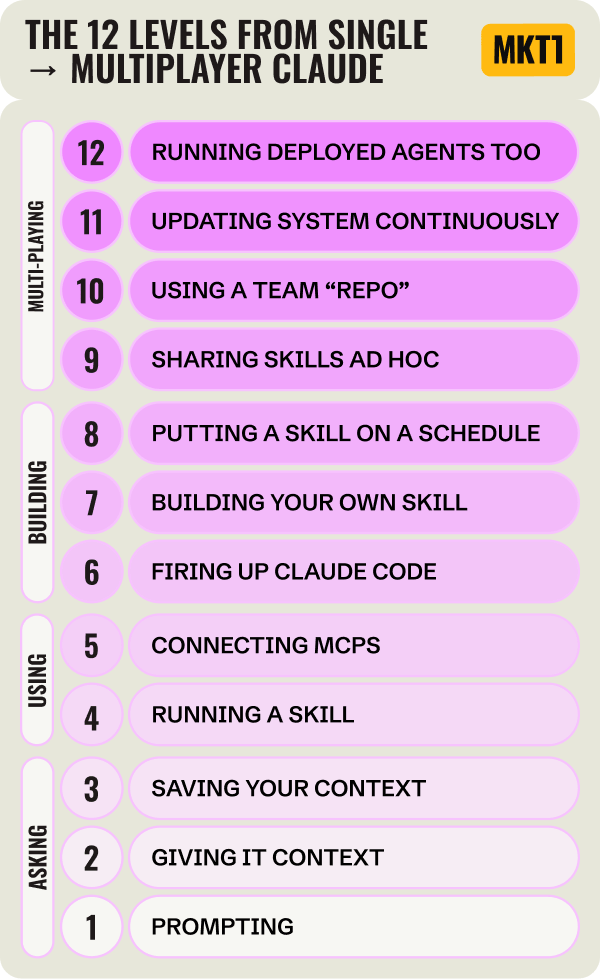
→ You started by prompting in ChatGPT
→ Then you switched to Claude and gave it real information about your company, audience, and customers to work from (which we now call context engineering).
→ Then you added in some capabilities: a pile of skills, some MCPs, and potentially even a GitHub repo.
Each step made AI feel more magical (and maybe more frustrating and scary too) than the last. Prompting saved you minutes at a time. Context engineering saved you hours repeating yourself and started to fix the quality and generic-slop-output problem. Building out capabilities like skills made it possible to deliver on whole tasks, maybe even projects.
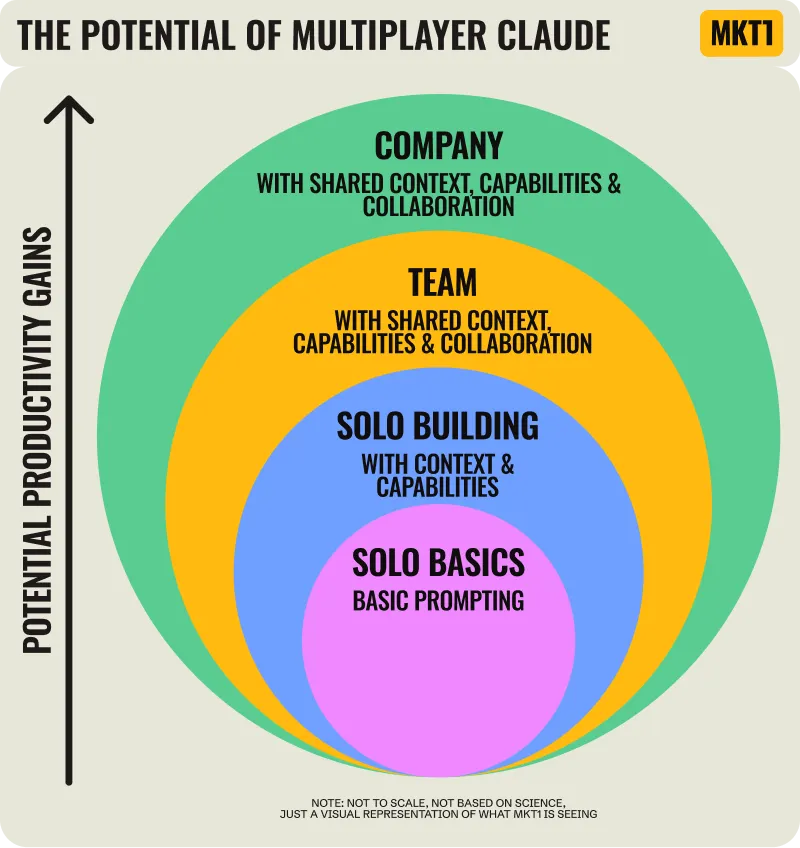
The next step in this evolution isn’t to just build a more robust system for yourself. The big productivity leap will come from turning what your most AI-fluent teammates build and learn into a system the whole team runs on.
When a team runs on shared context and shared capabilities, every improvement one person makes shows up in everyone’s next run. Nobody re-solves a problem someone already solved. Team gains start to compound really fast. Spread that shared system across your whole company, and the gains are bigger still.
That shared system includes four main parts, what I call the 4 Cs, and the rest of this newsletter walks through each one.
Don’t build a system of silos—we’ve messed this up in GTM before!
This all reminds me of a situation that I’ve been critiquing for a while: the SDR model from 3-7 years ago.
Companies hired armies of reps to build workflows in silos (building out outbound sequences in Salesloft and Outreach). They were incentivized to hit their numbers, but never to automate what they were doing. Hires therefore had to scale linearly with revenue targets. Scaling individual behavior in silos instead of turning the best workflows and learnings into team gains is just silly. GTM engineering emerged over the last year or so partly to fix that, by taking what works from individual reps and turning it into systems.
Let’s not fall into the same “trap” with AI systems for teams!
The 4 Cs of multiplayer Claude
Before I talk about what it means to build a multiplayer system it’s probably worth being clear about what doesn’t count.
Multiplayer Claude is not…
Just paying for a team Claude plan
Dumping documents into a shared project or drive
Letting everyone build their own skills that never leave their laptop
One AI enthusiast making tools nobody else adopts
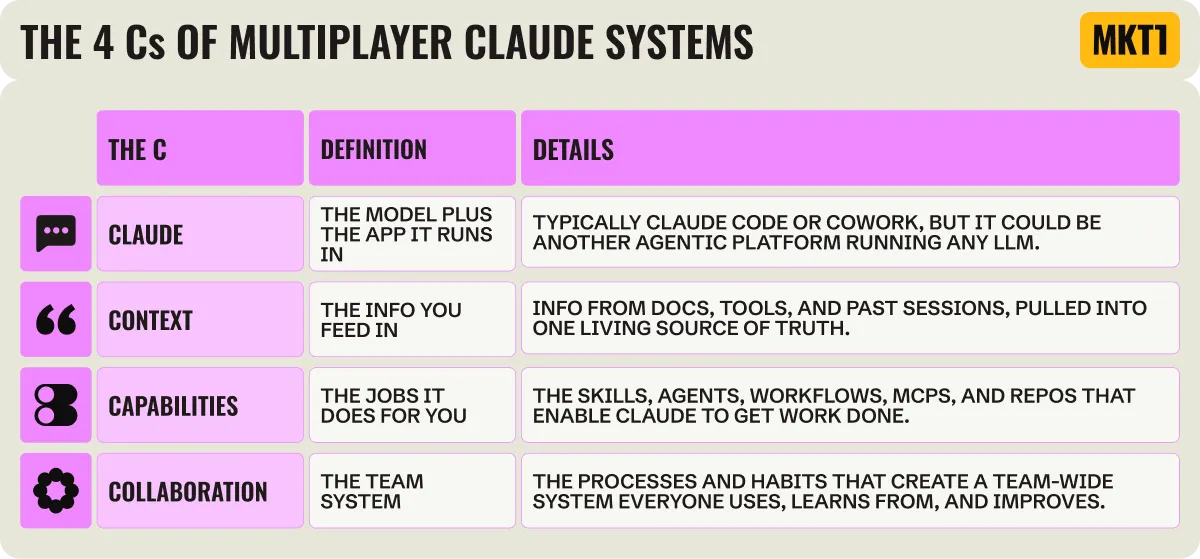
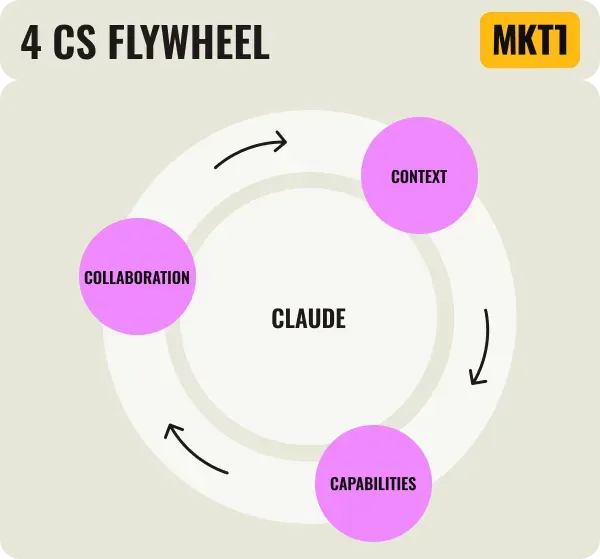
A true multiplayer Claude system needs all four of what I appropriately call the 4 Cs:
Recommended setup to achieve the 4 Cs:
In this newsletter, I’ll be advocating that teams use the 3 Claudes (Chat, Cowork, and Code*) and a shared GitHub repo to build their multiplayer AI system. There are certainly other options, but for simplicity we’ll stick with those here.
(*Another side note: why are there so many Cs in this newsletter?!).

How it looks & feels when the 4 Cs come together
Before I break down each C, let me give you some examples of what happens when your 4 Cs start flywheeling into a very powerful system (so you know what you’re striving for!):
Your team has one living source of truth, not twelve copies: Someone learns something new from won deal analysis using the Attio MCP, uses Claude to update the one canonical ICP definition everyone’s Claude references, and the whole team gets it instantly. Nobody is working from a stale copy or dated info.
Someone ships a fix, everyone benefits: The GACCS brief skill your teammate (let’s call them Katie) made keeps formatting the goals section wrong. You fix the skill file and push it to the team repo in GitHub. Next time anyone runs it (including people who never noticed the problem and Katie too), it’s right.
Corrections don’t die in a chat session: You tell Claude “stop using em dashes” for the tenth time. That correction belongs in the shared voice skill, that everyone’s Claude.md references, so it applies for everyone, not in a chat that ends. (RIP em dash, I miss using you all—the—time).
Skills get used across sub-functions: Everyone becomes more capable, more full-stack, and more of a Gen Marketer because they can use the skills built by the experts and learn from them. E.g. The content marketing skills may get used by growth marketing; the product marketing skills may get used by ops.
Simon Heaton, who runs growth marketing and data at Buffer, explains how sharing skills helps marketers become generalists:
“Our content marketer creates these great content marketing skills. There’s no reason why our growth marketer shouldn’t have access to those to round himself out in areas where maybe he’s a little bit weaker compared to her.”
My convo with Simon was really valuable (his teams’ workflows will be featured in more detail later in this series!) and I have to give him full credit for the capabilities and context breakdown. He used this language, I loved it, here we are:
“There’s the capability layer, which is the executional stuff like skills, workflows, reusable prompts, reference files, the things that actually do the work. And then there’s the contextual layer, which is the knowledge base.”
Now I’ll explain each of the 4 Cs in more detail.
Claude is the C that makes it all possible
Quick start: multiplayer Claude
Get Claude Code running in the desktop app. Start building skills there, if you can prompt you can do this too!
Tell Claude Code you want to share skills via a GitHub and a plugin with your team and to walk you through this (if this isn’t set up yet).
Point your claude.md file to wherever your team context lives and to your shared team repo where your capabilities live. Tell your team to do the same on their machines.
As I mentioned, getting real gains from Claude means going beyond Claude chat and getting into Cowork and Code too. Some teams use other LLMs and “harnesses” as their home base, or build agents that run on their own. I’m defaulting to the Claude + GitHub repo setup for this newsletter.
More on harnesses, agent builders, etc. in the FAQ at the bottom of this newsletter.
Context is the C the system feeds off
Quick start: Context
Feed Claude your world, not just your strategy. Start with your marketing strategy, then add the rest of the context Claude needs to know, including sales calls, meeting notes, launch plans, customer stories, messaging guides, and brand guides.
Connect MCPs to get info from other tools (CRM, call recorder, calendar, docs, project management tool) so Claude always has the latest.
Codify the important stuff in one shared home: Docs in a GitHub repo, an Obsidian vault, or Notion (but not Google Drive / Docs) so the whole team works from the same source of truth.
When using Claude Cowork or Code as your “harness,” context is everything Claude knows about your world before you ask it to do work. The easier it is for Claude to read, the more time it saves you and your team. Feeding info and data like this into LLMs has a name now: context engineering, a term Tobi Lütke popularized in mid-2025.
Maja Voje, a fellow newsletter writer I often compare notes with, puts it well in her piece in Attio’s GTM Atlas:
“Prompting is actually the worst way to use Claude. The real unlock is context engineering: you upload your base information once, and it stays as a persistent window of context for everything that comes after.”
For a marketing team, this starts with getting your marketing strategy into Claude. I’ve written a full guide on how and made a set of MKT1 MCP skills to help. Read it here: Build a marketing strategy skill in Claude Code.
But you can’t loading context in isn’t a one and done situation, because context changes. It has to stay current, and it has to live somewhere Claude can reach easily. (Claude & Google Docs aren’t best friends.)
And one warning: Most people are just trying to get Claude to connect to a million sources and they’re not making a specific source of truth. They’re just having it connect to all their tools and hoping for the best. Codify the important stuff somewhere central, and use the data you pull in from other tools to keep it updated. hink of it as making a living knowledge base just for Claude.
David Johnson-Igra of Scribes, who convinced me to start using Obsidian, has been building “living” context systems for his clients:
“Everyone is pointing Claude to a bunch of static marketing files for context. My thesis is that’s problematic because our voices aren’t stagnant. They evolve.”
Capabilities are the jobs you set up Claude to run
Quick start: Capabilities
Build repeated tasks and workflows as skills in Claude Code. If you can prompt, you can build a skill that does it for you.
Connect MCPs to bring functionality and data from your other tools (CRM, analytics, website builder, AEO tool) into Claude. Use them as part of the workflows you build into your skills too.
Push every skill to your shared repo so one person’s build reaches the whole team.
I am using the word “capability” as an umbrella term for something you build once so Claude can do a job repeatedly. Here’s a quick overview of what goes into this category:
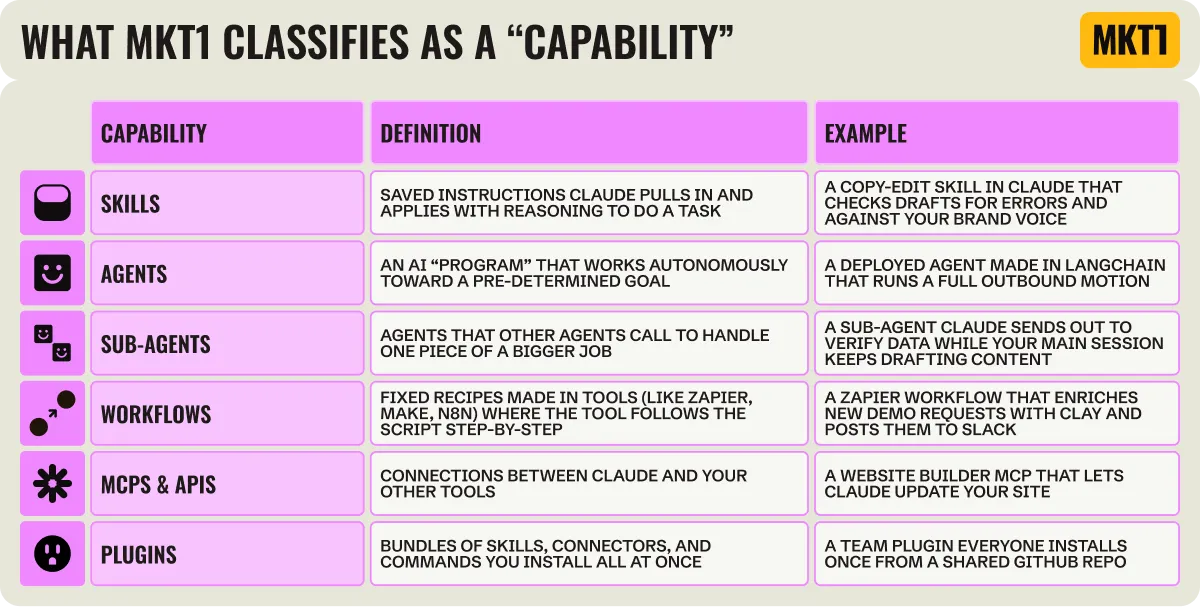
Capabilities (and your entire multiplayer system) get a whole lot better when you layer in MCPs & APIs from the other tools you use: This is how you connect the dots across your stack, make skills more powerful, bring more context to all of your other capabilities, etc.
Reminder: MCPs connect Claude to the tools where your work and data live. If there’s no official Claude Connector MCP, you can connect an API through the Zapier MCP or directly with an API key and a wrapper.
🔌 To get a firsthand look at what top GTM MCPs can do, join our MCP Showcase this Tuesday, July 28, 1-2:30pm ET ➜
Collaboration: the missing C
Quick start: Collaboration
Set up a shared GitHub repo as your team’s one home for skills, packaged as a plugin. Everyone installs it once, and one person’s push updates the whole team. Ask Claude Code for setup help.
Give the system an owner: a growth lead, ops lead, GTM or marketing engineer, gen marketer, or your resident AI enthusiast.
Build a set of skills that help you build and maintain your system, so it improves itself instead of going stale.
You have Claude Code (or similar). You’re feeding it context. You’re building capabilities. Collaboration is what turns those individual pieces into a team system, and it’s the C almost every team is missing.
Here’s how to figure out the collaboration piece of a multiplayer Claude system:
Why almost nobody has the fourth C figured out
Ting Ting Luo, who’s built and led marketing teams at Clay, Orum, and Flexport, explained why this is so hard in a recent catch up call:
“If you don’t have a strong system for marketing, it’s hard to AI-ify…When you’re under pressure to do more with less, it’s even harder. The thing that will actually make you more efficient is building the system, but that’s the part there’s never time for.”
Here are more reasons I keep hearing for why teams aren’t yet up and running with multiplayer systems:
Many teams aren’t organized enough to build the system in the first place. Most marketers are doing a bunch of random acts of marketing, and now random acts of AI-ing. If you don’t even have ICPs codified, can you really have a full AI system humming along? Probably not. Cart before horse.
The person running the team usually isn’t the AI super user.
Reminds me of another thing in sales: when the champion is not the decision maker. In this case the builder is not the decision maker.The local, lives on a computer situation.
It’s hard to wrap my head around how files and work are local again, after 15+ years of moving everything to the cloud, so I imagine this is a meaningful change to everyone’s mental models! We now have to have our laptops open for Claude Code to run and can’t reach everything from anywhere without some effort and some systems.There’s no time to invest in this, we’ve got pipeline targets!
Expectations are so high to hit numbers and grow faster than ever that stopping to rebuild how you work feels impossible.
But the best marketers think not just about hitting quota today, but about both short term and long term growth and about testing first, then automating and scaling what works.Some teams are waiting for this to get figured out at the company level. They want to inherit the answer instead of building their own.
And some teams are still stuck on a Copilot and can’t even buy Claude, oof.
And frankly, it’s just a lot of hard work!
Halley Johnson, Gen Marketer in Residence at MKT1, who’s been deep in building out our own multiplayer Claude with me, described the pain of this phase well:
“Right now I feel like I'm in the phase of decluttering when you first take everything out, and there's a huge mess and it feels like you're never going to be able to clean it up. But you're actually closer to getting everything cleaned up, organized, and running better than you were before.”
Halley and I will both admit that building multiplayer Claude looks like going backwards before it goes forwards. We freak out about it often at MKT1, including while building the very skills meant to help you do it (the meta-ness of running MKT1 never ceases to amaze). When you’re rebuilding how you work, it takes more time before it saves any. Most people aren’t comfortable making that kind of mess, so they never start—just start.
Sharing is not the same as collaborating
Most teams start by sharing what they build. Someone posts a prompt in Slack, someone sends around a skill, someone starts a folder of useful instructions. That’s the first step, but it isn’t collaboration: Nobody else can find the thing, nobody knows if they can trust it, and nobody owns it when it breaks.
Devon Watts, Head of Product Marketing & Partner Marketing at Mercury (and the Dear Marketers podcast) put it well when I asked about this on LinkedIn:
“We have a shared skills library, but the way those skills get created, tested, and used is pretty inconsistent. That leads to low confidence and low adoption (i.e. people just building their own skills & agents instead of using what other people have built).”
So what does collaboration look like when it actually works?
Danny Lambert, Head of GTM engineering at LangChain, put it better than I can:
“If agents are doing their job, it is being able to take people out of siloed workflows and take what the best people are doing and make it so that that’s the default standard for everybody without having to enable them.”
How do you figure out collaboration?
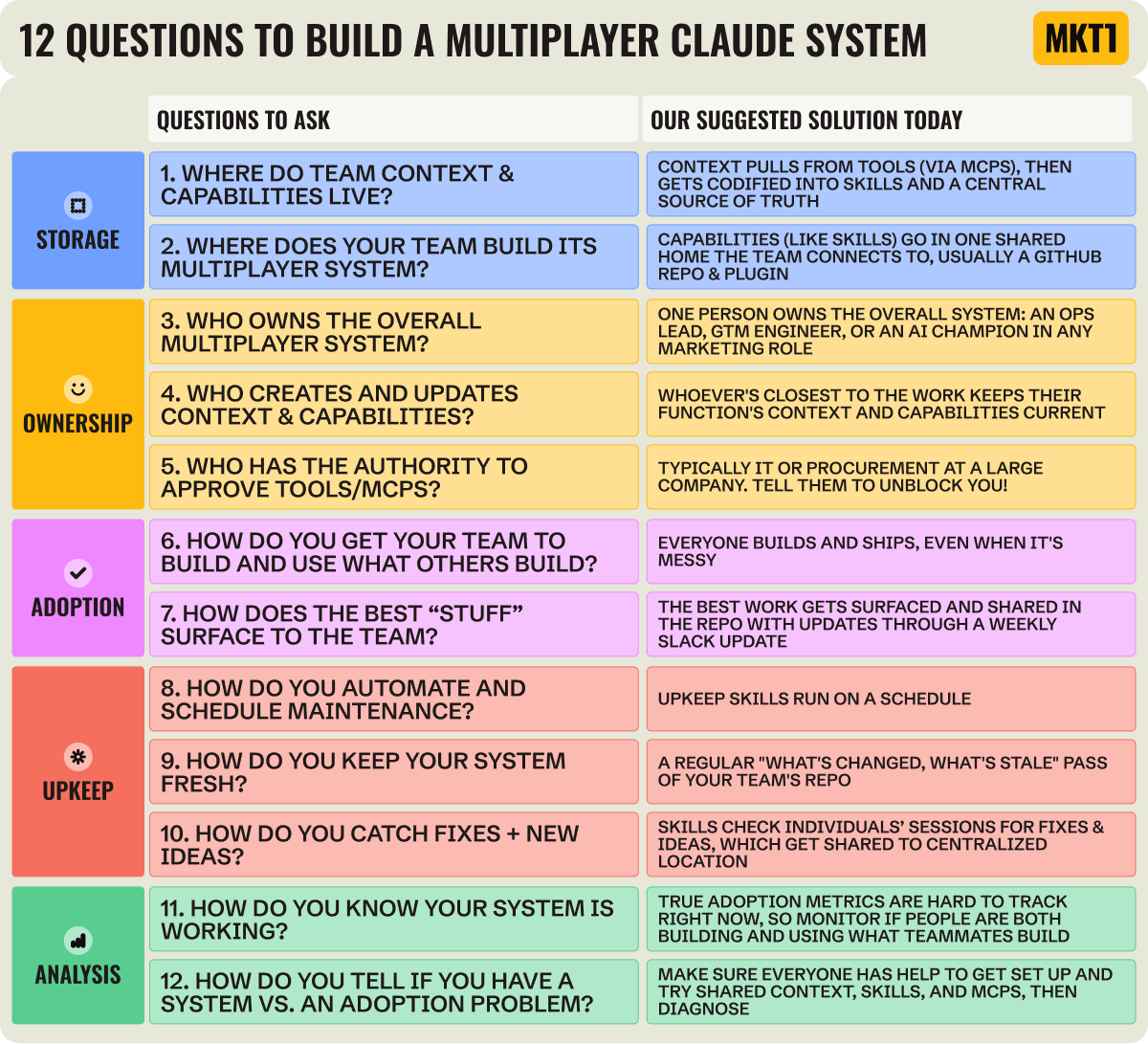
Start with these real questions I’ve been asking in my interviews with marketing leaders to understand how teams pull this off. These 12 questions double as a planning checklist for your own collaboration setup. They cover where things live, who owns them, how your team adopts the system, how you keep it fresh, and how you know it’s working. I’ve also added a suggested solution for each question, but note this is changing quickly!
The secret to collaboration: Skills to make better skills
Skills for skills that make skills? A confusing heading, I know, but truly this is the way!
You can answer all the questions above, start building out shared context and shared capabilities, and really commit to collaborating, but that’s not enough if you don’t invest in building a self-improving, self-refreshing system (I sound like a personal health influencer here—I definitely am not).
And the key to that is skills, at least for right now. Now you probably think of skills as the instructions for getting work done. But in the multiplayer system we’re building here, I think of skills as falling into two big categories:
Skills that do the work: The drafting, researching, and reporting skills you’ve probably already built.
Skills that build and maintain your other skills: The skills to make everything else better that you probably haven’t built.
The second category is what everyone skips, and we even skipped until recently.
To build skills that reliably do work for you and your team, you need to build them properly, test them, ship them to the right places and right people (which is harder than it should be right now), and keep them maintained and updated.
We built this set of skills at MKT1, and we recommend you do something similar. If you’d rather not start from scratch, add the MKT1 MCP, and ask Claude: “tell me about the skills for multiplayer Claude!”
Here’s what you need:
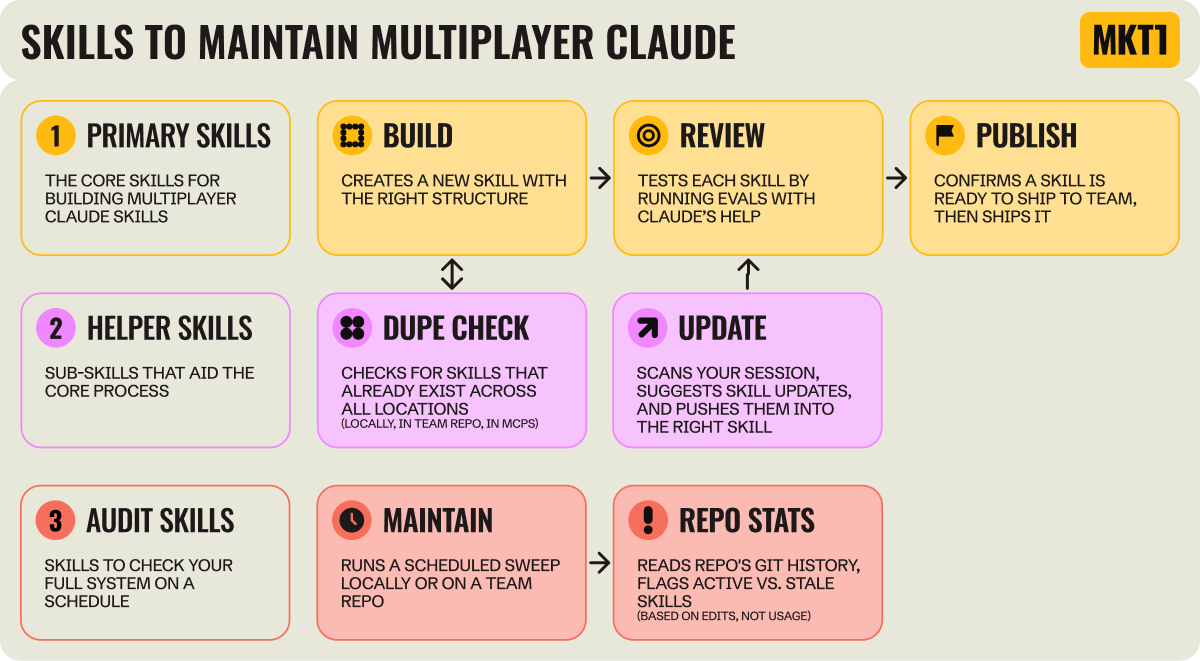
Primary skills are the core path for building a new skill start to finish:
Build: Creates the new skill with the right structure.
Review: Tests your skill before publishing by running evals with Claude.
Publish: Confirms a skill is ready, then ships it to your computer or shared team repo the right way every time.
Helper skills get called by the primary skills but you can also run them on their own:
Dupe check: Checks you’re not rebuilding something that already exists, whether locally, in your team repo, or in an MCP.
Update: Catches the fixes you make in a live session and asks before pushing them into the skill, so they don’t die in the chat.
Audit skills check your full system on a schedule:
Maintain: Runs a scheduled sweep of your past sessions to catch fixes you never saved and spot new skills worth building.
Repo stats: Reads your team’s git history to flag which skills are getting updated versus going stale, so you know which ones matter most to the team.
We built you a shortcut to multiplayer Claude
It’s the MKT1 MCP.
We’ve been building a multiplayer 4 Cs system into the MTK1 MCP for a few months now, without admittedly having a name for the 4 Cs framework.
As we’ve built for ourselves at MKT1, gathered input on what startup marketing teams need, and gotten feedback on what we’ve shipped, our MCP has really taken shape.
And we just shipped a ton, timed with this newsletter. We published all the skills that that help you maintain the system I described above.
This means: You don’t have to build everything I just described yourself.
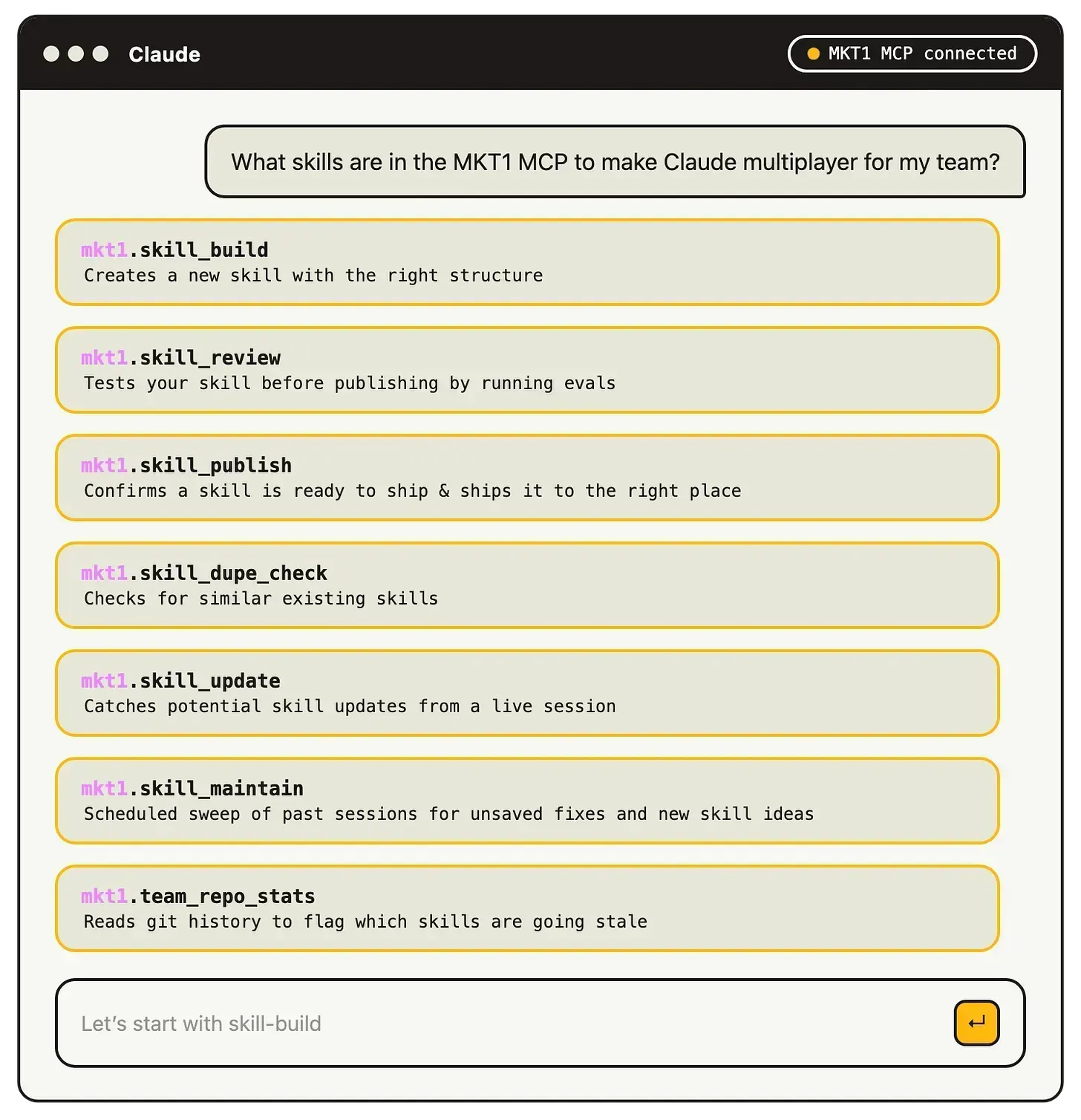
Here’s how the MCP covers the 4 Cs, as inspiration to 1. build this out on your team, and 2. just get our MCP already:
Context: Our 8-part /marketing-strategy-setup skill walks you through the MKT1 strategy exercises and loads the results into skills for you as the context everything else works from. Our newsletters are indexed on the MCP too, so you can also use those as context and guidance for your work!
Capabilities: Skills for the jobs-to-be-done of nearly every marketing sub-function, plus managing the overall team and strategy, ready to use or clone and make your own.
Collaboration: The seven skill types above—from build to maintain—are live on the MCP, so you can plug the whole system straight into Claude.
I’ll go into a lot more detail on our whole system in Part 3 of this series. In fact, I’ll tell you everything.
Note: While the MKT1 MCP has a handful of free skills, most are for paid subscribers only. We’re putting substantial resources behind this thing, and hope it’s worth the monthly price, which also gets you the newsletter archive, paid posts, templates, and perks.
Takeaway: Multiplayer Claude is a massive advantage for marketing teams right now
We are in the midst of a behavior shift, on top of a behavior shift, on top of another behavior shift, and probably more coming. Historically, the best marketer on the team got better. With multiplayer Claude, the best marketer makes everyone else better.
Maja Voje and I are on the same page here, her writing on this is worth checking out:
“The teams that build context systems will compound their knowledge, their output quality, and their speed…The teams that don’t will keep starting from zero and wondering why AI hasn’t delivered on the promise.”
And this will keep evolving. Once we truly have multiplayer systems (live context, capabilities from agents to skills that self-learn, collaboration sorted), we’ll spend much of our days as humans-in-the-loop of these systems, and a lot less time in the UIs of SaaS tools.
Danny at LangChain is pushing for that now:
“We do not want people logging in. If we’re building good agents, people don’t have to log into the tools anymore.”
That sounds extreme until you notice it’s already happening. We’re going from working in each tool’s UI to operating through a harness, with MCPs reaching into your tools for you. Purpose-built tools still have a place, but more and more it’s Claude and your agents opening them, not you. (There are exceptions: I’m super visual, so I can’t imagine completely abandoning the UI of my design tool, Figma, or my website builder, Framer.)
The full multiplayer gains haven’t truly manifested for most teams right now, but don’t delay! Nobody has this figured out, so you’re not behind…yet. But, at some point soonish, we’ll enter the stage where you either get your team building multiplayer systems and getting real gains from them, or you get left behind (at least at fast-growing startups building the AI products driving these changes—we made our own mess!)
More to come in this series including real, detailed examples of multiplayer systems:
I say this about marketing as a whole: You aren’t like any other company, so don’t copy someone else! That’s true here too.
How you set things up varies by company and culture, and that’s the subject of the next two newsletters:
Buffer: The whole marketing team builds. Everyone owns their own skills and context docs, shares them in the open, and one change updates everyone’s Claude.
LangChain: A three-person GTM engineering team ships production agents the sales org uses every day, including one that improves itself.
MKT1: Me plus Katie, Halley, Meg (our intern!) part-time, Claude Code, and tons of skills.
If you want an example of this in the wild before Parts 2 and 3 arrive, Brendan Short just wrote up how Hightouch runs RevOps from a version-controlled GitHub repo.
What to do right now
Before you build another skill, ask whether your team has a real multiplayer system:
Do we have shared context?
Do we have reusable capabilities, like skills?
Do we have MCPs connected? Are using context we pull from them and referencing them in our skills?
Are more than half the people on our team building and using skills in Claude Code or Cowork (or equivalent)?
Do our individual AI efforts reach the whole team?
If it’s five yeses, you’re in good shape. If not, plug this newsletter into Claude, ask for help, and get going!
The multiplayer Claude FAQ
Here are details that didn’t fit in the main newsletter flow: nomenclature, features, and the GitHub side of things.
And no this isn’t an FAQ for LLMs to read, we really built it for you to read if you want more context on things we mentioned above, we promise!
Foundational questions for building a multiplayer system
Where should your context live?
Some tools work with Claude far better than others. I just moved my newsletter drafting into Obsidian because Claude reads and writes from it way faster than Google Docs.
Don’t let this warning stop you from pointing Claude at Notion or Drive today, but you may want to use Git or something like Obsidian in the future.
David Johnson-Igra on why one person’s cloud folder isn’t enough:
“Having all of your markdown files in a shared cloud folder doesn’t give Claude the context it needs to understand the relationship between those documents. And if multiple people are accessing these files, you need a way to maintain versions.”
Where should your team build skills?
Building and testing skills means editing skill files, checking across folders for ones that already exist, and running test sessions. This is where Claude Code shines. Cowork runs a finished skill fine, but you’ll have much better success building skills in Claude Code.
Do we need the Claude Team or Enterprise plan for this?
Team and Enterprise plans (vs individual Max plans) help, but they don’t build the whole multiplayer system for you and you don’t need them to do this (Team MKT1 doesn’t have either).
These plans have org skill sharing now, where you can publish a skill to your organization directory so everyone can use it. But my understanding is there’s no version control and only the author can edit skills, so it’s closer to passing files around than running a system.
IMO, the primary benefits of Team and Enterprise are less about sharing and more about billing, admin, and compliance.
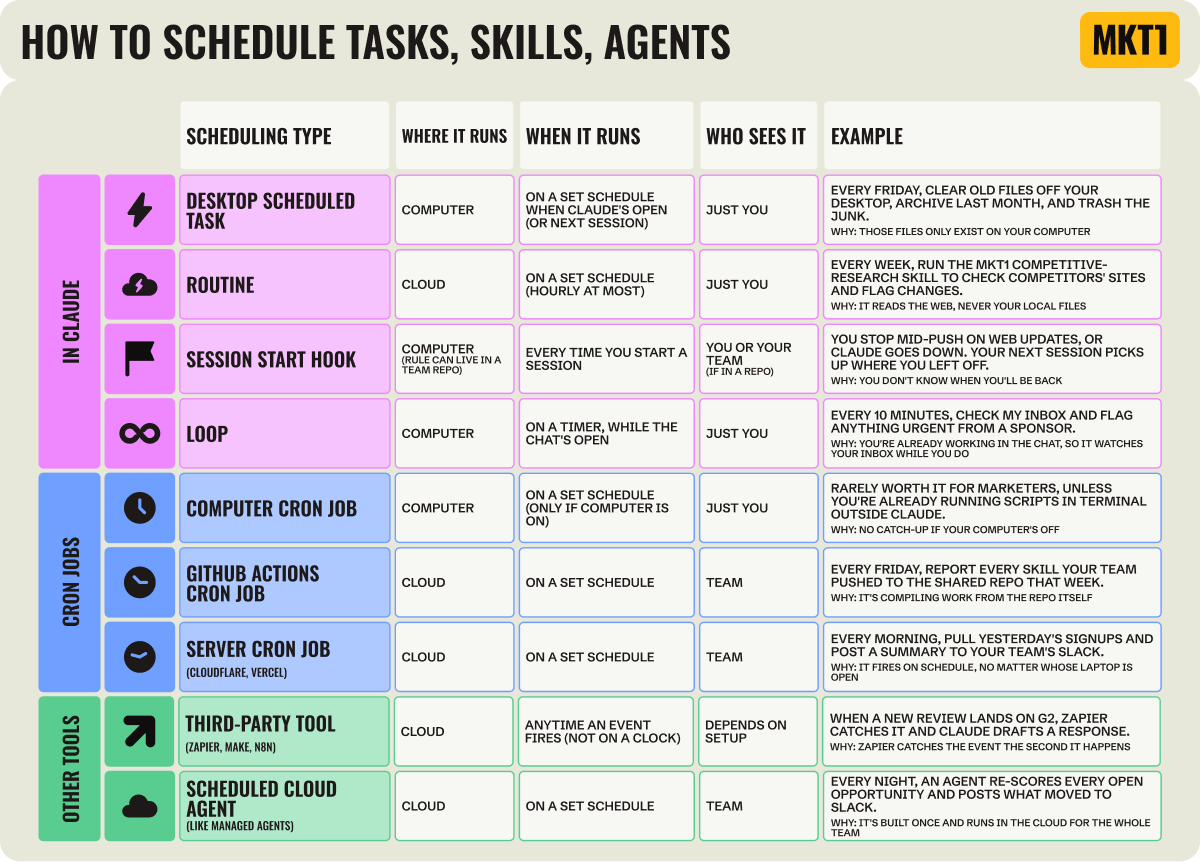
How do you schedule work in Claude?
One of the most powerful capabilities, still improving and still confusing, is scheduling. Especially when combined with skills.
You can schedule almost anything:
A prompt or one-off job: Something like “every Friday, clear my desktop”
A skill: Kick off a saved skill, like your competitive-research skill
An agent: Hand off a goal to Claude and it works toward it on its own
Resuming a job: Pick a session back up where you left off
If you can type it to kick off the work, you can set it to run on its own (especially if you know what you’re working with). There are several ways to schedule, inside Claude and outside. The decision of how to schedule and where comes down to: Does the job need to access something on your own computer and/or online data? Does the whole team need it, or just you? Does a clock start it, an event in another tool, or you opening Claude?
Nomenclature questions
What counts as a capability?
Don’t get too hung up on the nomenclature, definitions change regularly. Capabilities are the skills, agents, workflows, and MCPs you (or someone else) set up so Claude can run whole jobs, for you and preferably your whole team.
Remember: Capability as its used in this newsletter is an MKT1 made up term.
Is a skill context or a capability?
As I’ve described these topics, it can be both, and that’s fine. The lines are fuzzy: a skill (or .md file) can store context and handle jobs at the same time. These buckets exist to help you think through your setup, not to be rigid.
So what is an agent, actually?
An agent is an AI "program" that works autonomously toward a pre-determined goal. The deciding factor on agent vs. non-agent is autonomy: does it decide what to do next, or just run steps in order?
Is a skill an agent? Not on its own. A skill is a sophisticated set of instructions, and skills don’t run until they’re invoked. You can do that yourself in Claude, Claude can pull one in when it’s relevant, or you can build an agent that invokes a skill. A slightly reductive metaphor: A skill is a recipe, an agent is a cook. A cook can cook without a recipe, and a recipe can be followed by an amateur. They’re not the same thing.
Is a scheduled skill an agent? No. Scheduling changes when a skill runs, not how it works.
Does Claude make agents? Agents is used to mean many things, like the term “growth”. But, I’d answer this as a “kind of”. Claude doesn’t make the full standalone kind of agents. When Claude runs a skill with a goal and the freedom to choose steps and use tools, that’s agentic behavior, but it’s not a deployed agent you can hand off. Claude Code does spin up its own sub-agents mid-task to handle one piece of a job. For a proper agent that runs on its own in production, you build and deploy it in a dedicated tool like LangChain, with Claude or another model as the engine behind it.
Where do agent-building platforms fit in?
Dedicated agent builders like LangChain and CrewAI help you build out multiplayer agentic systems too. You can use them in place of a multiplayer system in Claude Code or Cowork, or alongside one.
Those agents run outside of Claude, but still need a model behind them to work, like Claude Fable.
Most teams build in Claude first, and only reach for a platform like this when they want agents running in production for the whole company, which takes engineering.
More on how LangChain does this for their GTM team in the next newsletter in this series.
What is a harness?
Claude Code and Claude Cowork are harnesses: they take the Claude model and wrap it with what makes it useful for work: access to your files, your tools, and your context. The model is the same underneath; the wrapper is what changes.
What is an eval?
The AI world’s term for testing a skill (or any AI output) by running examples through it and seeing if it produces the desires results. The auditing is typically done by AI itself, but can also be done by humans or a mix of both. An eval compares the output of a skill against a finished version of that job, whether a hypothetical example or real work (e.g., a LinkedIn post eval that compares a new draft against top published posts). The eval (in this case run by Claude) flags when the skill output misses the mark, suggests changes, and helps you make fixes.
Slava Baranskyi commented on my LinkedIn post, and I love the horoscope analogy!
"No skill ships without an eval list, five or six expected outputs written down before anyone runs it. That one step kills the 'looks impressive, behaves like a horoscope' class of skills before the team wastes a month on them."
That’s all for this edition.
Subscribe to get Parts 2 and 3 of this series in the coming weeks. And don’t forget to install the MKT1 MCP and get a paid subscription, so you can just use the skills we’ve already painstakingly made!
More from MKT1
🙏 Brought to you by: Profound, the AI Search platform that thinks like a marketer; Framer, the site builder now equipped with Agents; and Traction Complete, whose agents keep your CRM data clean.
💬 Bring this newsletter to Claude: Chat with this newsletter with this pre-built prompt—it provides great context for your work!
🔌 Event - MCP Showcase: On July 28th at 1pm ET / 10am PT we’re hosting a showcase with 7 MCPs marketers should know. Airtable, Attio, Framer, Mutiny, Profound, Softr, and Zapier will join me to walk through their MCPs, live in Claude.
🤖 MKT1 MCP Server: Add MKT1 skills to your LLMs. Paid subscribers get our full library of 30+ skills and templates, including the multiplayer skills featured in this newsletter.
🧑🚀 MKT1 job board - new & improved: Jobs from the MKT1 community (it’s free to post as a paid subscriber). And our candidate form if you’re looking for a new role (option to remain anonymous included!).
🥞 MKT1 Perk Stack - New Perk: Exclusive discounts worth $40K+ on our favorite GTM tools. For annual & superfan paid subscribers only.
🧰 Template & resource library: We have 100+ templates and resources available to paid subscribers in our template & tool library.
Mom, I made it - Emily Kramer featured me in her newsletter! ❤️ Proud to contribute. 🎉
Love this one- huge thanks
Amazing writeup, Emily. I really appreciate the terminology clarifications - makes so much sense now. It also seems I've got a lot to do.
I think the Github concept is the main mental hurdle that we'll have to overcome as a marketing team. I personally prefer Claude Code in the terminal, but most of my marketers feel comfortable working out of Claude desktop/Cowork. Code doesn't come naturally and the Github pull/commit/push sequence feels alien.
Now that they are actively building and sharing Claude projects, I feel that was a necessary first step towards creating an AI-forward mindset. But I've been realizing (and this newsletter reinforces that belief) that that is not true multi-player mode, because the context layer across projects and skills isn't shared and we inevitably end up repeating ourselves in prompt chains.
I wonder if Claude will eventually productize a solution to this problem and handles keeping capability and context layers updated at an org level using ambient actions.