


👋 This is a monthly free edition of MKT1 Newsletter—a deep dive into a B2B startup marketing topic, brought to you by Framer, Attio’s GTM Atlas, and RevenueHero.
Upgrade to a paid subscription for: Full access to our new MKT1 MCP Server | 100+ templates & resources | Post to MKT1 Job Board | MKT1 Newsletter Archive | $40K+ in discounts in the MKT1 Perk Stack
I just got a crash course in researching in Claude Code. When creating my two-part State of Marketing Report on 100 B2B companies, I thought I’d spend my normal 20-30 hours per newsletter building these out. I spent way, way longer. But the good news is: I learned so much that I wrote this third newsletter, to save you the time I lost figuring it all out.
I learned about Claude Code’s convoluted “memory,” how to pick the right methodology for researching each data point, when to use and when to avoid using MCPs for research, when to yell at Claude for making up fake numbers, why sites rendered in JavaScript mess up research (and AEO), how to use Claude artifacts to find interesting insights faster, what “curl” and “bash” actually mean, and more.
If you have no idea what any of that means, you will after reading this newsletter—and it’ll save you a ton of time when doing research at any scale in Claude Code, from gathering basic competitive intel on a few companies to building a full data report across hundreds of data points like I did.
There’s also a bigger thought running underneath all of this. After building this report, I’m convinced Claude isn’t just going to help you make content or get cited in LLM answers—it’s also a direct way to distribute content to your buyers. We published this report as a skill on the MKT1 MCP Server because we believe pushing high-value resources (not just product functionality) to LLMs will become a primary way to reach your audience. More on that in the final section of this newsletter.
Now let’s get to it…but first I’ll thank sponsors, share what’s in this newsletter, and tell you more about our next Buildathon on 5/27!
Recommended products & agencies
We only include sponsors we’d recommend personally to our community. If you are interested in sponsoring our newsletter, email us at sponsorships@mkt1.co.

Framer: DoorDash, Perplexity, Mixpanel, and Mutiny’s websites are all built on Framer. From early-stage startups to Fortune 500s, Framer is the website builder I personally recommend. It works like your team’s favorite design tool, with AI-powered building, integrated A/B testing, and one-click publishing.
🔓 Offer: Get 15% off a Yearly Pro plan with code MKT15. Annual MKT1 Subscribers get 30% off a Yearly Pro plan in our Perk Stack.
—
Attio just launched GTM Atlas, where operators at Clay, Granola, Vercel, and me share how they actually build GTM in the AI era. I contributed my thoughts on why Gen Marketers do less better.
🔓 Offer: Read my entry in GTM Atlas here.
—
RevenueHero is how companies like Clay, Customer.io and Freshworks auto-enrich, route, and book meetings in seconds. And they have great data too, a recent report on 1M+ form submits showed their top customers book meetings with 88% of qualified leads—report is here!
🔓 Offer: Get the report and mention MKT1 to get 15% off if you buy before 5/31.
In this newsletter:
This newsletter covers how to do research in Claude Code and is organized by the scale of research you are doing—from just your company, to a small group, all the way up to building a massive, publishable report.
🪞 Part 1: How (and why) to research your own company with Claude Code
🍿 Intermission: Learn how Claude Code remembers and saves info
🏟️ Part 2: How to research a group of companies—competitors, complements, prospects, or companies you admire
📊 Part 3: How to build a research report you can publish with Claude Code
⛽ Final thoughts: How Claude is becoming both fuel & engine
This newsletter is part 3 of a 3-part series on the State of B2B Marketing, to see all the graphs and stats I pulled in my research check them out here:
Part 1: State of B2B Marketing Teams
Part 3: This newsletter - Researching companies in Claude Code
Bonus for paid subscribers: 3 skills related to this research & report in the MKT1 MCP Server:
/mkt1-competitive-research
:Run competitive research for any set of companies. Creates a spreadsheet to track data and includes common data points and queries like positioning, pricing, GTM motion, exec team, and AEO readiness./mkt1-state-of-b2b-marketing-data
:Query the full dataset behind this report: 100 high-growth B2B startups, 90+ data points each, covering GTM motion, team composition, social, ads, homepages, CMS, conversion, and AEO readiness./mkt1-high-growth-b2b-company-list: My curated list of high-growth B2B companies ready as a reference set. Run quick research across a solid list of companies instead of starting from scratch.
Join our Buildathon: Learn how to use the MKT1 MCP
On May 27th at 9 AM PT to 1030 AM PT, I’m hosting a live Buildathon just for paid subscribers. I’ll show you how to find and use the 20+ skills on the MKT1 MCP Server, give you time to test some of them, and answer questions.
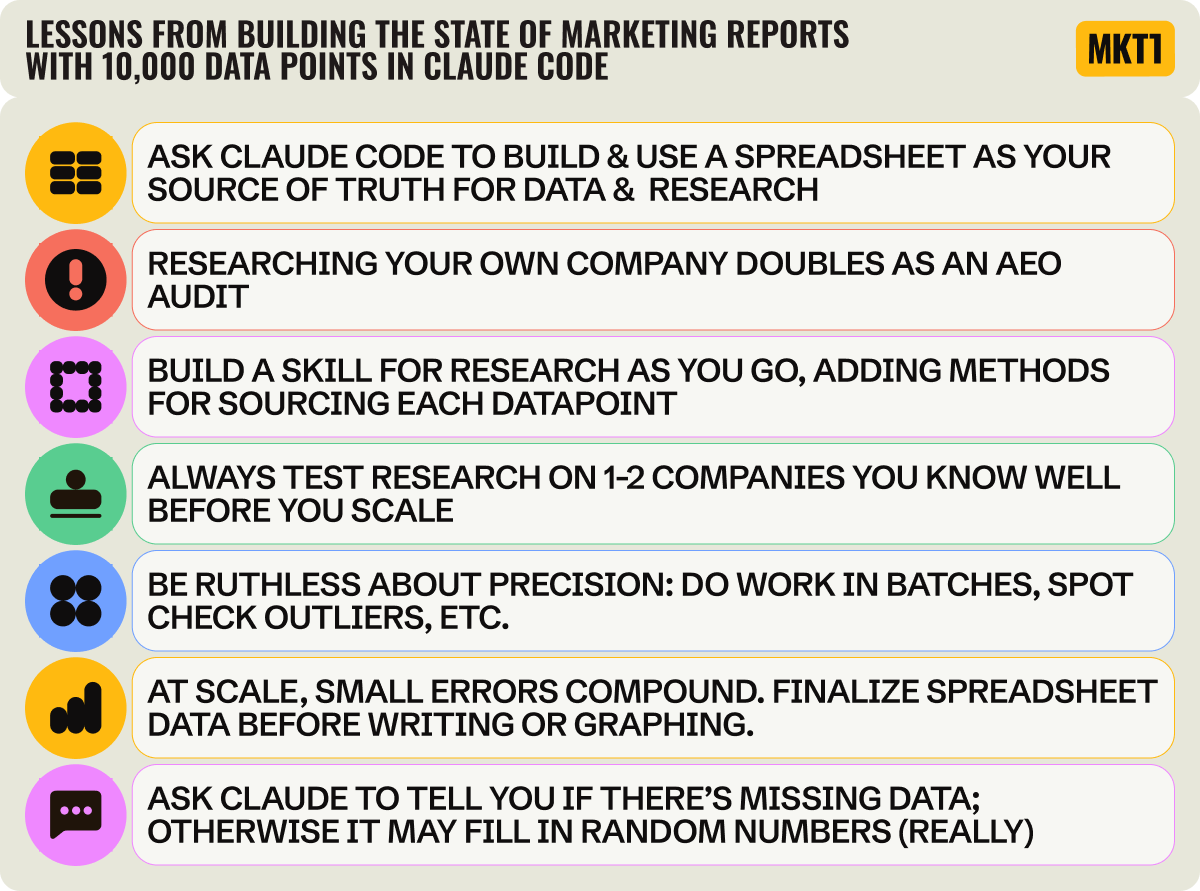
We’ll cover all these lessons and more in the newsletter below.
Part 1: How (and why) to research your own company with Claude Code
The best way to start doing research in Claude Code is with your own company. Not only will you learn what info is easy to get (and what's shockingly hard), but you'll also do an AEO audit for your company in the process. If you can't scrape the basics about your company, that means the LLMs can't read your site.
This step is also the precursor to everything else in this newsletter, from running competitive research to building full research reports. Nail the methodology on one company and you'll know what to ask for at every scale after.
How to do the research:
Run an “incognito-style” session in Claude Code Desktop. Claude Code Desktop doesn’t have a native incognito feature, so you fake it: In the prompt itself, tell Claude to only use what’s publicly available, as if it’s encountering your company for the first time. Or better yet, you can start a new session in an empty project folder (pick a blank folder on your desktop), so no skills or memory get loaded at all.
Note: Claude Chat does have an Actual Incognito Mode, click the ghost icon in the top right.Prompt Claude to do research on your own company to nail down research methods and to find the gaps where your company isn’t showing up. A good prompt covers four things:
Asks Claude to pull a wide range of data points (pricing, customer logos, recent launches, new hires, positioning)
Asks Claude to fetch your homepage and tell you what an LLM can vs. can’t read from it (so you catch JS-rendered content)
Asks Claude to check the AEO basics, including homepage schema and your robots.txt for LLM crawler rules
Asks for a summary: what to fix on your site, what was hardest to pull, and what methods it used to pull information
Ask Claude to save this as a reusable skill so you can run the same research on other companies later—competitors, partners, target accounts.
Here are the prompts you can copy & paste into Claude Code:

Prompt 1: Ask Claude Code to research your company
Pretend you’ve never heard of my company at [URL] and only use what you can find on the public web, like an LLM crawler hitting my site for the first time. Then:
Pull what you can find on my company: pricing, customer logos, recent launches, new hires, blog post activity, headline copy, positioning, exec team.As you research each data point, tell me how you found it. If you can’t find something easily, stop and tell me what the challenge is.Audit the AEO basics: fetch my homepage (flag JS-rendered content), check the schema, and read my robots.txt for LLM crawler rules.Summarize what was easy, hard, and impossible, what methods you used, and what I should fix on my site.
Prompt 2: Save the skill to use again
Save what we just did as a skill called company-research-skill.
Include the prompts and data points we researched and the methodologies that worked.
Make it reusable for any company URL.
What I learned:
Lesson: Researching your own company doubles as an AEO audit
Doing research on any company in an LLM doubles as an accidental AEO audit (AEO = Answer Engine Optimization, the LLM equivalent of SEO). If it’s not easy to find basic information, something’s off with the AEO, usually with how the site is set up. I noticed this while building the 100-company report. For some companies, Claude Code came back with almost nothing useful, which made me wonder why their info was so hard to find.
So I looked closer at the AEO specifics, specifically at what their site was built on, how it was rendered, what AEO best practices were being followed, and what schema was on the page.
The reason I couldn’t get basic info from many pages (like whether a homepage mentions “AI” or the most recent blog post publish date): Many sites load content in JavaScript, not HTML. LLM crawlers don’t run JavaScript, so if your content isn’t in the HTML, the LLM sees an empty shell.
I was also surprised to find many companies aren’t using proper schema on their site—a very quick AEO win to knock out. Schema is markup that tells LLMs what’s on the page; FAQSchema, for example, tells LLMs that there’s an FAQ on a page. Only 2% of startups have it, and 40% have no homepage schema at all. All stats are according to our State of Marketing report (part 1 and part 2) on 100 fast-growing companies, researched with Claude Code.
Most of us know robots.txt is from SEO, but you should update it with your LLM crawler preferences. Almost all B2B startups (97%) allow LLM crawlers, but only 12% have actually written explicit rules for LLM bots in their robots.txt. You can ask Claude Code to check what your robots.txt currently does, and also to update it for you!
The smartest robots.txt move I saw in my research was Attio’s setup. They block CCBot (which feeds LLM training data), but allow GPTBot and ClaudeBot. Translation: “Don’t train on us, but DO cite us in real-time answers.”
Lesson: Always test on yourself before you scale
If you’re thinking about running competitive research or partner research or building a report (which we’ll cover later in this newsletter), start by researching yourself. Not only do you get some AEO learnings, but you also learn much faster what research is possible, what’s easy, and what takes forever. It’s much easier to spot-check research on your own company when you know it so well.
This is the right approach if you’re building anything reusable, like a competitor research skill. For one-off data about another company, you don’t need to test it on yourself first!
Things you might try on your own company include: pricing and packaging, homepage copy, customer logos and case studies, recent product launches, and recent hires. Relatedly, if doing person-specific research, try it on yourself first. You’ll learn a lot about what Claude Code can do by trying this first.
Some research takes longer than you’d think because the data isn’t as available as you’d assume. I was shocked by what took me forever. Even with the Clay MCP, around 10 CMOs were missing from the enriched data on the 100-company report, and Claude’s agent searches confidently surfaced executives who’d left their roles 1-3 years ago. My knowledge of who actually runs marketing at these companies came in clutch. Testing on your own company first surfaces gaps like these cheaply.
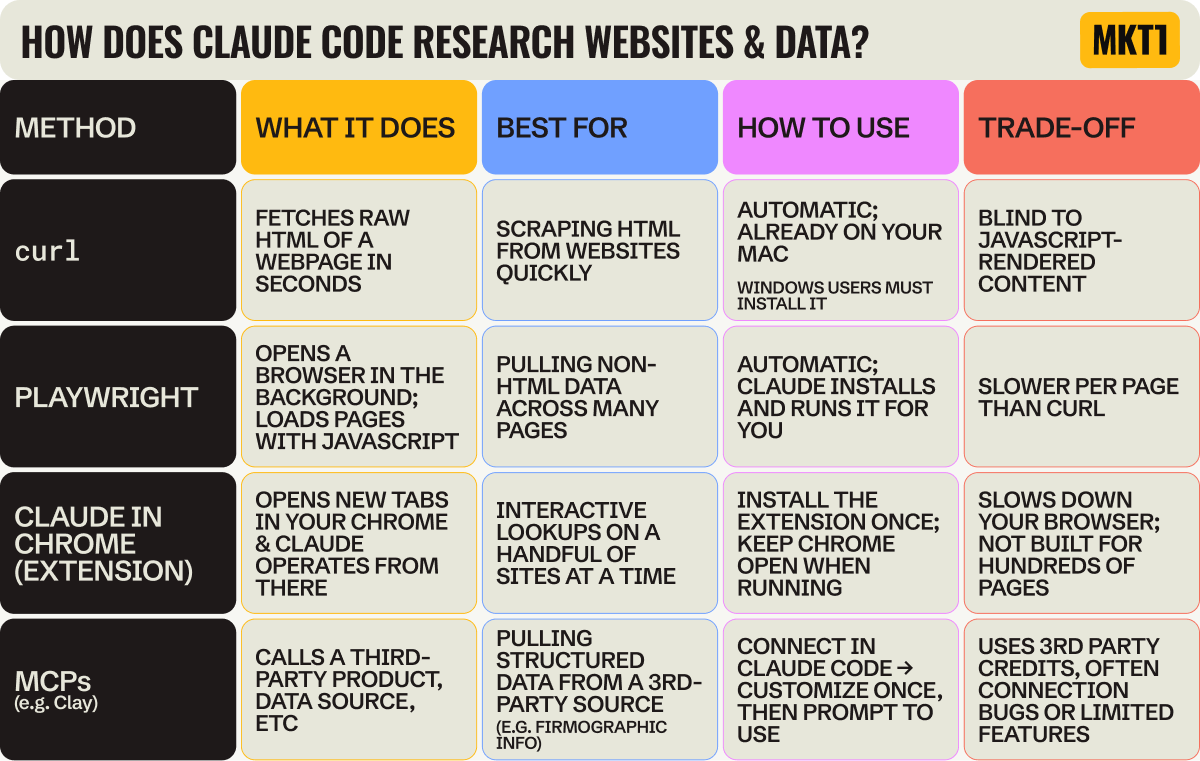
The hard part of doing research is figuring out the right methodology, and Claude Code sometimes suggests hard paths when there are easy ones. I assumed the Clay MCP would be the fast path for a lot of this, but a plain curl (a command that fetches the raw HTML of a public web page) got me accurate LinkedIn follower numbers in under a minute. I didn’t even know what a curl was before this newsletter. Just say “use a curl” and Claude Code does it for you, no Chrome extension needed.
Add MKT1 to Claude Code with our MCP Server
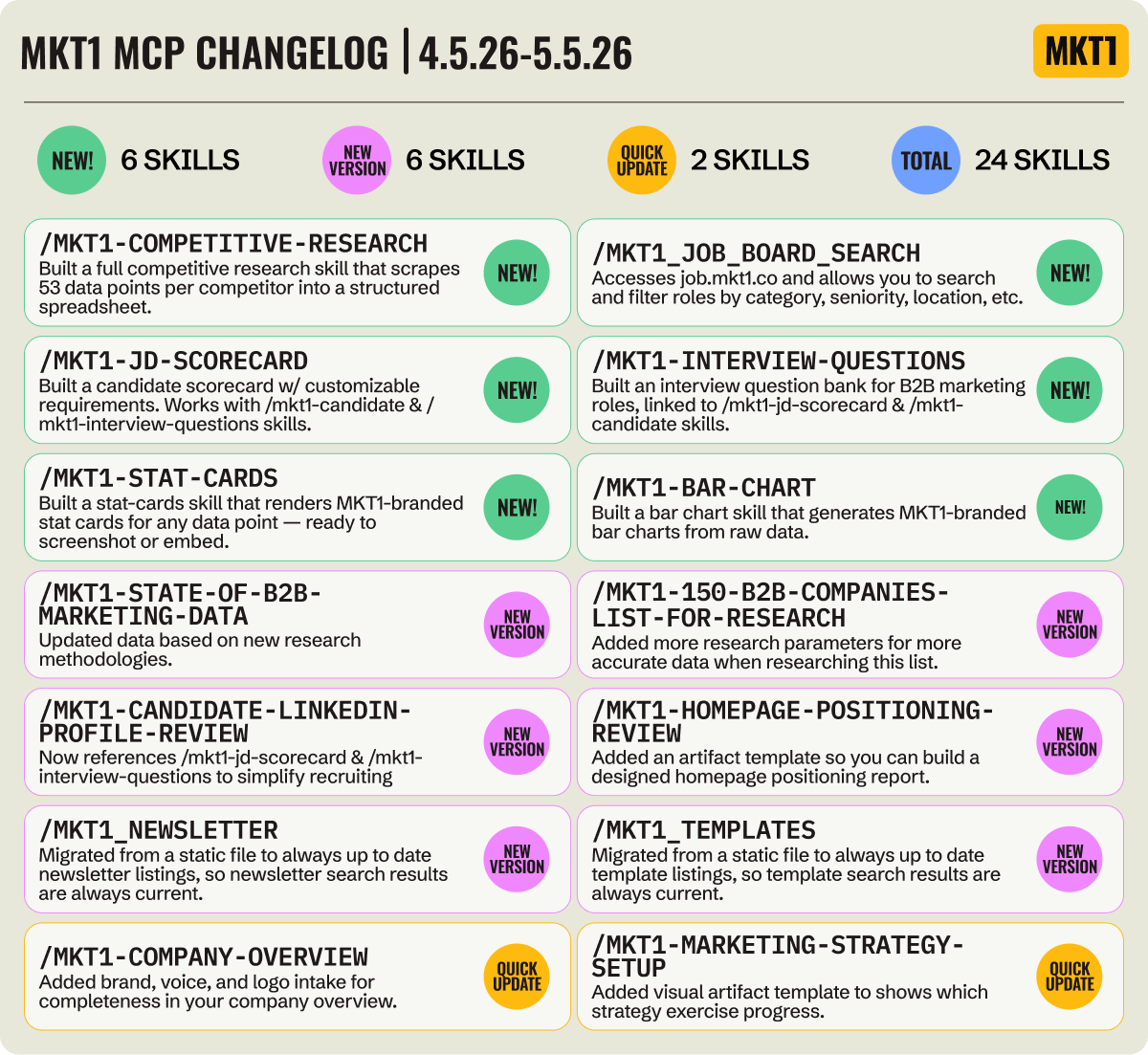
Not only have I added new skills for research (like this week’s new competitive-research skill), but I’ve also updated many of our existing skills to include visual artifact templates and added a set of marketing recruiting skills.
⚠️ Before you go any further…
Learn how Claude Code remembers and saves info
Before I get into how to research a group of companies, you have to understand how Claude Code remembers things. I didn’t, and it cost me.
I duplicated research prompts I should have saved as skills right away. I didn’t notice gaps in my data until I was deep into the report, because I’d been tracking it in a Claude Code session (aka the chat window) that eventually compressed. And I wasted credits running the same things multiple times. There are a bunch of terms that sound similar, and most people use them without knowing the difference. Adding to the confusion, the lingo and methods for saving and remembering things are different in Claude Chat and Claude Code. It’s a bit maddening, TBH. So here’s the table I wish I’d had at the start:
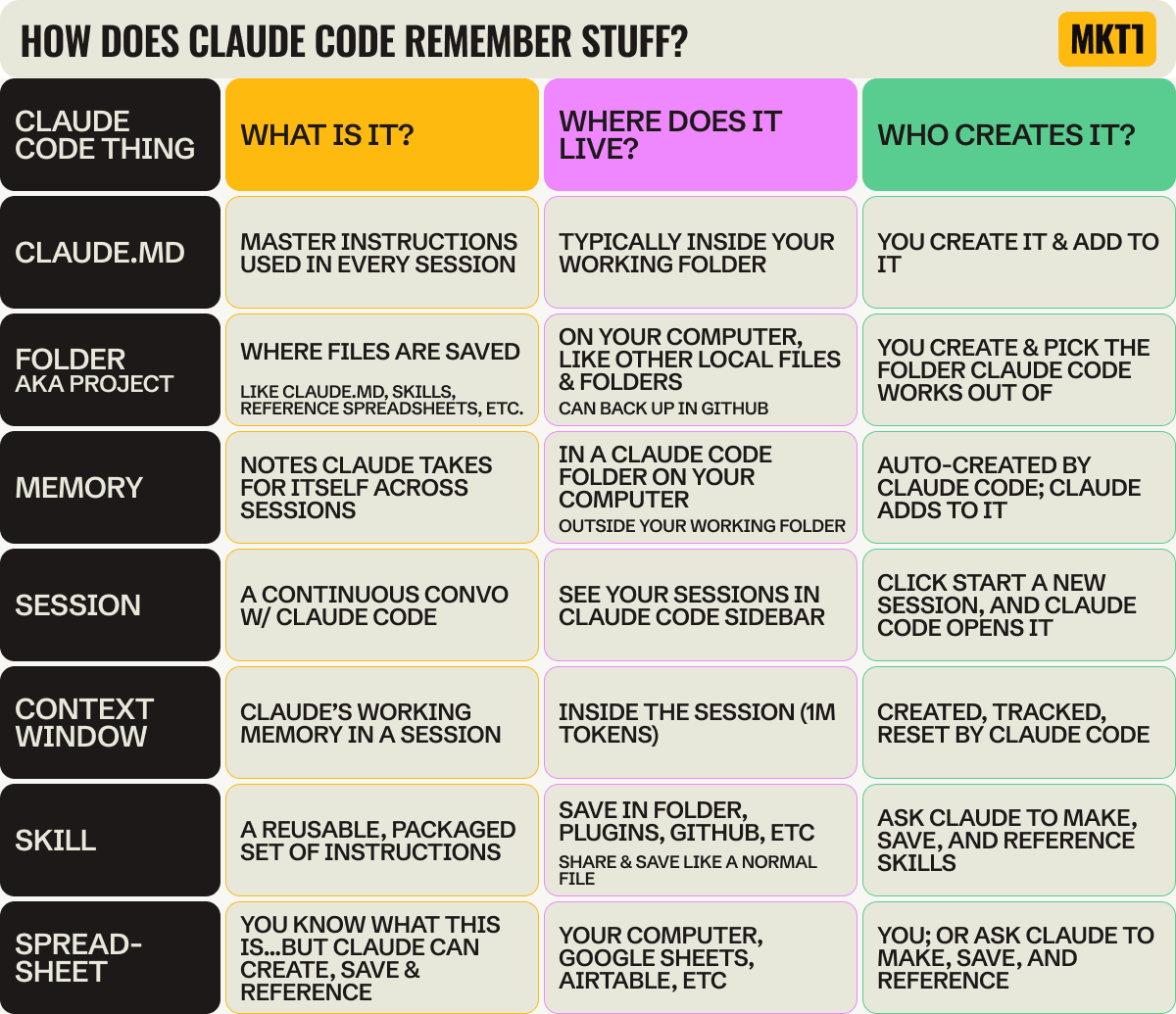
The bad news is, even when you use all these things perfectly, Claude Code doesn’t remember where to save and pull info from all the time. So, you have to actively direct Claude to save things in the right places. And then you have to remind it to reference those things.
I tell it things like “save this to my CLAUDE.md file,” “save this to a skill,” “create a row in the spreadsheet,” “update the skill to reference this spreadsheet or file” or even “tell CLAUDE.md to invoke this skill at this time).” These are prompts I use on a regular basis to keep things organized.
You never have to tell Claude to save to memory (it does that on its own), but I don’t trust it. When something’s only in memory, Claude doesn’t reliably reference it later. So I save to CLAUDE.md or a skill instead, because I created them, I wrote them, and I know what’s in there.
Is this all a little exhausting? Well yes, but once you get the hang of it it becomes almost second nature (emphasis on almost).
Part 2: How to research a group of companies
From competitors, complements, a target account list, or companies you admire
This section covers how to research a group of companies, whether researching your competitors, ecosystem partners, target customers, or just companies you’re trying to learn from. Most people will default to doing this for their competitors, but I always say: Imagine if you spent as much time thinking about your complements as your competitors. So, I highly recommend using this research workflow for potential partners to understand who they are and how they might be able to work with you.
How to do the research:
First up, get a list of canonical URLs you’ll be using in your research. You can either ask Claude for help sourcing relevant companies for you, list them out directly, or upload a CSV.
If you aren’t sure what companies to use, you can use the mkt1-high-growth-b2b-company-list skill in our MCP server as a starting place.
Ask Claude to set up a skill for the research you’re doing and a corresponding spreadsheet to track all the data points and URLs. The skill is your repeatable instructions, your spreadsheet is the source of truth for the research itself.
Decide which data points you want to track. Common ones: pricing, positioning, customer logos, recent launches, new hires, exec team, GTM motion, headcount.
Run the research in batches, 1 data point at a time, 1 company to start. Then you can run it quickly on the rest.
Ask Claude Code to make a pdf report, battle card table, visual artifact—whatever you need. Once you get it exactly right, ask Claude to save it as a template referenced by the skill.
We have a skill for this in the MKT1 MCP!
Install the MKT1 MCP Server and run the mkt1-competitive-research skill. You can even duplicate it and ask Claude to make it an ecosystem skill to analyze your partners too. For paid subscribers only.
Here are the prompts you can copy & paste into Claude Code:
Prompt 1: Create your skill & spreadsheet
Take the “company-research” skill I already made and duplicate it as a new skill called [insert name, i.e. “competitive-research”]. Adapt it to work across a list of companies instead of one. The skill should:
Ask me how I want to source the competitive companies (paste a list, ask you to find them, or upload a CSV).Set up a spreadsheet that will be the source of truth for the research, both any URLs and data points we need, and save the company URLs in it, one row per company.Suggest data points to track (common ones: pricing, positioning, customer logos, recent launches, new hires, exec team, GTM motion, headcount), work with me to lock them in, then add a column for each.If any data points need extra URLs to research (pricing page, LinkedIn page, third-party site), add those URLs as their own columns first and have me spot-check them before you start.Run the research one data point at a time across all companies, not company by company. Start with 1-2 companies for each data point to check the method, then run the full list. Don't run everything at once.Leave cells blank and flag them when something can't be found, instead of guessing or filling in plausible-sounding values. If a research method isn't working or is taking too long, try another and flag it to me.Include the prompts and data points we researched and the methodologies that worked.Make it reusable for any company URL.
Prompt 2: Run your new skill
Run the competitive-research skill. I want to compare my company against [3-5 competitors]. Focus on [pricing, positioning, customer logos, recent launches]. Run it for 1 company first and show me the results so we can update the process or data points if needed before continuing.
What I learned:
Lesson: Use a spreadsheet as your source of truth for research
Before doing research on a group of companies, you need to build a spreadsheet to hold it all. You might be thinking “I’m using Claude Code for research because I don’t want to make a spreadsheet!” Valid.
But in this case, Claude Code can make the sheet for you, save info to it, and reference it...you never even have to look at it. I only looked at mine once or twice when building my State of Marketing research report (it was 101 rows and 100 columns, so I’m very happy about that).
Here’s what I learned, and what you should do even if you’re only researching a few companies:
If you ask Claude to research a bunch of companies across a bunch of data points all at once, you’ll get answers fast, but they won’t be right. When you try to fix the mess piece by piece, you end up with an even bigger mess.
Instead, have Claude make a spreadsheet at the start of your research. The first column is the company name. Then have Claude research the URLs and add to the second column (or add them yourself, depending on the number).
Then for every data point you want to research, have Claude add another column. Go column by column. For each data point, figure out the right approach first (Claude Code’s plan mode helps), test it on a couple of companies, spot-check the answer, then run it across all of them. As Claude researches, it can reference the columns it’s already filled in to help.
If any step involves scraping or checking a URL, it 100% needs to be a column. LinkedIn handle, pricing page, careers page, blog, etc, whatever the skill is going to hit. If you let Claude guess the URL from the company name when it’s researching a data point, it gets messy when it can’t find the right url—and may lead to fake data.
When you want to add more companies, more data points, or fresher data later, you reference the spreadsheet, not Claude’s memory or a past session. That’s way more reliable, and in Claude Code, “more reliable” also means fewer tokens used.
Lesson: Build it once, then run it forever
Research is a repetitive activity, and when you are doing something repetitive, train your brain to think: Make a skill!
You need a research skill for every type of research you do: competitive, partner, candidate, etc. You can also make a skill for research-basics, that all your research related skills reference so you don’t have to repeat yourself (I made this as I did my report). And maybe you don’t think you’ll want this info on competitors again, or you think it’s just a one-off request from your CEO. It’s probably not. You’ll likely want to refresh, expand, or rerun this. Making a skill is so easy and low stakes (you literally just say to Claude Code, “save what we’ve done so far as a skill called competitive-research”), so why not?
Set up the skill as you do the research, in parallel. It doesn’t need to be perfect at first; you can add to it over time. As I locked in on how to research a data point, I asked Claude Code to add it to a skill.
Here are some of the things to capture in a research skill for a group of companies (or people):
Add a concrete definition for each data point to your skill (and remember, each data point is a column in your spreadsheet). For example, I was searching for words used in website heroes, but Claude waffled on the hero definition multiple times. Once I gave it specific dimensions for what a hero is and saved that to the skill, it got way better.
Take competitive research as an example: For every competitor, I want the same things. Pricing and packaging, positioning, recent product launches, customer logos, who they’re hiring, social presence, content they’re publishing, etc. The first time I figured out how to reliably pull each data point, I told Claude Code to save the method to my skill. By the time I got to company #3, the skill could pull most of it on its own.
Some data points are orders of magnitude harder to pull than others. When you hit one that’s brutal (say, scraping recent LinkedIn posts, which is always a pain since they have no API) decide whether it’s worth keeping in the skill at all. My research skills say stuff like: “Every time we run competitor research, pull these 10 things automatically, but ask me before going after the LinkedIn posts.” That way the easy stuff runs unattended and the hard stuff doesn’t eat up all my tokens like Pac-Man on a bender (I write things like this to see if people are actually reading the newsletter, there will be a quiz on LinkedIn).
Bonus: You can also set up scheduled “routines” now in Claude Code, to remind you to run competitive research again in say a month.
Join our Slack waitlist - Launching next week
Good news, we’re launching a Slack just for talking about our MCP Server—and using Claude Code in general. It’s invite-only for paid subscribers using the MKT1 MCP Server. Get on the list ➜
Part 3: How to build a research report you can publish with Claude Code
This section covers how to build a research report at scale—pulling data across 50, 100, or more companies and turning it into something you can publish. I built my State of Marketing Part 1 and Part 2 reports this way, mostly by getting it wrong the first time. Most of what’s below is what I’d tell myself if I were starting over.
How to do the research:
Figure out what companies you want to research. At this scale you’re probably uploading a CSV—target accounts, industry list, ICP cut, etc. If you don’t have a list, ask Claude for help identifying companies and finding URLs.
If you’ve already built a company-research or competitive-research skill from Parts 1 or 2, ask Claude to duplicate those skills as a starting place and save it as something like research-report.Ask Claude to set up a skill for the research you’re doing and a corresponding spreadsheet to track all the data points and URLs.
Decide which data points you want to track. If you’re building a research report and you’re not sure where to start, ask Claude to help you brainstorm. Ask Claude Code to add these as columns to your spreadsheet, 1 per data point.
Run each data point for a small batch of companies at a time before scaling it up. Record the methodology that’s working in the skill itself—the URL, the curl call, the regex, whatever got the answer. That way the skill gets smarter as you go, and you can rerun it later without rebuilding the method.
Make sure your data is accurate: Ask Claude to spot-check a few rows and all outliers—outliers are where scrape errors hide. Also set up a rule in your skill so that Claude flags unknowns, instead of just filling them in with nonsense. Read my lessons below for more on this!
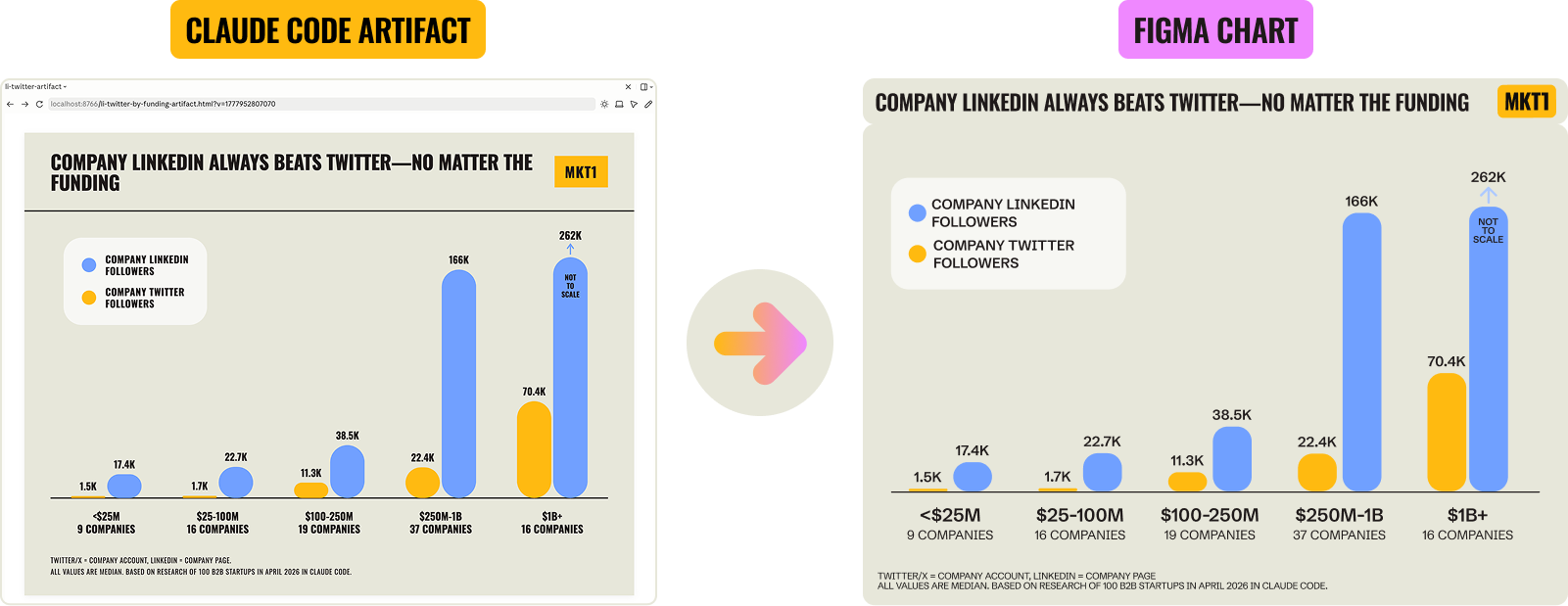
Ask Claude to build graphs as HTML artifacts in the side panel during iteration—this helps you see what’s going on, try different cuts, and pull insights. Move to Figma using their MCP (or your design tool of choice) once everything’s locked, so you’re not redoing the chart every time data shifts.
Save your skill and your spreadsheet as you go. The skill is the instructions, so you can run this again on more companies or easily add data points later. The spreadsheet is your source of truth for the data. You can also ask Claude Code to make a template of your artifact and save that alongside your skill.
Publish and share your report. Be sure to caveat your methodology: Flag what isn’t statistically significant, call out where numbers are fuzzy, and note that Claude Code was used.
Here are the prompts you can copy & paste into Claude Code:
Prompt 1: Build the research report skill
Take my company-research or competitive-research skill and duplicate it as a new skill called research-report.
Adapt it to work across a bigger list of companies and prep the data for a publishable report.
The skill should:
Ask me how I want to source the companies (paste a list, upload a CSV, or have you find them).Set up a spreadsheet that will be the source of truth for the research, both URLs and data points, and save the company URLs in it, one row per company.Suggest data points to track and work with me to lock them in, then add a column for each. If I’m not sure where to start, brainstorm options first.Run each data point one at a time, starting with a small batch of 3-5 companies to check the method, then scale to the full list. As you go, record the working method (URL, curl, regex, whatever) in the skill itself so I can rerun it later.Flag any cell you can’t fill in—don’t guess or fill in plausible-sounding values. Treat “unknown” as a real third state for any yes/no column. If the methodology gets stuck, takes too long, or hits an unknown value, let me know and we’ll work through new methods together.After each data point is run, spot-check a few rows and all outliers. If the outliers don’t look right, flag them as scrape errors before moving on.Save to the skill and the spreadsheet as you go.
Prompt 2: Build artifacts and pull insights
Using [spreadsheet] with my researched data, build HTML chart artifacts in the side panel showing different cuts of the data, group by [fill in column names or data points].
For each cut, suggest the best chart type (bar, line, or simple table) before you build, I'll confirm.
Reference my brand-guide skill for colors and styling. For each graph, surface the headline insight, where means and medians diverge, and which tells the most interesting story.
When we finish, reference these artifact templates in the skill.
What I learned:
Lesson: Be ruthless about precision
When you’re building a full data report, you can’t check every cell. 10,000 cells is too many to eyeball. So you have to trust the methodology, and to do that in Claude Code, you have to work in phases.
Batching your work keeps you from eating credits like someone at an all-you-can-eat Vegas buffet. But even running things in phases, I still got stuck, changed methodologies midway through, ran data multiple times, and spot-checked into the wee hours of the morning.
Here’s what I learned:
Don’t trust Claude’s first answer on what methodology is most efficient or assume Claude will flag when there’s a faster, cheaper way.
Sob story: I burned 250 Clay credits trying Clay’s MCP for follower counts before realizing a curl call gets the same info in seconds.
The table below explains what curl is and a few ways Claude can pull data from the web, so you know your options—I just learned about this stuff too.
If possible, drop entities or data points that aren’t easy to pull—it’s rarely worth the workaround.
Another sob story: I built a simple 150-company dataset for our MKT1 MCP Server. 10+ companies came back blank for hero copy because their homepages are built entirely in JavaScript, which curl can’t read. I dropped those companies rather than build workarounds. The same logic applies to any data point: If one is dramatically harder to pull than the rest, it’s rarely worth the trouble.
As I described in the sections above, you should test your method on a 5-10 company batch before scaling. But this matters even more here because at scale, errors cascade through graphs, through columns, into conclusions you’ve already published.
After you’ve run the research at scale, always ask Claude to spot-check, and not just random rows, but specifically the outliers. I found that what look like outliers in scraped data are often just bad data, and not real outliers. I caught some data that wasn’t captured right this way.
Automation gets you to a starting point; manual verification gets you to the finish line. That last mile is really hard to nail; most of my time was spent there.
Yet another sob story: Claude Code’s web search confidently surfaced executives who’d left their roles years ago, Clay missed real CMOs, and I ended up reviewing 100 marketing leaders’ LinkedIn profiles manually.
Budget time for this, and don’t build graphs or downstream assets until your data is locked.
Why do research in Claude Code, not Cowork or Chat? A simple example…
Claude Code keeps your history very easy to access. It adds everything to one folder on your computer, saves memory across sessions, and shows you exactly how much context you’re using as you go. In Cowork, it’s harder to dig through and track what Claude actually did.
This is more useful than it may sound. Halfway through the build of my State of Marketing reports, I needed to check how an earlier data point got pulled—specifically, what regex we used to find usage-based pricing mentions (regex = a pattern that finds specific text, like “any mention of AI credits or tokens”).
My skill didn’t have it documented; I wasn’t painstakingly writing down every method as I went (I should have been!) But the Python script Claude wrote (Python = the coding language Claude uses to scrape and process data at scale) was still in my folder, the raw HTML was still in my folder, and my tracker file had a one-line note. I could reconstruct what we did and decide whether to trust the data or redo it. I even asked Claude to summarize what we’d done and add a few lines to the skill, so I wouldn’t have to replay the history next time.
Lesson: At scale, small errors compound
A single bad data point in a research report on many companies cascades through your work—the same bad URL gets pulled again, the wrong insight follows, the mistake gets published. I rebuilt graphs again and again (via the Figma MCP) when data shifted, re-wrote insights, and ended up updating the two State of Marketing newsletters after they shipped to correct numbers (with notes on the changes, of course). Errors compound, and so does the work to fix them.
A few rules I learned for keeping a big research project like this manageable:
Tell Claude to flag unknowns, not fill them in with nonsense. When Claude can’t find an answer, it may fill in a plausible-looking round number instead of admitting it doesn’t know. I figured this out because there were too many round numbers in places where round numbers don’t make sense (7,700 and 12,500 followers, for instance). Instead of Claude telling me it didn’t have the right URL, couldn’t read JavaScript-rendered blog publish dates, or couldn’t find a marketing leader, Claude just filled stuff in and told me the dataset was complete for 100 companies.
The same failure shows up if you force a yes/no in a column. If you don’t allow for a third option (yes, no, AND unknown), Claude will just put in “No” when it shouldn’t.
Slice your data in different ways before committing to one cut. Once your data is in clean spreadsheet columns, the same dataset can be cut by funding, company size, category, GTM motion. Each cut tells a different story, and means and medians often differ (means get skewed by outliers like Stripe and OpenAI; medians don’t). I ran through a bunch of cuts for each graph in my State of Marketing report—what’s more interesting, the by-category story or the by-funding story, for instance?
Use Claude artifacts during iteration to visualize data, whether for seeing different cuts or to decide what type of graph is best. I naturally want to make every visual in Figma because I’ve been doing that for years, but Claude’s artifact-building has gotten pretty good. You can still use Figma (or your design tool of choice) for the final, publication-ready versions.
I learned this the hard way. I made a starter graph in my brand style, connected the Figma MCP, and told Claude where to build the chart. Every time I corrected data or added a column, I had to redo it.
What I should have done: asked Claude for quick HTML chart artifacts during the build. They render in the side panel of the desktop app, update instantly when data changes, and look on-brand enough to decide on. Push the final data into Figma at the end for polish. Live and learn—or in this case, graph and learn.
After figuring this out, I built a progression into my skill. It starts by making a basic artifact in Claude (chart, table, doc) once the spreadsheet is filled in. Then it asks me if I want to use a specific MCP for the final asset (Mutiny, Gamma, Figma, etc.) if I really want to polish it. And you can go back to your old skills and bolt on artifact steps, which I recently did to all the strategy skills in our MCP server.
Quick definition: An artifact is an asset made by Claude that opens in Claude’s side panel: a chart, table, doc, styled report, etc. This actually works the same in Claude Chat and Claude Code now. Artifacts run on your normal Claude usage; they don’t pull from Claude Design credits (Claude Design is a separate product for pitch decks and mockups).
What’s next? Claude won’t just help you create fuel—it’ll become the engine too
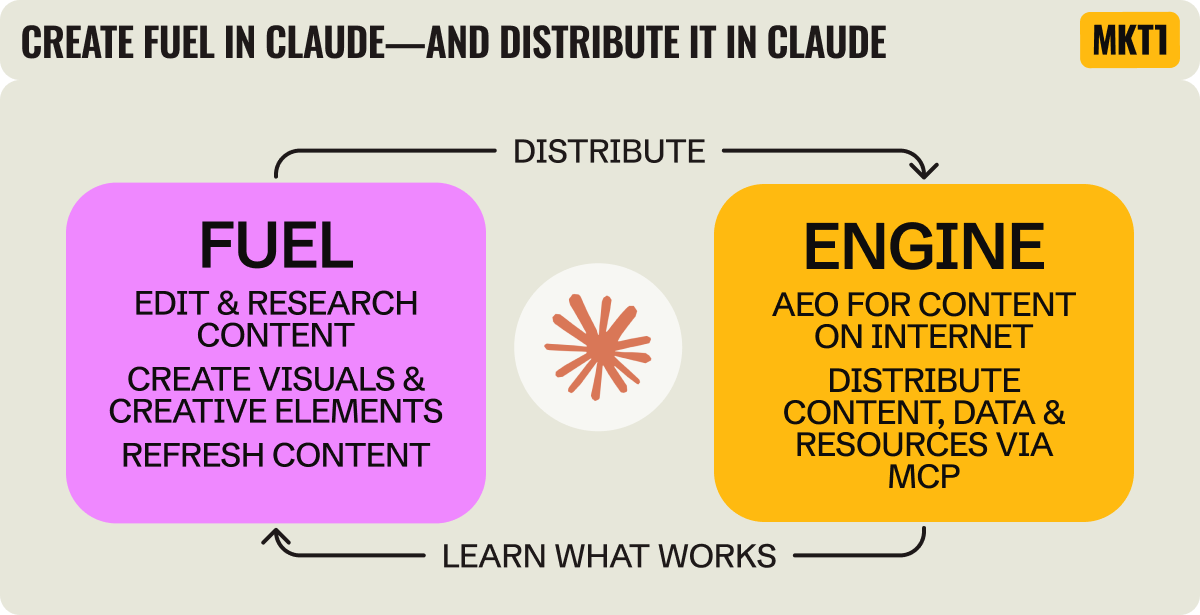
If you’ve read MKT1 for a while, you’ve definitely heard me talk about fuel & engine—the two fundamental elements of marketing. If not, here’s the framework: Fuel is what you create (content, reports, messaging, etc). Engine is the channels you use to distribute the fuel.
Over the past few months building the MKT1 MCP server, people have asked me: What does an MCP server for a newsletter actually do? To which I say: distribute our content and skills—built based on my advising, writing, and templates.
And watching so many of you install and use our MCP Server has given me a new way of thinking about Claude.
While most marketers are already using Claude to create fuel, Claude will increasingly become the engine. And not just because of AEO. I think companies will start to deliberately expose their content, data, and resources to Claude and other LLMs through MCP (or whatever the standard ends up being). It will be a direct path or engine to your users and customers.
Right now, every MCP launch is about connecting products to Claude Code—I’ve talked about Clay, Figma, Airtable, Attio, Mutiny, and more MCP servers in this way. But the same plumbing works to distribute “marketing” fuel: your blog posts, your reports, your data, your point of view.
Are companies catching on and using MCP this way?
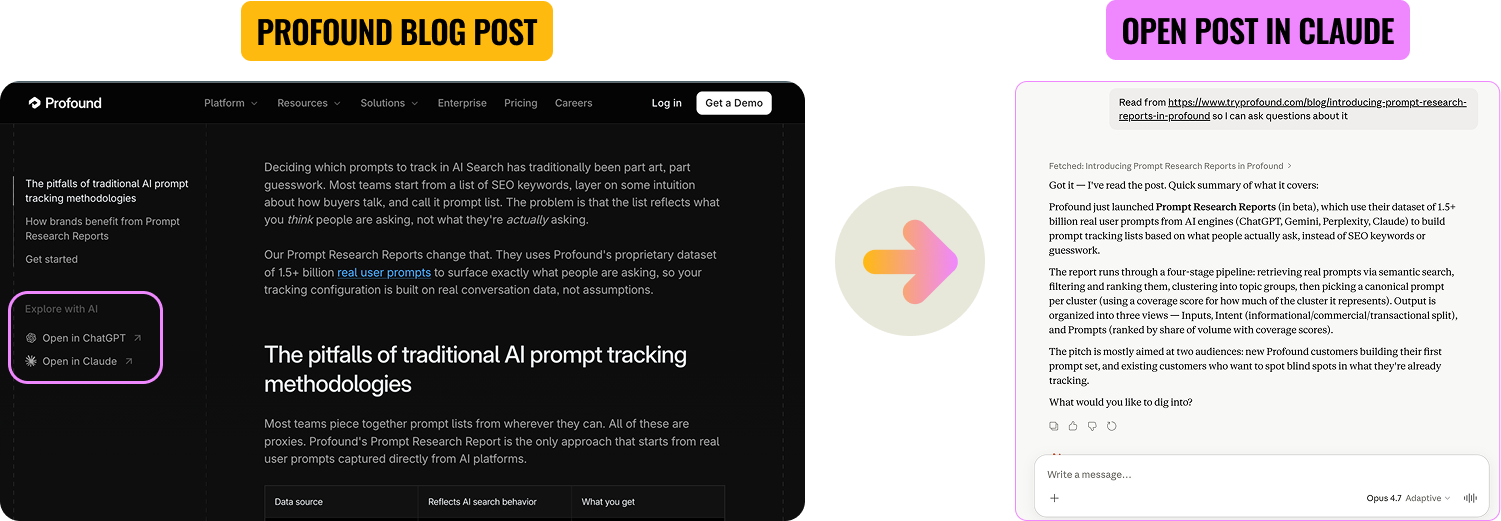
Some companies are part of the way there. Profound is a good example (makes sense they’d lead the way—they’re an AEO company). Every blog post on their site has “Open in ChatGPT” and “Open in Claude” buttons in the sidebar. Click one and a prompt with the post link is loaded into your LLM, ready for follow-up questions. The blog post becomes the start of a conversation, not the end. But the button is still a click off their site into an LLM.
AllTrails is an interesting B2C example. Their "product" in this case is really data and knowledge about hiking trails. So their MCP lets you describe your ideal hike conversationally (”a loop trail near me that works for kids, dogs, and has great views”) and get real, ranked options from their 95-million-member database…without leaving Claude. (I love this example, even though you'll never find me hiking!)
What's next: Distribute content and skills—not just your product functionality—through MCP
You can take this a step further. Right now most MCPs only reach existing customers aka people who already use your product. But you can build an MCP that is your free tier. Include skills, content, and research that make it worth installing independent of using your product.
We're trying to prove this out through the MKT1 MCP Server. Two skills are free for anyone who installs it: /mkt1-newsletter (search and pull from past MKT1 newsletter content) and /mkt1-job-board-search (open B2B marketing roles). The rest are gated for paid newsletter subscribers.
So finally the meta moment of this whole newsletter: I used Claude to create this report, and now Claude can deliver it to you as well.
This should now explain why I went the extra mile and published the State of Marketing Reports as a skill (3 newsletters wasn’t enough), giving anyone with our MCP the ability to query the full data in the report themselves. Yes, I’m a bit of a workaholic and don’t know when to stop, but I also wanted to prove this idea I’ve been thinking about for a while.
When thinking about distribution this year, the question may not be “do we start a newsletter?” or “do we record a podcast?” or “do we focus on building a LinkedIn following?” It might be "do we have an MCP server where we can distribute this content?"
Even more from MKT1
🙏 Brought to you by: Framer, a no code website builder; Attio’s GTM Atlas; and RevenueHero, scheduling automation for RevOps and marketing teams. All 3 companies have offers for MKT1 subscribers!
🤖 MKT1 MCP Server: Add MKT1 skills to Claude Code and Cowork. Paid subscribers get our full library of skills and templates, including the 2 new research skills used in this newsletter.
🧱 MKT1 Buildathons: Save your spot for our next Buildathon on May 27th, where I’ll show you how to use the MKT1 MCP Server in Claude Code. For paid subscribers only! Missed our first Buildathon? Watch the replay to see how to build a /marketing-strategy-skill in Claude Code.
🧑🚀 MKT1 job board - new & improved: Jobs from the MKT1 community (it’s free to post as a paid subscriber). And our candidate form if you’re looking for a new role (option to remain anonymous included!).
🪢 Join our Slack waitlist: We’re launching a Slack just for talking about using Claude Code or Cowork and/or our MCP Server. It’s invite-only for paid subscribers using the MKT1 MCP Server. Get on the list ➜
📦 MKT1 Unboxing: Watch our video series to see Kramer (that’s me) unbox Mutiny, Wistia, Luma AI, & Attio.
🥞 MKT1 Perk Stack - New Perk: Exclusive discounts worth $40K+ on our favorite GTM tools. For annual & superfan paid subscribers only. We just added 3 months free of Granola, check it out!
🧰 Template & resource library: We have 100+ templates and resources available to paid subscribers in our template & tool library.
Ok I loved this post for so many reasons — I bet you probably had a hard time stopping because it feels like there’s endless layers to unpack. You can use these as fuels and engine yes and drive real engagement with your brand through MCPs. That’s all engagement you can probably track along the way with tools like profound and Airops.