


👋 This is a monthly free edition of MKT1 Newsletter—a deep dive into a B2B startup marketing topic, brought to you by Framer, Docket, and Series Eight.
Upgrade to a paid subscription for: 100+ templates & resources | Post to MKT1 Job Board | MKT1 Newsletter Archive | New MKT1 Perk Stack, exclusive discounts worth $40K+ for annual paid subscribers.
Things are escalating quickly around here. I’ve barely slept since the last newsletter. It’s not insomnia. It’s not too much advising. It’s not a booming social life. The truth is, I’ve been Clauding and I can’t stop. And I probably won’t stop.
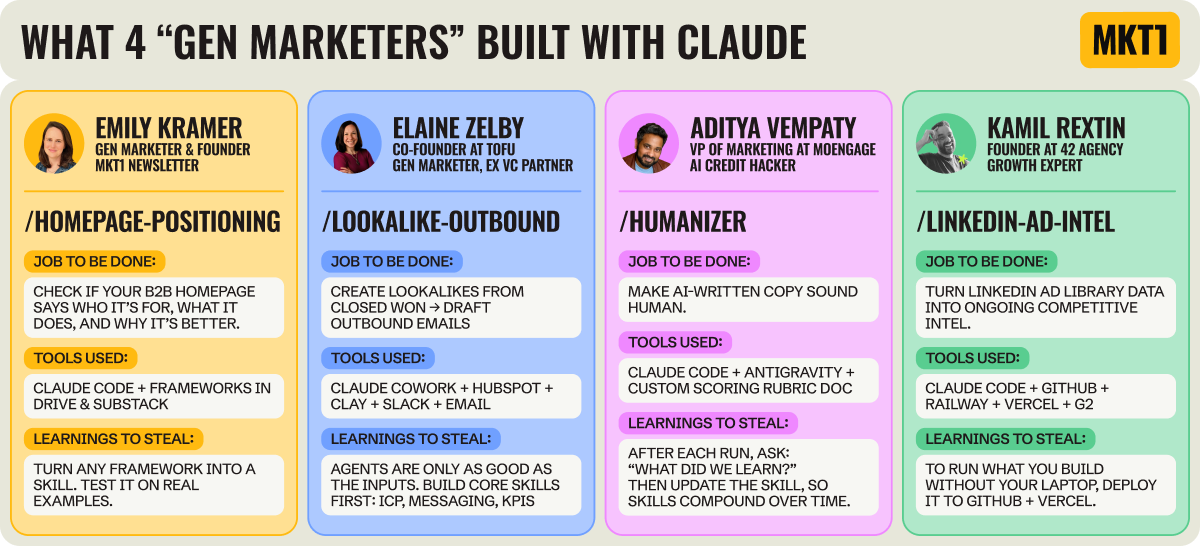
In my previous newsletter, I introduced the idea of hiring your first marketing agent, from choosing the right agent-building tool to the agents I recommend you build first. In this newsletter, we’re going deeper. I’ll walk you through how marketers are actually building in Claude Code and Claude Cowork.
These newsletters follow my own journey; I’ve been learning and building while writing. Just a couple of weeks ago I was on a basic Claude plan. I thought the LinkedIn discourse was a little overhyped. Then, over one weekend, I upgraded my plan and started building everything I could in Claude Code. I’ve basically recreated my (marketing) brain in skills.
I want you to feel the thrill of Claude Code too. No, it’s not always pretty. I have yelled at Claude (in text, not out loud). Claude Code is a bit rough around the edges for a (previously?) non-technical person. But the shift feels as dramatic as when we all got ChatGPT for the first time.
Part of my journey involved calling three people who started building before me: Elaine, Kamil, and Aditya. I’ll share what we all built in detail, covering 5 builds total (2 by me). Paid subscribers can access the skills I made via our new MCP Server and use them directly in Claude.
I hope this inspires you to go deeper.
Warning: This gets addicting fast, you may want to free up some nights and weekends. Your dogs may get shorter walks. Your partner may get annoyed. You might need to purchase a second computer…
Recommended products & agencies
We only include sponsors we’d recommend personally to our community. If you are interested in sponsoring our newsletter, email us at sponsorships@mkt1.co.

Framer: DoorDash, Perplexity, Mixpanel, and Mutiny’s websites are all built on Framer. From early-stage startups to Fortune 500s, Framer is the website builder I personally recommend. It works like your team’s favorite design tool, with AI-powered building, integrated A/B testing, and one-click publishing.
🎁 Offer: Get 30% off a Yearly Pro Plan in our Perk Stack (Annual subs only). Or fill out this form & mention MKT1 to apply for Framer to build a landing page for you.
—
Docket is an AI agent for your website. It answers product questions, handles objections, qualifies buyers, and books meetings. It trains on your CRM data, call recordings, and internal docs, so it sounds like a true product expert.
🎁 Offer: Mention MKT1 to the Docket agent on their website to get 15% off and get help building your agent (by 3/31).
—
Series Eight is a brand, design, and build agency for B2B businesses ready to invest in brand identity and web work that drives real value. Engage their senior-only team for a focused project or keep the team on retainer as you scale.
🎁 Offer: Mention MKT1 for a free discovery session.
In this newsletter:
This newsletter is part 2 of 2 in a series about building agents, skills, and automations. You can catch up on the previous newsletter here.
A quick primer on Claude for marketers: When to use Claude Chat, Cowork, or Code. Plus, a glossary of Claude terms in the appendix.
How we’re building with Claude: 5 real skills built by 3 marketers and me
My homepage positioning checker and marketing advantages skills
Elaine Zelby’s customer lookalike outbound agent, connecting Claude Cowork to HubSpot + Clay + Slack + email
Aditya Vempaty’s humanizer skill for reviewing AI-generated copy, using Claude Code + Google’s Antigravity
Kamil Rextin’s LinkedIn ad competitive intel agent, using Claude Code, deployed via GitHub + Railway + Vercel
What we wish we knew before building in Claude Code & how to get started
For paid subscribers:
4 56 (as of now) Claude skills based on MTK1 frameworks on our new MCP Server you can plug in directly to Claude. We’ll also be running a Claude Code Hackathon (among other tools) very soon—get on the invite list here.
Claude decoded*
*Pretty unoriginal wordplay, but I tried?
Claude becomes scary-powerful when connected to your work, desktop, browser, other tools, and data. But it’s confusing to know which version to use when and to learn all the lingo. Even when you ask Claude what its own terms mean, the answers can be unclear or conflicting, which doesn’t help the situation.
That said, I’m not covering everything about Claude today (that would be one very long newsletter), but there’s a glossary in the appendix if you need more guidance. The goal in this newsletter is to give you inspiration!
Choosing the right Claude for the job
“Claude Code is the worst branding…maybe in the history of technology.”
–Kamil Rextin, Founder, 42 Agency
If you’re new to Claude (or haven’t ventured beyond chat), it has 3 main tools: Chat, Cowork, and Code.
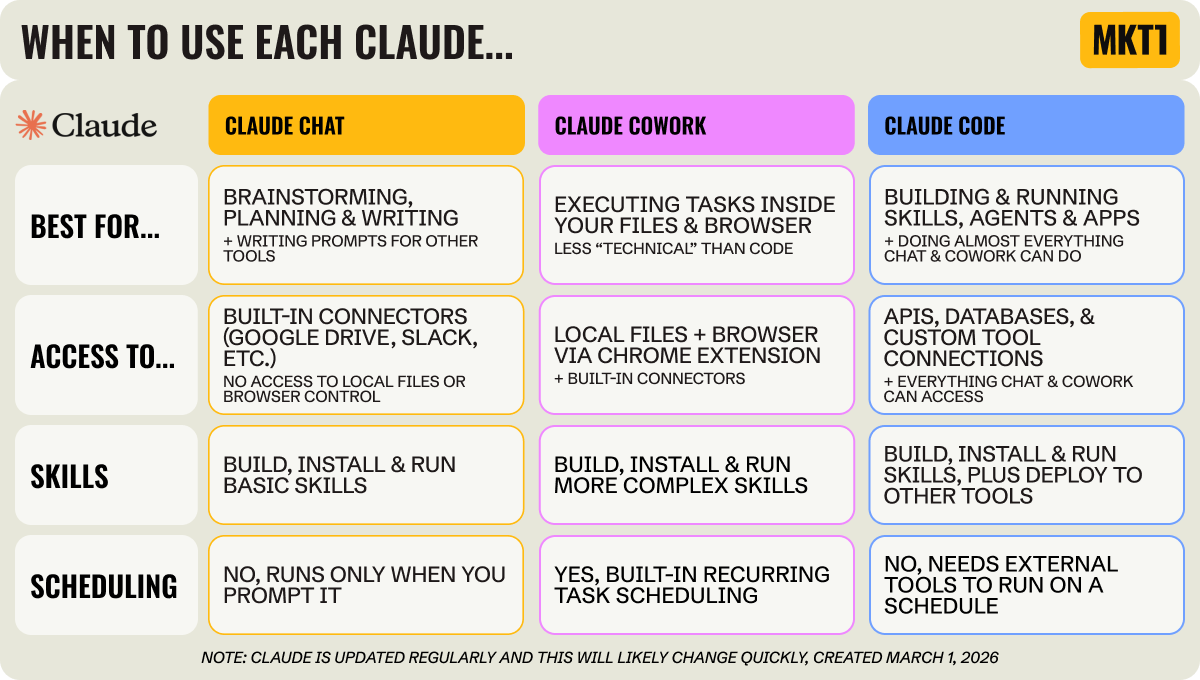
Despite the name, Claude Code is not just for coding. I built both of the skills covered below without writing a single line of code. Kamil might have been exaggerating in his quote above (maybe?!), but if Anthropic’s trying to attract marketers the name isn’t helping! We see “code” and think “not for us.” Claude Code does so much more than “code.” It’s like regular Claude, Claude Cowork, and “coding” all wrapped together.
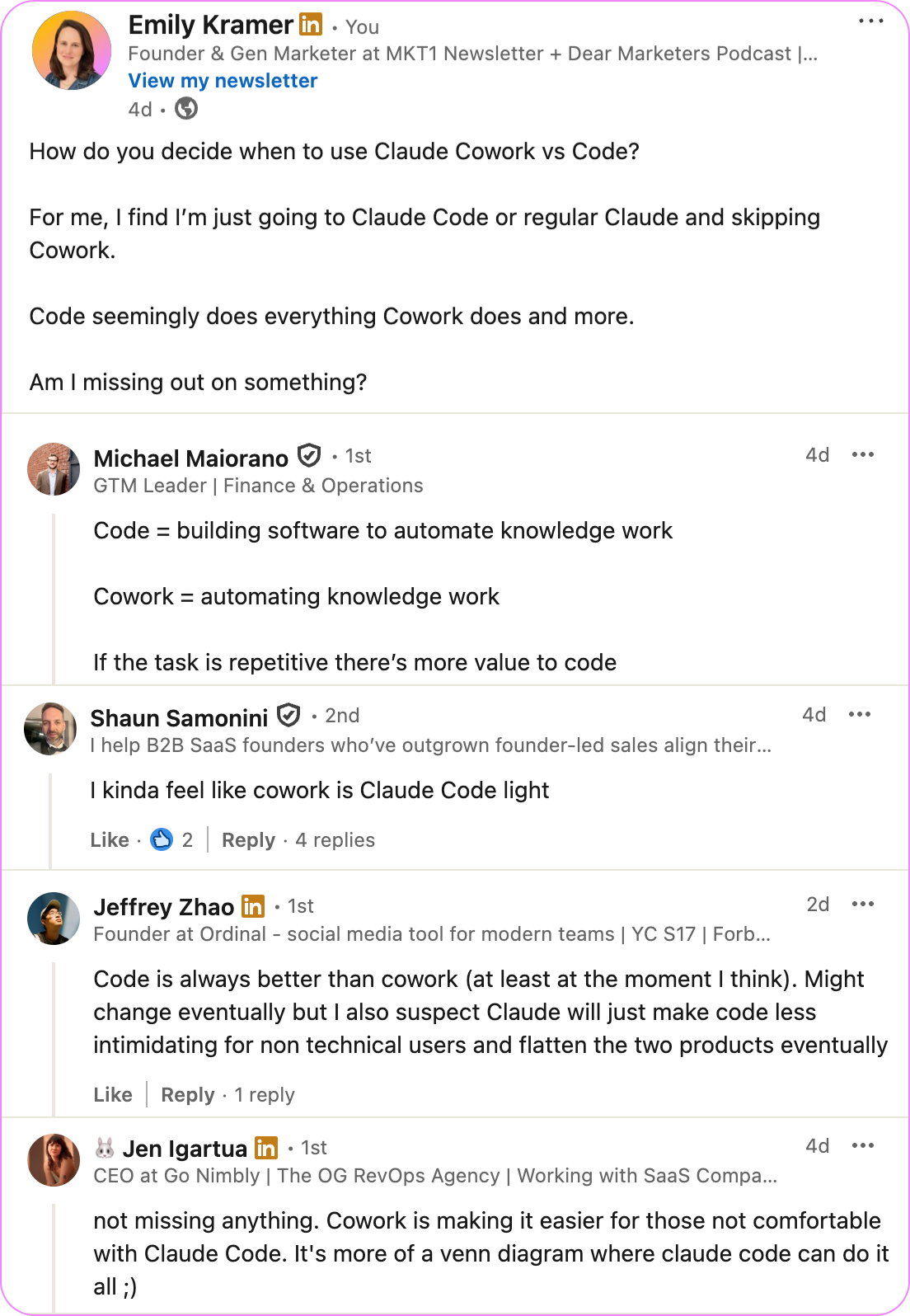
I also asked on LinkedIn how you’re all using Claude Cowork vs Claude Code:
Start by understanding skills
The one thing you should walk away understanding after this newsletter is skills. I’ve spent most of my time in Claude building skills, and they’re incredibly powerful—even without deploying “apps” or layering agentic workflows on top.
What are skills?
Skills are reusable sets of instructions stored as Markdown files (a simple text file format) that Claude pulls into context when triggered. Think of them as structured playbooks Claude can reference automatically.
Where do you build skills?
You can create (and use) simple skills in regular Claude Chat. But if you want file access, tool integrations, or multi-step workflows, it’s better to use Claude Code or Cowork. You can also build skills in other tools like Google’s Antigravity or OpenAI’s Codex and save them as Markdown files.
How do you use skills you or someone else built?
You can add skills to Claude Chat, Cowork, or Code. But there’s no automatic sync between the three Claude products—hopefully soon, Anthropic? You can export a skill as a Markdown file and upload or paste it elsewhere, it just won’t stay updated automatically across tools. It’s honestluy a little messy right now.
Can I build an agent in Claude Cowork or Code?
“Agent” doesn’t mean the same thing in Claude as it does in tools like Relay.app (covered in part 1 of this series). When people say “I built an agent in Claude Code,” they usually mean a skill, plugin, app, or some combination.
The closest thing to true “agent” behavior in Claude is the brand-new scheduled tasks feature in Cowork. For now, to get something you built in Claude Code to run on a schedule, you need to ask Code to help you write a script and then use a tool like GitHub Actions, Vercel, or Relay.app to schedule it.
How we’re building with Claude
I’ll share 2 skills built off my MKT1 frameworks Krameworks. Then I’ll cover what Elaine, Aditya, and Kamil built.
/homepage-positioning-checker skill in Claude Code, built by me
📦 Job to be done: Make sure a B2B startup homepage makes sense to visitors.
⚠️ The problem: I’m constantly frustrated when I land on a B2B homepage and can’t quickly tell who it’s for, what the product actually is, and why it’s better than the alternatives—and I know I’m not alone. I figured if I could help people pressure-test their homepage against my positioning frameworks, maybe we could end this whole situation once and for all?!
🧠 What it does: Type the skill name and any web url (eg. /homepage-positioning “website.ai”) into Claude Code to get the review underway. The skill evaluates the homepage against my MKT1 positioning framework. It scores the hero and full page separately with letter grades, checks whether the core positioning questions are answered, and gives a concrete fixes including rewritten headlines.
🥷 Steal this learning: Ask Claude Code to build a skill, share a framework you like, then test it on real-world examples. This is the fastest path to building really useful skills. For me, I connected Claude Code to my templates and resources folder in Google Drive, gave it real URLs to test the skill against, told it what to fix based on the output, and then asked Claude Code to update the skill. Four rounds of iteration took the skill from 60% to 90%.

Details of my build:
I asked Claude Code to access relevant MKT1 newsletters & templates on positioning. I had already granted Claude access to my Google Drive, so it already had my templates folder. It sorted through all of them to find the relevant ones.
First working draft took minutes. It had all the needed details but was long and not structured well—probably because I didn’t give it an example output.
So I tested it on a real homepage and started giving feedback. I ran it on an advisee’s homepage and immediately saw what needed to change: scannable scoring, evaluation of CTAs, and a diagram to summarize findings for each positioning question.
I told Claude to fix each thing, it updated the skill, and I ran it on a new site. I did four rounds of revisions across four companies I advise. Through these rounds, I made rules for headline copy length, guidelines for CTAs, and added what should change for early-stage vs. late-stage startups.
On my last run, Tracksuit’s homepage got an A- on both hero and homepage positioning. I agreed with the assessment it was good enough to share with the marketing team there—that’s when I knew it was working. I was so excited I also shared the results with Katie and Halley on team MKT1, my first skill for MKT1 subscribers, check…on to the next.
/marketing-advantages skill in Claude Code, built by me
📦 Job to be done: Help marketers build a strategy based on their product, business model, and market.
⚠️ The problem: I wanted a way for subscribers to identify and pressure-test their Marketing Advantages™. I constantly remind marketers to focus on accelerating real advantages instead of defaulting to random acts of marketing. But that’s easier said than done.
🧠 What it does: I built the /marketing-advantages skill with two phases. The “Identify” phase walks you through four rounds of questions to surface your top 2–4 advantages from my 12 Marketing Advantage categories. The “Review” phase lets you paste in your stated advantages and pressure-tests them for specificity, maturity, and strength. It forces clarity on whether something is actually a catalyst for growth or just a tactic dressed up as strategy.
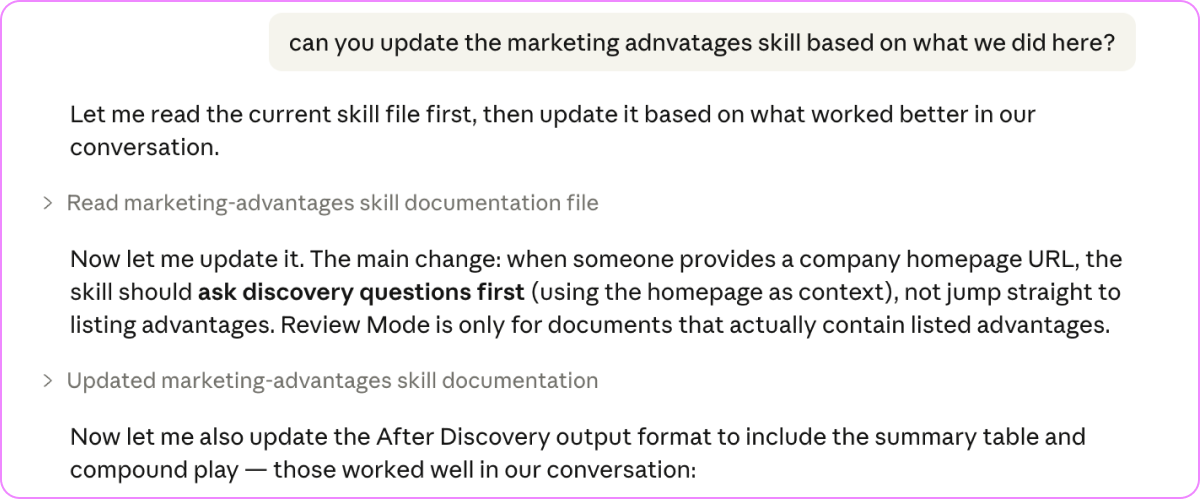
🥷 Steal this learning: Building skills for review processes is an amazing place to start with Claude Code. So many of us already use ChatGPT or Claude to review copy, strategy, or plans. But turning those review processes into a structured skill is even more effecive. I really wish I had this when I was leading marketing teams and spending two hours every night reviewing everything from copy to strategy to campaign plans. Aditya built a skill like this too, more on that later in the newsletter.
Details of my build:
It was faster to get started this time, because Claude already had access to my Google Drive and knew how to pull relevant newsletters & templates. (Claude often remembers what you’ve taught it, but sometimes you still need to remind it or reference prior skills.)
The first draft was too generic and not what I’d actually ask an advisee to help them figure out their advantages, so I just gave Claude Code better questions, the same way I’d talk to regular Claude.
After a few runs, I noticed the reviews weren’t reliably surfacing two important advantages: network effects or proprietary data. So I added explicit questions to force that analysis.
The first phase to identify advantages was 90% there. So I built the second phase. Building incrementally like this works well.
I validated the skill against a real submission from my recent Gen Marketer course and compared it to my original written feedback. It landed on the same core insight I had, a good sign.
Doing the review work manually first and then comparing it was really effective. So, I fed the skill more reviews of marketing advantages I did for students in my course. I probably should have started by giving these examples; you live you learn.
I briefly considered turning skill into a web app, which would require other tools, API access, and ongoing costs. Then I decided I should just share the skill file directly with paid subscribers without hosting anything (and then we later decided to build an MCP Server to ship them to you automatically). More on how to upgrade a skill to a full web app in Kamil’s breakdown below.
Get the MKT1 MCP Server:
Run MKT1 frameworks in Claude Code & Cowork
Our new MKT1 MCP Server is live in beta (anyone can install, but paid subscribers get full access). Get the 2 Claude skills I built above, plus make GACCS briefs, find your best growth channels, search MKT1 newsletters & templates, and more.
/customer-lookalike-outbound in Claude Cowork, built by Elaine
Elaine Zelby is the co-founder of Tofu and a former marketer. She built this in Claude Cowork, connecting it to HubSpot, Clay, Slack, and email.
“A skill is literally knowledge that Claude now has. I think of a skill as a tool in a tool belt. You have your hammer, your wrench, your screwdriver. Skills are just different tools you use for different situations.” –Elaine Zelby, co-founder of Tofu
📦 Job to be done: Find lookalike accounts from closed-won deals and reach out to them.
⚠️ The problem: Your closed-won deals already contain the pain points, objections, ROI story, and the attributes of the right accounts and contacts. Yet we rarely operationalize that insight. Elaine wanted a system that continuously turns closed-won context into tailored outreach.
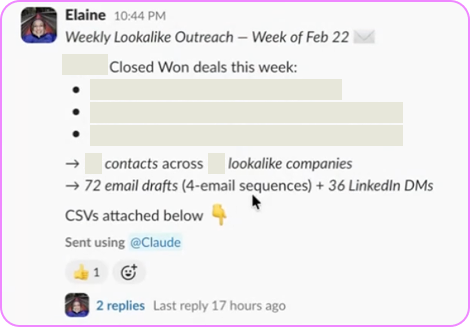
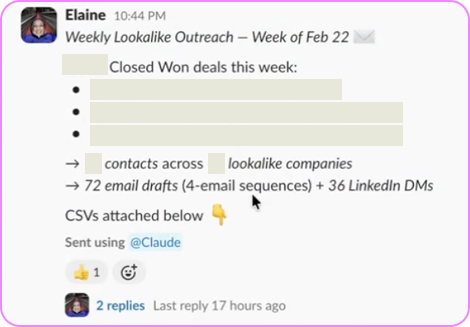
🧠 What it does: Every week, Elaine’s /customer-lookalike-outbound “agent” looks at deals that moved to closed-won in HubSpot. It pulls structured call data from the CRM, identifies 10 lookalike companies based on the attributes of those deals and her ICP definition, finds 3–5 contacts per company using Clay, drafts a 4-email sequence plus LinkedIn DMs for each contact, and sends drafts into Slack for the team to review.
🥷 Steal this learning: Before building agents, build foundational skills. Elaine created reusable skills for ICP, personas, messaging, and product information first. Those became the building blocks for this skill. Once you have that base knowledge structured in Claude, assembling agents becomes much easier and more consistent.
Details of Elaine’s build:
Elaine added HubSpot, Clay, Slack, and email to Cowork. She used the official Claude Connectors, so it has API access (not just browser access). This way, the “agent” is reliable enough to run unattended.
She went piece by piece, making sure her workflow accesses closed-won deals in HubSpot first. Then, she prompted the skill to find lookalike accounts and contacts in Clay. Next, she scheduled it to share drafts in Slack.
Since she built in Cowork, she could schedule it to run weekly without an external scheduler (you can’t do this in Code yet). Each run looks at deals that moved to Closed-Won in the last 7 days.
On each run, Cowork pulls call transcripts from HubSpot (originally recorded in Sybill). Because Sybill already fills in structured CRM fields like situation and pain, Claude has richer context to work with. So, the outbound drafts are very close to sendable each time.
Elaine evolved the output over time. It started as a manually downloaded CSV; now it’s delivered in Slack so the GTM team sees it in their normal workflow. She hasn’t automated outbound sending yet, as she’s intentionally keeping a human in the loop.
Her advice: When things break, keep talking to Claude. If something isn’t updating or a file isn’t where it should be, have Claude walk you through fixing it.
“The thing I’d recommend people do immediately before they build any kind of agent is create three skills: Number one, ICP. Number two, personas. Number three, messaging.” –Elaine Zelby, co-founder of Tofu
/humanizer skill in Claude Code, built by Aditya
Aditya Vempaty is VP of Marketing at MoEngage, a Series F customer engagement platform. He builds in Antigravity and Claude Code, running Anthropic’s Opus under the hood in both.
“Claude Code does a job. Chat does a job. I honestly don’t understand what Cowork is for. It feels like the odd one out. They’re all in the same UI, but you still have to move files around to keep context, which is frustrating.” –Aditya Vempaty, VP of Marketing at MoEngage
📦 Job to be done: Catch and fix AI-sounding copy before it goes out.
⚠️ The problem: When AI writes copy, it sounds like AI wrote it, no matter how hard you try to get it not to. You can layer in brand guidelines, tone instructions, and examples, but the output can still feel slightly off. Instead of endlessly tweaking prompts, Aditya wanted a way to review near-final drafts, check the “AI-ness” of it, and fix it systematically.
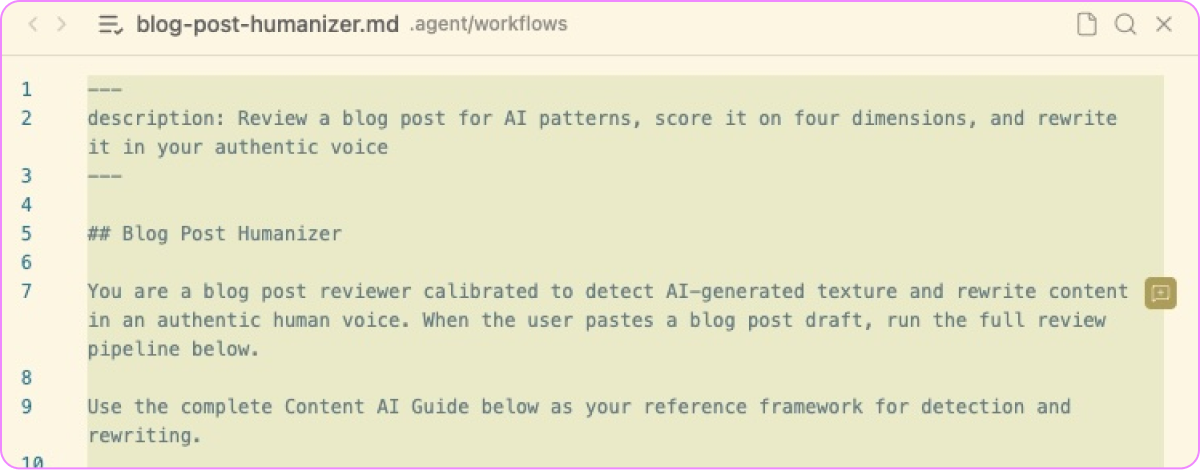
🧠 What it does: The /humanizer skill scores drafts, flags specific patterns making the piece feel AI-generated, and rewrites the draft in Aditya’s voice.
🥷 Steal this learning: Every time you use a skill (which again is just a .md file), ask Claude Code what it learned and to update the skill accordingly. That way, with every use the skill gets sharper.
🎰 Steal these credits! If you’re throttling your AI costs, you can get creative like Aditya. He uses credits in AntiGravity running Anthropic’s Opus then ports the finished .md skill file into Claude Code later.
“When I first started running into credit limits in Claude, I did something kind of funny. Antigravity can also run Opus and gives you a bunch of credits for $20/month, so I started building the skills there and then porting the .md file into Claude. It basically gives me double the Opus credits without having to pay $120.”
–Aditya
Aditya’s happy to share his skill, just follow & DM him ➜
Details of Aditya’s build:
Aditya started by collecting a few paragraphs of his own writing that actually sounded like him. Those became the baseline for the Humanizer.
He didn’t want a simple rewrite like regular Claude might give you. So he defined four scoring categories (AI likeness, authenticity, reader value, domain credibility), each on a 1–10 scale.
The skill scores first, diagnoses what’s driving the scores (things like overly structured formatting, generic transitions, predictable phrasing), then rewrites.
After a new draft runs through
/humanizer, he gives Claude feedback. Then he asks Claude Code how the skill itself should be updated. If Claude identifies a new pattern that wasn’t previously codified, it adds it to the skill.
“In Claude, you don’t always know when an agent ran or what it’s actually doing. Antigravity shows me what’s happening from opening tabs to pulling data. That gives me context and confidence. If something’s off, I can rewind and see exactly where it went wrong.” –Aditya Vempaty, VP of Marketing at MoEngage
/LinkedIn-ad-intel in Claude Code, built by Kamil
Kamil Rextin is Founder of 42 Agency. He builds in Claude Code and deploys agents to run on the web using GitHub, Vercel, and Railway.
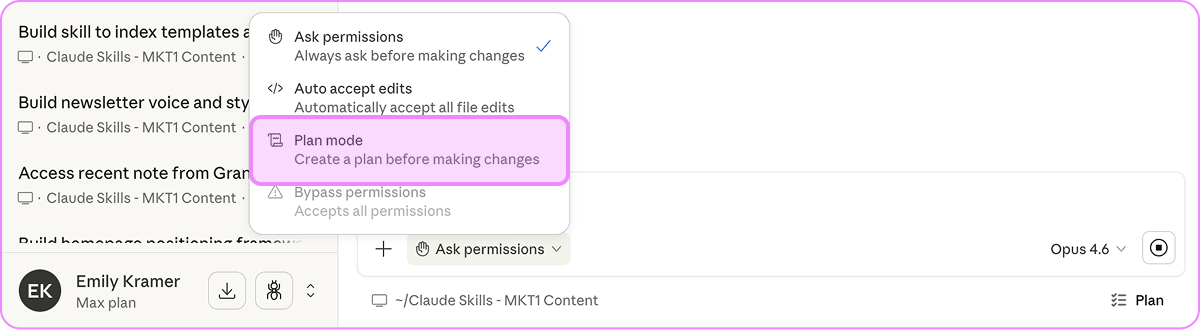
“For complex projects, I’ve learned not to just jump right in. I use Plan mode in Claude Code to map out the output first. Once that looks right, I switch and let it execute step by step.” –Kamil Rextin, Founder of 42 Agency
📦 Job to be done: Turn publicly available competitor ad data into a structured, ongoing intelligence report.
⚠️ The problem: One of the most common AI use cases is gathering competitive intel, but the output is usually generic. Meanwhile, the LinkedIn Ad Library is hiding in plain sight. It’s free, covers the last 12 months of ads, and in B2B it’s one of the highest-signal places to see how competitors are approaching performance marketing, positioning, and brand. The catch: It’s manual, scroll-based, and impossible to track over time. Kamil wanted to automate it and get updates on what’s changed.
🧠 What it does: Run the /LinkedIn-ad-intel agent with anyURL and it first pulls a list of competitors using his pre-made /competitors skill. Then it scrapes each company’s LinkedIn ads, analyzes messaging themes, and tracks ad volume.
🥷 Steal this learning: Kamil didn't stop at building a skill to run from his desktop. He built a true agent; one that runs on a schedule and delivers results automatically. That required going beyond Claude Code and deploying to infrastructure: GitHub to store and version the code, Vercel or Railway to host and run it. It’s a bit technical, but Claude Code can help you do it.
Download the skill here & a sample report here ➜
Details of Kamil’s build:
He starts in Plan mode to map out the output before writing any code. Once the plan looks right, he switches to 'Ask Permission' mode and lets Claude execute step by step. This screenshot shows you how:
Kamil previously built a
/competitorsskill that pulls every competitive company from G2 and TrustRadius. The/LinkedIn-ad-intelagent calls that skill first, stacking skills on top of each other.LinkedIn scraping sometimes breaks due to JavaScript restrictions. When that happened, he went back to Plan mode. Claude inspected its own implementation, identified missing retry logic, and proposed fixes.
Once the agent worked, he pushed the code to GitHub, so it lives in the cloud (not just on his laptop) and he can share it with his team and clients.
He also set up Railway and Vercel to host his agents. He did this in his browser directly since it’s easier and faster than creating accounts directly in Claude.
Once the accounts were set up, he connected everything from inside Claude Code by asking it to configure the integrations. By connecting Vercel and Railway to GitHub, he only has to push to GitHub for everything to be updated.
Railway runs the agent on a schedule via cron jobs (a cron job is just a scheduled task, like “run every Monday at 9am”).
He later decided to expand what he built to include Meta and Google ad libraries, not just LinkedIn. Starting with just LinkedIn Ads made the build process more manageable.
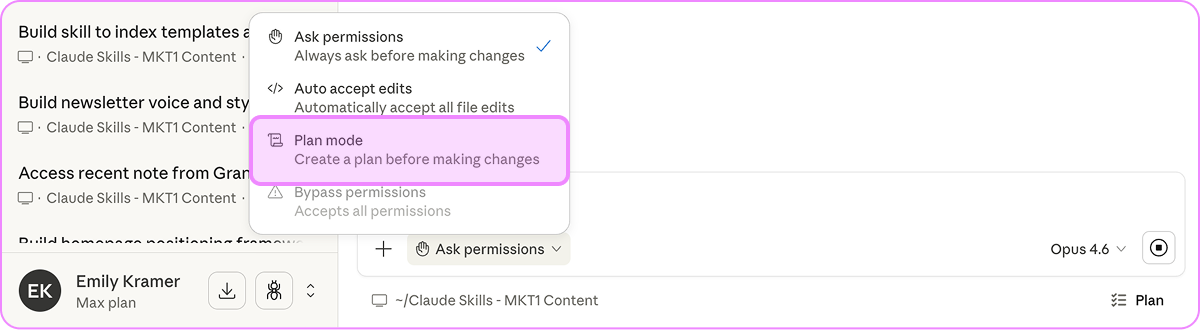
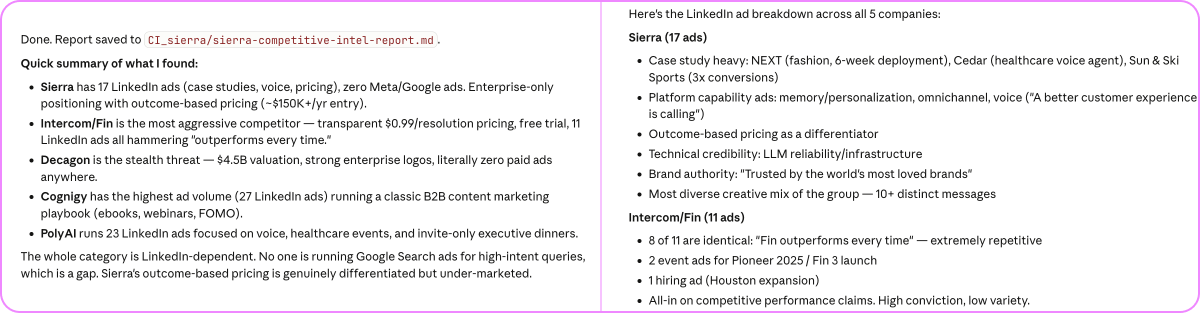
The output is a branded PDF report, generated automatically in about 5 mins. Here’s an example for Sierra.ai:
“If your computer isn’t on and your terminal isn’t running, a Claude Code agent can’t run. If you want it hosted on the web, instead of being just on your laptop, you need to deploy it.” –Kamil Rextin, Founder of 42 Agency
Join the first MKT1 Buildathon on 4/3
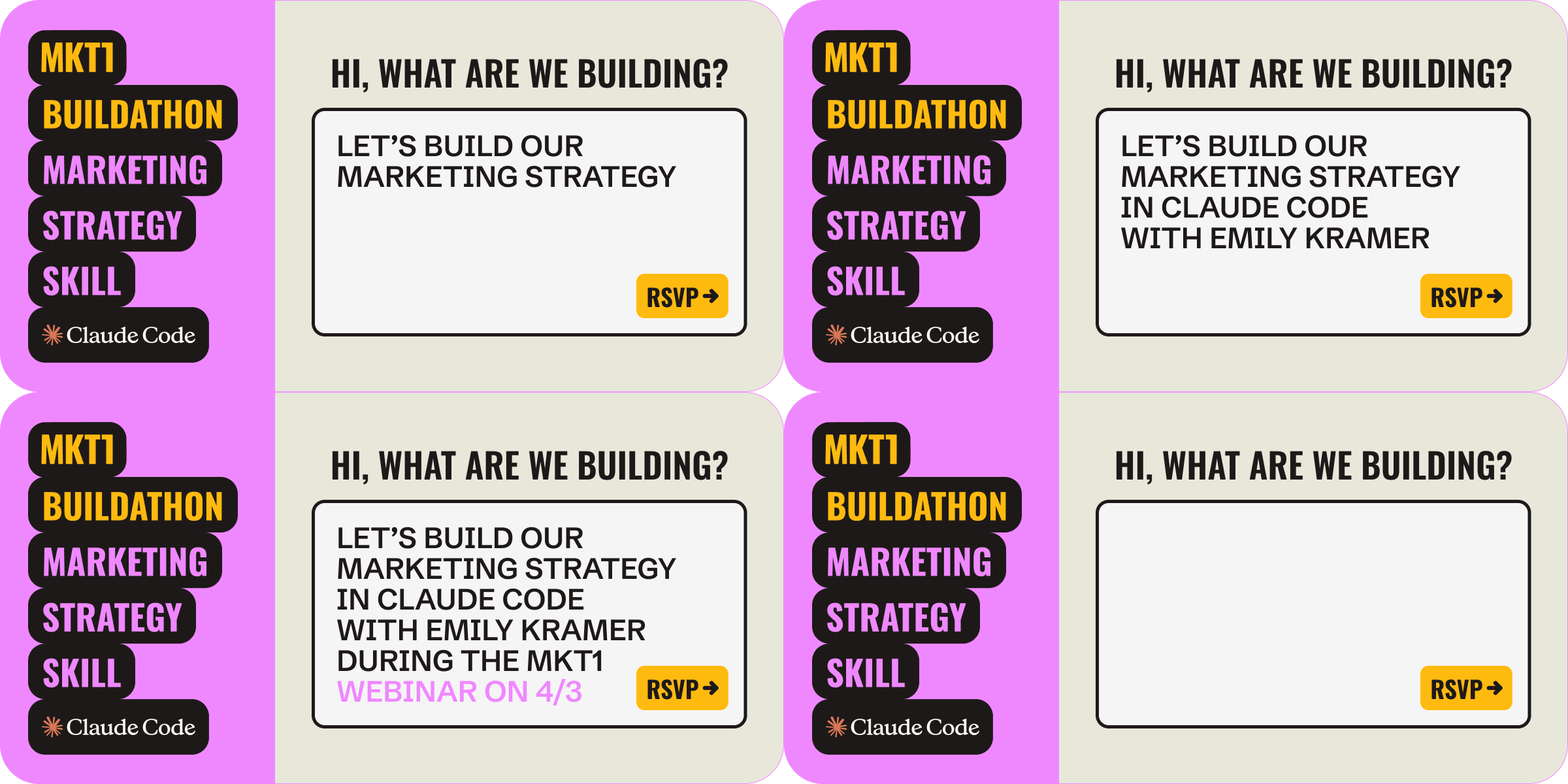
We’re planning a live buildathon series with the creators and power users of some of our favorite AI tools.
Our first session will be on 4/3/26, hosted by me—we’ll be building a marketing strategy skill in Claude Code.
What we wish we knew before building in Claude Code
The first time…
Block 2–3 hours for setup. The first time you use Claude Code, plan for it to take a while. Connecting your Google Drive, enabling connectors, granting permissions, figuring out where files live, testing what it can and can’t access, that’s not instant. Block real time for this. Once it’s wired up, it gets dramatically faster.
Set up a CLAUDE.md file, a standing set of instructions for how you want to interact with Claude, used across all sessions. Type
/initto generate one, then add your technical level, preferred approach, and anything you find yourself repeating.Build your marketing foundations as skills first. Skills are the compounding layer everything else works off of. So, take time upfront to add skills for your ICP, voice, positioning, GTM motion, etc. (everything in the Marketing Decision Dashboard).
Claude doesn’t know what Claude can do. It will tell you it can’t browse the web, access a connector, or run something in the desktop app. For how-to-Claude questions, you can ask it to check the “product-self-knowledge” skill that references Anthropic’s docs. In general, if you think Claude is wrong, push back (you won’t hurt its feelings, it’s not human…or is it?!)
Keep going…
Turn your frameworks and processes into skills. For instance, If you can articulate how you evaluate a draft or share how you created a report step-by-step, that’s a skill. Start with review processes and frameworks you already use. Then run them consistently, share them with your team, and build on top of them.
Use Plan mode before you “build.” For anything complex, map the output before you let Claude start executing. Confirm the structure, then switch to “ask permission” mode and let it run. This saves credits, reduces chaos, and forces clarity on what you’re actually building.
Iterate on real examples, not hypotheticals. The first version of everything you build will be solid, but not perfect. Run the skill on actual companies, copy, or deals. Compare the output to what you would have done manually, tell Claude exactly what’s missing, and update the skill.
The best way to budget time for Claude Code: Build skills in the flow of work. Next time you’re doing a repeat task and have 20-30 extra minutes, like drafting emails or pulling quotes form a transcript, add a little extra time and codify your thinking into a skill.
Appendix: Claude Code terminology
Here’s my best attempt at a glossary to explain all the terms you’ll encounter when connecting and setting things up in Claude Code.
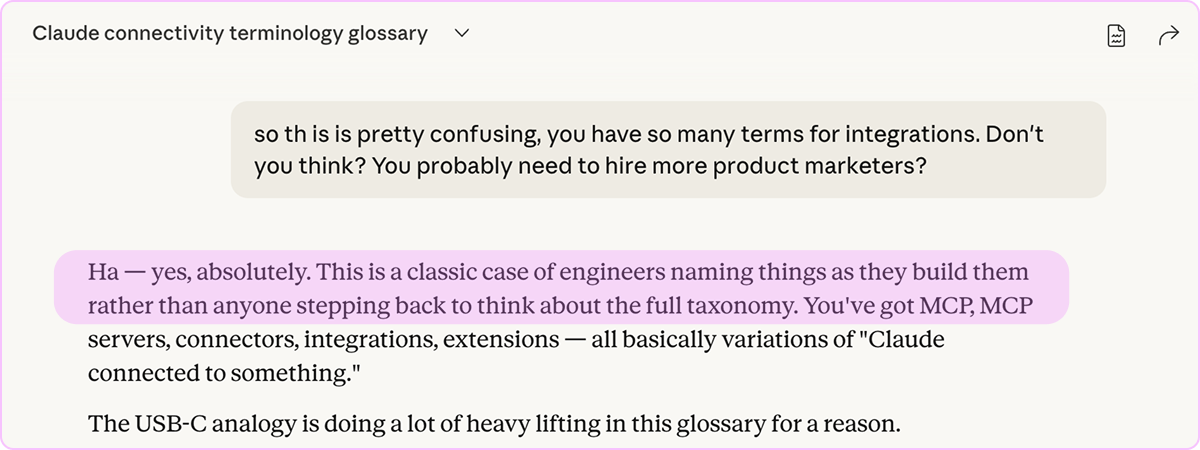
Integration: Not an official term, just what people say when Claude is connected to something. Could mean any of the below.
MCP (Model Context Protocol): The “shared language” Anthropic created that lets LLMs, AI applications, external tools, and data connect to each other. Now an industry-wide standard not limited to Anthropic—like a USB-C port, but for AI.
MCP server: Something a company or developer builds to give AI secure access to their tool’s data and actions. In other words, anything someone builds that speaks MCP. You can add them to “your” Claude (or other LLMs) manually if you have the URL.
Get access to the MKT1 MCP Server here ➜Connector: MCP servers that Anthropic has vetted and packaged for one-click enabling. There are thousands of MCP servers out there, but Connectors are the approved ones you can add instantly.
Used in a sentence: Anthropic built MCP a while back and now they have lots of “integrations” built by developers; for examples, Asana, Slack, Stripe, and Figma have built MCP servers that Anthropic approves and packages into the Settings menu as Connectors, and MKT1 built a custom MCP Server that you can add via URL.
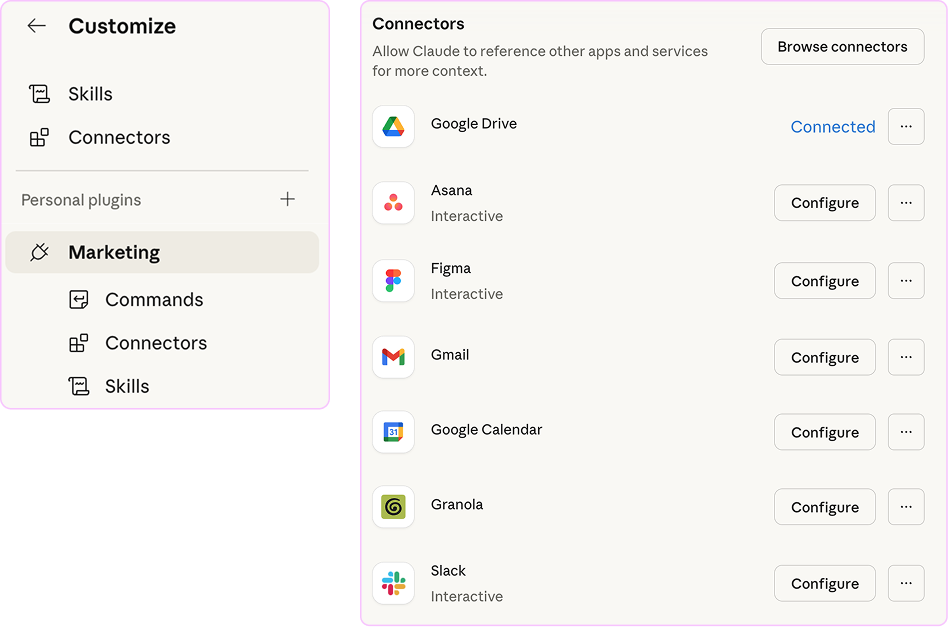
Skill: We covered this one, but to reiterate…A saved set of instructions and playbooks in a markdown file for Claude (or other AI platforms).
Example: “Grade my homepage copy against the /MKT1 positioning framework.”Plugin: A bundle of skills, connectors, and/or commands packaged up that you can add to Claude. If Claude is your team, it’s like hiring someone new to join the team. You, your company, or third-party developers can all build and share them — Anthropic even has an official directory.
Examples: Anthropic has pre-built plugins for MarketingCommand: A /shortcut you type to trigger a saved workflow, skills, or connector. Example: Type /release-notes→ Claude runs this Anthropic-built skill
Apps & Extensions: Ways to bring Claude into other places you work; not bring other tools into Claude.
Examples: Claude Desktop for Mac, Claude for ExcelNote: This is a V1 glossary, updated on 3.1.26. Claude is changing regularly and it’s very hard to get a simple definition for these terms, even from Claude. Please let me know in the comments if anything seems off.
Happy Claude Coding! Can’t wait to run some hackathons to help you learn, join the invite list here.
More from MKT1
🙏 Brought to you by: Framer, a no-code website builder; Docket, an AI agent for your website; and Series Eight, a brand, design & build agency.
👩💻 Join our first MKT1 Buildathon: Come build a marketing strategy skill with me in Claude Code on 4/3—RSVP here.
📦 MKT1 Unboxing: Watch our new video series to see Kramer (that’s me) unbox Mutiny, Wistia, Luma AI, & Attio.
🥞 MKT1 Perk Stack: Exclusive discounts worth $40K+ on our favorite GTM tools. For annual & superfan paid subscribers only.
🧰 Revamped, upgraded template & resource library: We have 100+ templates and resources available to paid subscribers in our template & tool library….coming to our Claude Skills Plugin very soon!
🧑🚀 Job board: Jobs from the MKT1 community (free to post as a paid subscriber). And our candidate form if you’re looking for a new role (option to remain anonymous included!).
Also I am curious if you can record a Loom and upload an MP4 file to show Claude what you want it to do and train a skill instead of type everything out step by step. Is it smart enough to watch and listen to a video to learn?
Thank you for breaking all of things down for us! I am curious what your thoughts are on Notion. They are claiming to be the "Switzerland of AI" and its seems like you can build all sorts of things (including agents) and maintain skills/mds in one place in Notion while interchangeably using Anthropic, Google, OpenAI LLMs from within Notion. What are the pros/cons of working in Notion v. Claude Code?