


👋 This is a monthly free edition of MKT1 Newsletter—a deep dive into a B2B startup marketing topic, brought to you by Attio, Closing Media, and Wistia.
Upgrade to a paid subscription for: 100+ templates & resources | Post to MKT1 Job Board | MKT1 Newsletter Archive | New MKT1 Perk Stack, exclusive discounts worth $40K+ for annual paid subscribers.
We’re all hearing the word “agent” more lately. And if you read what’s on LinkedIn, you’d think most m teams have 100 agents doing 90% of our marketing work and spending their whole day in Claude Code. In reality, many marketers I know are still figuring out the difference between workflow automation, chatbots, copilots, and agents. And the vast majority are just dipping their toes in agent building, with varying degrees of success.
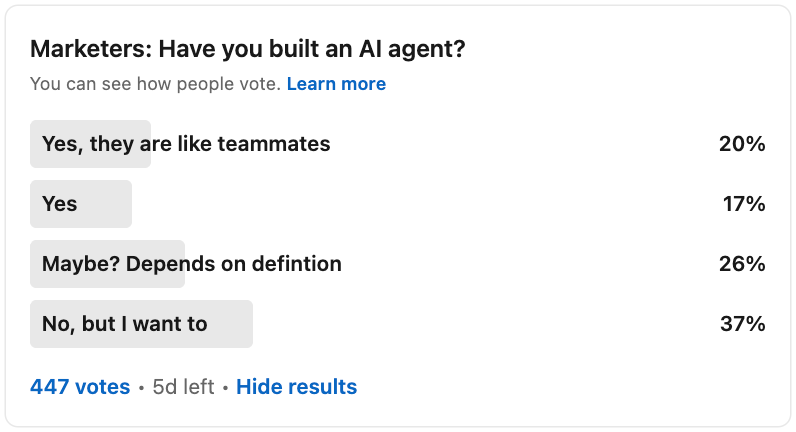
No matter where you fall in this spectrum, the time is now to get a handle on how AI can actually automate work for you, Agents represent a real shift in what AI can do, and I think every marketer should be learning to build them right now. Agent-building can be a frustrating and computer draining process, but things are improving quickly. The gap between teams that figure this out and those that don’t is about to get very wide, very fast.
Agents run work on your behalf, in the background, without you initiating every action. An agent monitors your competitors overnight and drops a report in Slack by morning. It watches for job changes at your target accounts and drafts outreach before you’ve had coffee. It takes your webinar recording and turns it into five draft LinkedIn posts without you asking.
If you’ve been following thinking on the new role and skillset I’m calling the “Gen Marketer,” you understand why. Marketers need to use AI to move with increased velocity, learn faster, and run leaner. That way, you can focus on your time on creating work that stands out from the increasingly noisy pack.
I’ve been building and experimenting with agents myself, but I wanted to bring in someone who sees what hundreds of marketers are building. So I phoned a friend: Jacob Bank, Founder & CEO of Relay.app. After watching him wow students in my course with agent knowledge and skills, I knew he’d be able to help MKT1 readers too. So, this newsletter is based on my conversations with Jacob.
In this newsletter:
Part 1 - This newsletter: Learn how to build marketing agent “teammates”
WTF is an agent? How is different than an automated workflow? Can’t Claude do all of this?
How to build your an agent you actually ship by thinking in job descriptions, not prompts
4 agents every marketing team should create, plus descriptions you can plug into your agent builder of choice
Part 2 - Next week’s newsletter: How 3 marketers built 3 agents step-by-step
This upcoming newsletter will dive a bit deeper on how to build agents in specific tools, step by step.
Recommended products & agencies
We only include sponsors we’d recommend personally to our community. If you are interested in sponsoring our newsletter, email us at sponsorships@mkt1.co.

Attio just shipped Ask Attio, and it makes other CRMs feel outdated. Search, update, and create with AI in one prompt. Ask Attio anything: update fields and stages, run company research, or prep for meetings with full context. (And yes, Attio is MKT1’s CRM).
🎁 Offer: Try Ask Attio for free.
—
Closing Media is a boutique agency that runs LinkedIn and Google campaigns for growth-stage startups. They know the best ways to build and scale ad campaigns in 2026 (hint: thought leader ads!) and have years of expertise (I worked with them in 2018!).
🎁 Offer: Reach out to Closing Media here & mention MKT1 to get $5,000 of free ad spend for your next campaign.
—
Wistia: Wistia is a one-stop video marketing shop. I’ve used them for 10+ years starting with video hosting, and now they cover recording, editing, webinars, and social clips. Wistia’s LLM embeds make videos AEO-ready, helping AI tools understand your transcripts and content.
📦 MKT1 Unboxing: Watch me unbox Wistia with Co-founder Chris Savage: How to make video embeds LLM-friendly, their new remix feature, their webinars product, and more.
A quick break to unbox Mutiny
Mutiny’s brand new AI agent is here. They did the heavy lifting to build the perfect agent for marketing and sales teams to create on-brand, shippable assets using your company’s data and context. Think case studies, business cases, 1:1 landing pages–anything customer facing. I chatted with Jaleh Rezaei, CEO & Co-Founder, who gave me a live demo in our latest MKT1 Unboxing video.
Some highlights from this unboxing and discussion with Jaleh:
How to build ABM landing pages & business cases that automatically pull in your brand, your sales calls and account history, and link to existing content—in a single prompt.
How to put an end to the sales request queue by starting from pre-built Mutiny blueprints or saving your own work to create templates for your team.
How to measure success of assets built in Mutiny, hint: you can see person-level data for every asset, so no more wondering if that enablement asset actually got used and seen.
Why Jaleh is so focused on bringing sales & marketing closer together and why we think velocity is the most important metric for marketers now.
Join the Mutiny waitlist to get 30 days free with unlimited AI usage »
About MKT1 Unboxing: A series of 30-minute demos + conversations where I (Emily Kramer) unbox marketing and GTM tools—no slides, no scripts, no sales pitch. Just real tools, real workflows, and real talk. The goal: help you find AI tools worth using.
And now, time to build your first marketing agent…
Part 1: WTF is an agent?
“Agents are a totally different way of thinking about work. An agent is not a place that you go to do work. An agent is a doer of work.” – Jacob Bank, founder of Relay.app
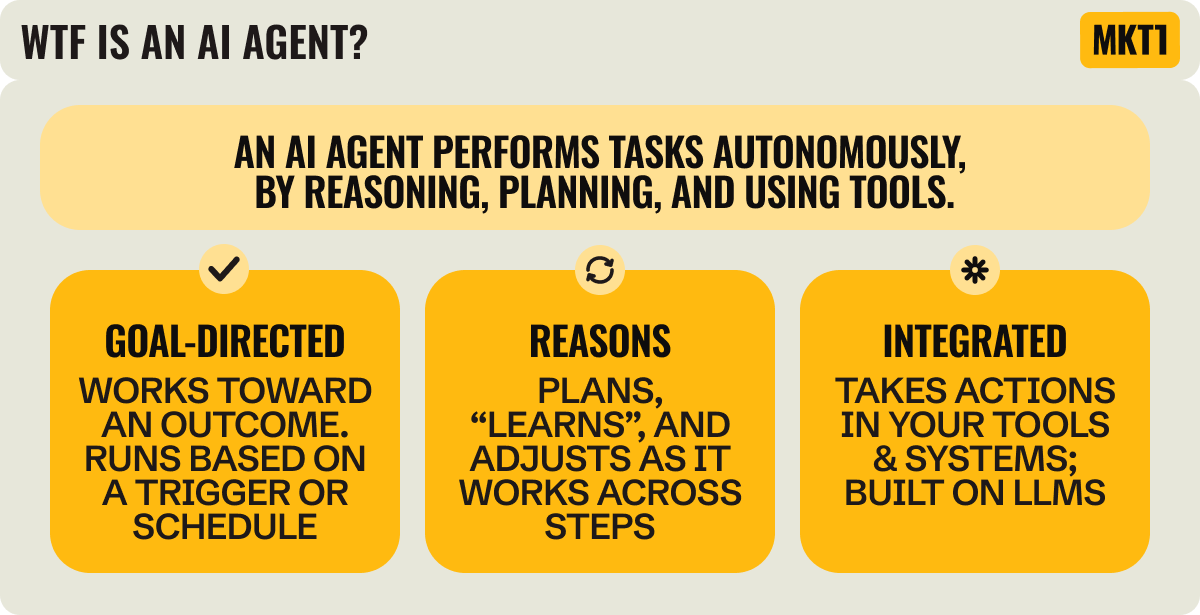
An agent is an AI that gets work done for you. It can reason and take action on its own. Think less “assistant I talk to” and more “junior teammate who handles their own to-do list.” You set the parameters, but the agent figures out how to approach the task, uses the tools available to it, and moves toward the outcome.
But everyone defines “agent” a bit differently. It’s admittedly a little confusing—I found myself getting stuck on definitions and what’s what when writing this very newsletter (even with the help of conversations from Jacob). We have tools to help us build AI agents and workflows. We have whole companies dedicated to building a purpose-built AI agent for you. We have the big AI companies building agent builders.
That said, most definitions of an AI agent converge around three characteristics: agents are outcome-focused, reason and plan across steps, and integrate with other tools.
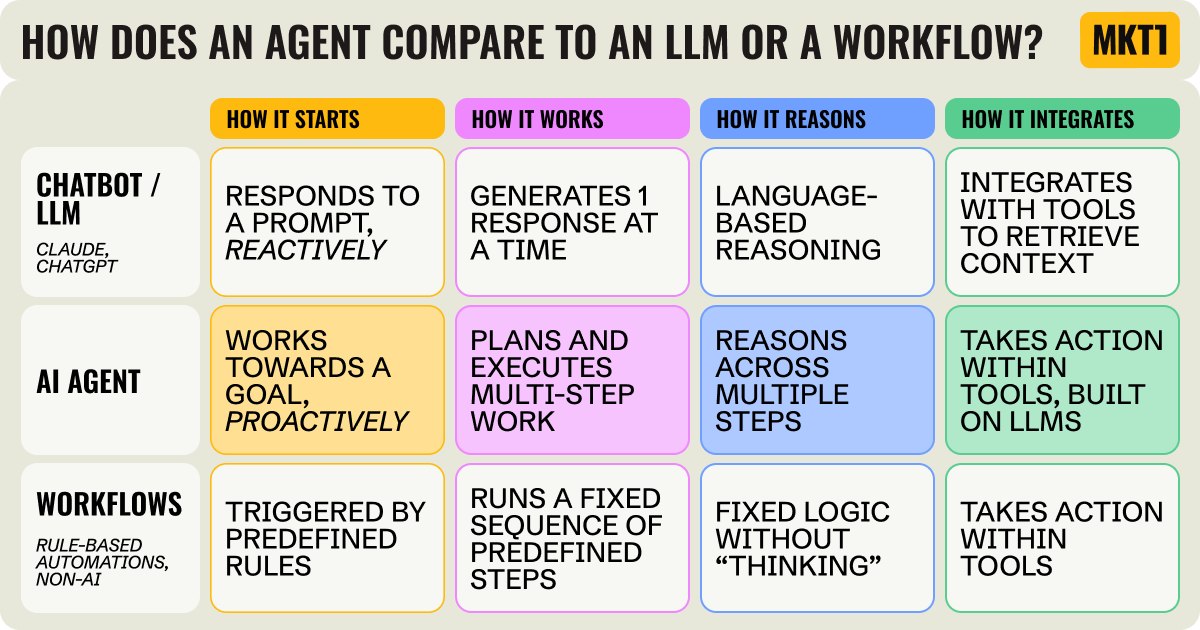
How does an AI agent compare to a chatbot or workflow automation?
“We’re at the beginning of a complete phase shift in how people think about productivity tools. A productivity tool forever has been a place where I go to click buttons and do work…But an increasing amount of the work we get done will be through workflows and agents that are doing that work automatically.” – Jacob Bank, founder of Relay.app
To me, an agent feels like a chatbot and a workflow automation came together… and made a super-kid. “With those tools, you are the operator. But with agents, you are the manager. You set them up, review their output, and train them over time,” explained Jacob.
Here’s a detailed breakdown of what all this nomenclature means:
An LLM is the underlying model (GPT-4)
A chatbot is an interface built on top of an LLM. You ask it something, it responds (ChatGPT, Claude)
A copilot (or embedded AI agent) lives inside a product you already use. It assists you in using the tool and is powered by an LLM. More sophisticated versions can take action inside that system. Think “Ask Attio” inside Attio’s CRM.
A rule-based workflow automation is triggered by predefined rules and executes actions across tools. It follows explicit if/then logic. These don’t necessarily use an LLM, though they can. Think Zapier in its pre-AI era.
An AI agent uses an LLM for reasoning, like a chatbot or copilot. It acts across tools and systems, like a workflow automation. Unlike traditional workflow automations, it doesn’t just follow fixed rules—it can interpret context, decide next steps, and work toward an outcome.
And here’s a comparison for understanding what an AI agent actually is (and isn’t):
Part 2: How to build your first agent
I know what you’re thinking: this sounds cool, but I’m not technical enough to build agents. But luckily, you don’t need to know JSON, webhooks, or advanced automation to build an agent. Back to the teammate metaphor: If you can write a job description for a new hire, build a step-by-step workflow in any tool, and use an LLM, you can definitely build an agent.
There are 3 phases here: Pick a task, build your agent, and refine your agent. I’ll walk you through each one.
Phase 1: Pick a task, hire an agent
1. Identify the task
While agents can do multi-function workflows, it’s best to start with something simple. Think of a task that takes manual or repetitive effort. I start by thinking about the things I’m already doing in a few categories:
What am I already asking LLMs to do regularly? This usually means generating or editing content. For me, it’s editing a LinkedIn post or writing YouTube descriptions. Can I turn this into an agent with better inputs and less manual cleanup?
What processes am I doing in other tools that feel manual? We all log into tools and do the same things over and over again. For me, that’s finding the right people to invite to events or cleaning up screenshots before sharing them. Could an agent run this workflow end-to-end?
What research could I do more frequently or in more depth? We all say we want to do more research on our audience, competitors, partners, market, trends, top prospects, etc., but it’s hard to keep up. For me, this could be tracking what advisees’ competitors are doing, monitoring what B2B startup marketers are discussing across communities, or analyzing call recordings for content ideas. Could an agent handle the scanning and summarizing so I can act on it more regularly?
2. Write an agent spec (like it’s a job description)
Once you have an idea, make sure your agent’s first task has a measurable deliverable, something like: “Pull out three potential clips from this webinar transcript.”
Think of this like writing a simple job description: Start with a descriptive agent name and write a short list of responsibilities. You’ll then feed this into your agent building process.
Jacob described this as “A good responsibility tells the agent what-when-how,”, specifically:
What work should the agent do
When they should do it
How they should do it, including how they should deliver the final output
Phase 2: Build the agent
3. Pick a tool to build your agent
There are a lot of options for building agents right now. Some are more autonomous, others are more structured. Some are triggered automatically when something happens behind the scenes (e.g. a new contact enters your CRM). Others are activated by you each time (e.g. by prompting them directly, even via text message, like in the very trendy OpenClaw). Some are pre-built and productized, and you buy them off the shelf. Most teams will end up using all three: autonomous tools for discovery and one-off work, structured systems for the workflows that matter most, and productized agents for the most time-saving, repeatable work.
But you don’t need to overthink this if just getting started, the goal is to try to build something! I find lots of marketers overthink what’s the best tool, and it prevents them from building.
Here’s how I think about the landscape right now:
Autonomous agents like the newish Claude Cowork, let you describe a goal and they figure out the path.
You point them at a folder or tool, tell them what you need, and they determine the steps in real time.
But, despite the label “autonomous,” you typically need to activate these agents each time; they don’t just run continuously in the background by default.
These are powerful for exploratory work or tasks where the process isn’t predictable. (I’m also running this stuff on a second computer, because they are slow!)
Structured agent builders like Relay.app, Zapier, or n8n work differently.
You define the available tools, triggers, and logic upfront.
You determine if you want them to run automatically based on a trigger or at your command.
The agent operates within those boundaries, often with human-in-the-loop controls and explicit error handling.
These are better when you need repeatability, visibility, approval workflows, or something that runs reliably at scale.
Productized agents (like Mutiny) are pre-built and robust.
You’re not designing the logic; the company has already defined the job and built the workflows.
These can be more refined and “sturdy” than something you build yourself, especially for well-defined, common use cases.
And no matter which you choose, use ChatGPT or Claude (the non-Cowork version) to help you research what to build, where to build it, and how to build it. This path is (usually) cheaper than going straight into tools and saves you some major headaches.
4. Build the agent
Now take the “job description” you wrote in step 2 and actually build the agent.
In most tools, there’s a prompt box or setup screen where you can paste in your agent spec. Start there. The platform will usually guide you through the next steps—connecting tools, defining triggers, choosing models, or setting output formats.
Most modern builders have a built-in co-pilot that asks follow-up questions and helps you fill in gaps. You don’t need to architect everything upfront. You respond, refine, and move forward.
The process is often more guided than you expect.
Here’s an example of what this might look like…
Phase 3: Refine your agent
5. Ship it and improve it
Once you’ve got a minimum viable version working, publish your agent and let it run on real tasks. You’ll learn far more from seeing it operate in the wild than from endlessly tweaking it in setup mode.
Most tools provide logs, error messages, and step-by-step visibility to help you understand what went wrong. Use that feedback to tighten the instructions, clarify the output format, or adjust the logic.
If things are breaking, explain the problem to an LLM and have it help you debug, start again with a prebuilt template, or go simpler. E.g. Instead of building a social media monitoring agent across multiple channels (like in my example above), have it monitor just one.
6. Build more
Keep going! Once you build one, you’ll start getting ideas for more on the regular. Go try to build those too. Maybe someday you’ll end up like a person on LinkedIn saying they’ve automated 40% of their job, but know that’s not the reality for most…yet.
I have a lot of 75% done agents that I don’t go back and finish. I don’t have any great advice here, I usually go back to them when I am doing the thing manually again and fix them. I think this is the reality for most people here. You only actually ship and use a small percentage.
“If you were hiring a new competitive analyst, you would not write them a thousand-word document about what you want them to do. You’d say, ‘Hey, look at our competitor YouTube videos and send me a report, tell me if there’s anything interesting.’ And then they’d give you the report and you’d say, ‘Focus more on this, focus less on this.’ And that’s exactly how you should work with your AI agent.” – Jacob Bank, founder of Relay.app
But what about “Agent Swarms” and “Parallel Agents”?
You may see a lot of people talking about multi-agent systems, meaning agents coordinating with each other, running in parallel, forming little AI “teams.” Tools like Antigravity and CrewAI are built for exactly that.
I think in most cases we may be getting our head out over our skis (have I been watching too much Winter Olympics with this phrase)?
Short answer: Yes, some marketers are building those, but that’s not where most teams should start.
When you’re getting started, focus on outputs. Pick one clearly defined task with a tangible deliverable (a competitor brief, a repurposed content draft, a weekly report). Build an agent that owns that job end-to-end. Let it produce something visible in a shared system: a Google Doc in Drive, a Slack message, a CRM update.
If and when you add another agent, don’t over-engineer coordination. Have it work off the output of the first one (that Google Doc, for instance). One agent creates a doc; another reviews or enriches it. One pulls data into a sheet; another analyzes it. They don’t need to “talk” directly. They can collaborate through shared artifacts, just like humans working in the same tools.
Start with one job, and let agents collaborate through shared systems. You’re still ahead of the game if you do this, I promise.
“If you’re wondering how multiple agents work together, it’s just like people! They send each other emails and Slack message, collaborate on the same Google Docs, etc, so you don’t need to think about a totally new concept of an “agent swarm.” – Jacob Bank, founder of Relay.app
Want to join a live MKT1 Hackathon?
Coming soon! We’re planning a live hackathon series with the creators of some of our favorite AI tools. These events are for paid subscribers only and the first one is kicking off by end of March. (now’s the time to upgrade that subscription 😊)
4 marketing agents you can build right now
“In general, the rule that I found is for a purely hands on keyboard knowledge work task…an AI agent can do 50 to 90% of what a great human employee can do.” –Jacob Bank, founder of Relay.app
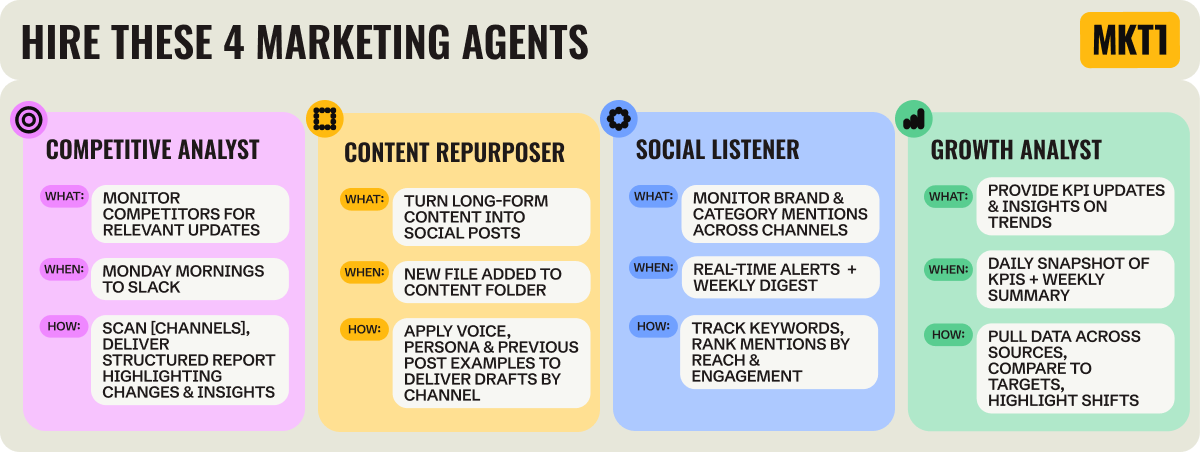
Here are 4 “popular” ideas for agents that most B2B marketing teams could use. You can find more in this LinkedIn post I did this week, template libraries from various agent-building tools, or by asking an LLM.
You can copy and paste these “job descriptions” directly into a tool (like Relay.app) to start building your own version. Or make these your own. The beauty of any AI workflow is it can be fully customized to your needs. So use these templates as a starting point or a first experiment to understand what’s possible, and iterate from there.
1. Competitive intelligence agent
Most marketers deprioritize or shortcut competitive intel because it takes so much time (and because we’re burned out from “battle card” requests from sales). Build an agent instead! A competitive agent is an easy one to start with because it runs entirely on public data, and doesn’t need internal permissions.
What: Scan competitor websites, LinkedIn, YouTube, press releases, job boards, and G2 reviews for new features, pricing updates, positioning shifts, key hires, and funding announcements.
When: Weekly on Monday morning (or daily if your industry is super-competitive or fast-moving).
How: Deliver a structured report to Slack or email. Highlight what changed since the last run and flag anything that could impact positioning, campaigns, or sales conversations.
Add context: Add a step that pulls in your positioning from Google Docs, Notion, etc. and prompt the agent to assess competitor changes against those claims.
Related agents: Competitor pricing tracker or a product feature comparison agent that maintains a live feature matrix
Analyze complements, not just competitors. Leveraging the trust and credibility of 3rd-party partners, aka ecosystem marketing, is a very effective way to grow right now. So don’t stop at competitive research. Create an agent to analyze the latest from potential partners, influencers, analysts, etc with the same intentionality you would competitors.
2. Content repurposing agent
Most teams create strong fuel and then don’t extract enough mileage from it. Not because they don’t want to, but because repurposing takes time and mental energy. Since the source material is your own content, the quality floor is significantly higher than generating content from scratch. This is one of the easiest, highest-ROI agents to build.
What: Take new long-form content (webinars or podcast transcripts, newsletters, a successful longer-form LinkedIn post), and repurpose it into social posts.
When: Triggered automatically when new content is published or uploaded.
How: Deliver a set of draft posts to a Doc or directly to your social platform channel for review.
Add context: Feed the agent your brand voice guide, target persona definitions, past social posts with data, and current social goals, so it aligns with what you’re actually trying to drive.
Related agents: Full recording to clip transcript extractor, customer quote library builder, evergreen content resurfacing agent
3. Social listening agent
You can’t manually monitor every place your brand or category gets mentioned. Agents are great at monitoring conversations happen in LinkedIn comments, Slack groups, Reddit threads, and X replies, especially when given a few keywords to monitor. This agent helps you know what people are saying, and can chime in when needed.
What: Monitor specific mentions of your company across LinkedIn, Reddit, Slack communities, X, and relevant forums. (I think it’s best to start by choosing one platform at a time).
When: Real-time alerts for high-priority mentions (so you can engage in a timely way) plus weekly reports.
How: Deliver a concise digest to Slack that prioritizes mentions based on: Posts from high-reach or high-authority accounts, posts gaining engagement quickly, mentions tied to priority topics. Show the highest-impact opportunities first.
Add context: Pull in focus keywords or topic, brand name variations, and top influencers or creators in your space.
Related agents: Executive name mention tracker, partner mention alert agent, target account mention agent.
4. Growth analyst agent
Automate the jobs a strong growth marketer does every day: check HubSpot, look at email performance, scan ad accounts, and figure out what actually needs attention. The problem is that analytics live in different systems, and most teams don’t have the time to synthesize dashboards daily. You can also have the agent share updates with the whole team so everyone has visibility into what’s changing.
What: Pull data from HubSpot, your email platform, ad accounts, and anywhere your marketing analytics exist. Share daily KPIs and flag meaningful shifts.
When: Send a daily KPI snapshot, with a more detailed weekly trend summary.
How: Deliver a short update to Slack or email that includes: Core KPIs vs target and last week notable changes or anomalies, 1–2 areas that likely need investigation
Add context: Pull in your KPI targets and quarterly goals from your planning spreadsheet so the agent evaluates performance against your actual goals.
Related agents: Pipeline quality monitor that tracks conversion rates, paid campaign monitor, Forecast vs. actuals agent
More examples of things people have actually built from this LinkedIn post’s comments:
Account research & outreach agents
Cold outreach agent with ICP mapping, research, and email composition
Customer lookalike agent pulling HubSpot data, finding similar companies via Clay, personalizing email sequences and LinkedIn DMs
Weekly database scanners for high-intent signals with ICP lead enrichment
Case study opportunity detector (or just use Mutiny!)
Content creator agents
Executive POV miner (pulls themes from sales calls, customer interviews)
A blog post generator that pulls in the latest news each week
Landing page creation agent trained on brand guidelines
Resource hub built and updated by agents
Podcast guest research agent
Social media manager agents
LinkedIn page management
Content insights from top voices
LinkedIn post topic finder
Research agents
Trademark clearance agent for agency that does naming
Research agent synthesizing audience signals, competitor posts, and content pillars into prioritized ideas
Conference opportunity analyzer
Productivity agents:
Job board scraper and poster
Draft intro emails directly in Gmail by sharing LinkedIn profiles
More tips from my workshop with Jacob
Here are some things to keep in mind as you build:
Use LLMs to help you build agents.
Describe the job to ChatGPT or Claude and have it help you break the work into steps, anticipate edge cases, and refine instructions. I rarely build in any AI tool without an LLM helping me plan & write prompts as I go.
Design for reliability before scale.
A lot of the questions during my session with Jacob came down to trust. How do you know which model to use? What about subtle logic errors?
The answer isn’t finding the perfect prompt, it’s constraining the system. Start by defining the exact structure of the output. Don’t just ask for “three clips” or “a competitor summary.” Specify the fields you expect. Most modern platforms support structured outputs, which force the model to return content in a predefined format. That constraint dramatically reduces formatting drift and vague answers.
Check your work with another agent.
People are always concerned about hallucinations, and rightfully so. For higher-stakes work, use a simple writer + checker pattern: one pass generates, a second pass audits against a short checklist or your definition of done before it ships.
Security, cost, and access, concerns are valid
Treat permissions like you would with a new hire, begin with read-only access, limit what the agent can change, and expand write access only after you’ve seen it behave well on real inputs.
The same discipline applies to cost. Keep scopes bounded and steps explicit so the agent doesn’t wander. Open-ended tool use and retries are what make usage unpredictable.
For this reason, I’m less likely to use a brand new unestablished tool that might be hot that day. And if your company doesn’t give access to all tools, you may be able to start with basic productivity tasks that require less tool access.
Don’t create another place to go. Treat agents like teammates, not tools to visit.
If your agent lives in its own interface, you’ll forget it exists. The best agents deliver work into systems you already use (Slack, Drive, your CRM, your project tracker) just like a teammate would. And remember, you can use one agent’s output (a Google Doc, a Slack message, a spreadsheet) as another agent’s input.
Relatedly, I find that setting every agents output to daily seems like a good idea when setting it up, but is overly ambitious. I’m not actually going to look at if a competitor changed their customer’s page daily, so don’t add the extra noise!
How agents fit into modern marketing teams
“Whenever you’re in doubt about how you should work with an agent, just think about how you’d work with a person. Write a job description like you would for a teammate. Assign tasks like you would to a teammate. Review and edit the work like you would with a teammate. Give feedback like you would to a teammate.” –Jacob Bank, founder of Relay.app
Truth be told, when I start to think about agents too much, I get a little freaked out about what happens to human marketers. I can’t 100% predict where this goes in the long term.
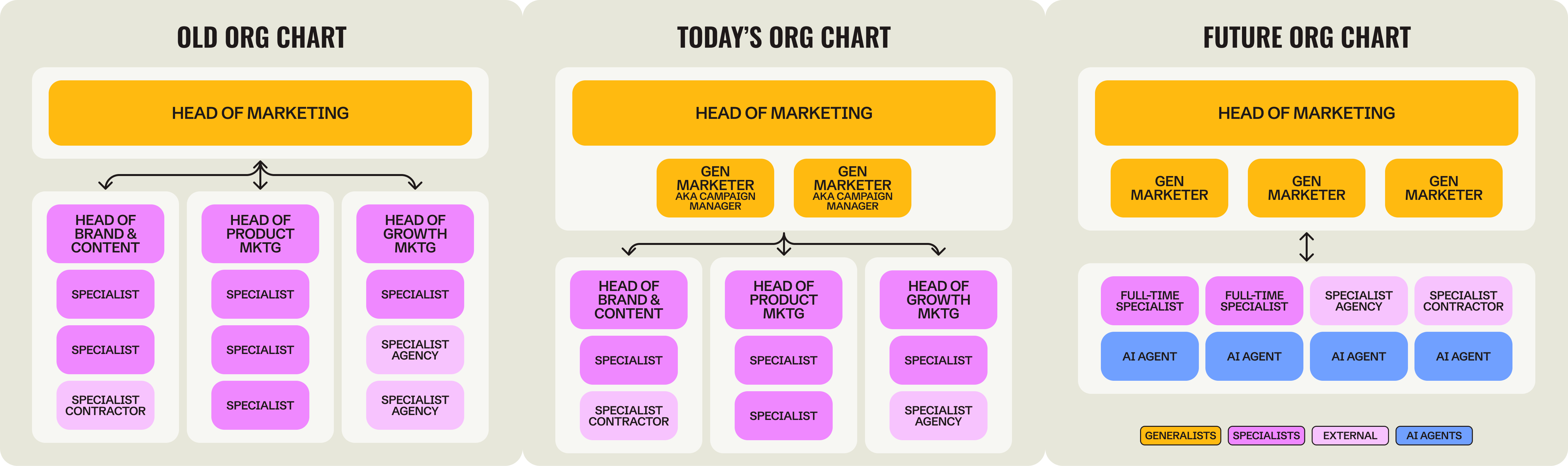
But for now—and likely for a while—the teams that learn when to use humans versus agents are going to operate more effectively. I’m bullish on marketing teams shifting away from specialist-heavy silos and toward flatter structures built around Gen Marketers: AI era generalists who own campaigns end-to-end and pull in specialists, contractors, and agents as needed. A Gen Marketer with a team of well-tuned agents can execute faster, learn more quickly, automate the mundane, giving them more time to spend on campaigns that actually stand out.
Here’s how I see the division of labor today…agents handle repeatable knowledge work: monitoring, drafting, enriching, reporting. Humans handle strategy, creative judgment, and anything where the cost of being wrong is high.
For now, just start building. And if you want to go deeper, get on the waitlist for our upcoming hackathons—we’ll be working on everything from agent building to vibe coding to AEO workflows.
Thanks to Jacob Bank for the conversations that inspired this newsletter. Jacob is the founder and CEO of Relay.app, previously the product lead for Google Calendar and Gmail. You can find him on LinkedIn where he posts about agents and workflows—and he teaches a course on Maven about agent building if you want to keep learning. He’s also hosting free webinar in a few days on Feb 23 on “Creating AI Marketers.
More from MKT1
🙏 Brought to you by: Attio, the AI native CRM; Closing Media, a LinkedIn Ads & Paid Media agency, and Wistia, a one stop video marketing shop.
🔓 Gen Marketer Hackathons: Be the first to know when we kick off our Hackathon series, get on the list here.
📦 MKT1 Unboxing: Watch our new video series to see Kramer (that’s me) unbox Mutiny, Wistia, Luma AI, & Attio.
🥞 MKT1 Perk Stack: Exclusive discounts worth $40K+ on our favorite GTM tools. For annual & superfan paid subscribers only.
🧰 Revamped, upgraded template & resource library: We have 100+ templates and resources available to paid subscribers in our template & tool library.
🧑🚀 Job board: Jobs from the MKT1 community (free to post as a paid subscriber). And our candidate form if you’re looking for a new role (option to remain anonymous included!).
🍽️ MKT1 Supper Club: Get on the list for monthly IRL dinners with Kramer, a small group of smart marketers, good food, and conversations on topics that actually matter in your role—made possible by some of my favorite GTM tools.
Great post! I just finished Jacob's Maven AI Agent Certification and have been so impressed with Relay.app. To help determine what agents and use cases would actually be helpful (both in personal life and work) I kept a running note over the course of a week of anything that felt tedious (e.g. weekly competitive insights, writing a meeting recap, reviewing and flagging email to see which actually needed a response).
As usual, fantastic insights and helpful, practical guidance with actionable next steps. Thank you!