


👋 This is a monthly free edition of MKT1 Newsletter—a deep dive into a B2B startup marketing topic, brought to you by Appcues, Omni Lab, and Framer.
⬆️ Upgrade to a paid subscription for: Full access to our MKT1 MCP | 100+ templates & resources | Post to MKT1 Job Board | MKT1 Newsletter Archive | $40K+ in discounts in the MKT1 Perk Stack | New! Office Hours with Kramer
🩷 RSVP: MKT1 x Lovable Buildathon on 10/28 at 10AM PT. Come build apps and MCPs alongside Kramer and the Lovable team. RSVP ➜
💬 RSVP: MKT1 Office Hours for paid subscribers: Multiplayer AI on 9/25 at 10 AM PT. RSVP ➜
For half the summer, my team ditched me. But, this ended up being the best possible scenario for our multiplayer AI setup at MKT1. I should probably pay the team extra for taking that time off.
Then I spent too much money on a new computer. My old MacBook Air wasn't cutting it for my current workflows. But, that's paid for itself already because it was the second best thing we did for our multiplayer setup this summer.
But, this isn't a newsletter about buying new Apple products (I will not be buying the foldable iPhone for the record, I mean probably not) or the importance of taking vacation.
This is a newsletter about how MKT1's 3 Gen Marketers (me, Halley & Katie) run a multiplayer AI setup that got way better in August due to the aforementioned incidents, and what your team can take from it.
What’s multiplayer AI? your team's shared AI setup, where everyone works off the same skills, routines, and agents, connected to up-to-date context.
The single-player trap
The 3 of us ship a lot of stuff, fast, but speed often leads to silos and shortcuts. This is where the vacation and new computer incidents come in.
It became painfully obvious we'd fallen into the trap so many of these tools set: Too much of what we'd built was local and individualized to our own computers and our own Claude accounts. We needed to make everything more accessible to others. This is a bit ridiculous because I've been writing about multiplayer AI since late July in this series. But sometimes you need forcing functions to improve the system.
This also led us to a simple test that's now the north star for our multiplayer system. We call it the Multiplayer AI Vacation TestTM: If a person or computer is offline: Can the work run? Can you update the AI workflow?
And for your own AI setup, we have another simple test: the New Computer TestTM: Can you get up and running fast, with all your AI skills and routines, connected to context and files?

After we made some improvements to our system, we now give ourselves an A- on the Vacation TestTM and a B+ on the New Computer TestTM. We’re now truly multiplayer and not tied to local-only context when it comes to our AI setup. My team is living proof of what 3 generalists with the right multiplayer AI setup can do.
So let’s get to it. We’ll walk you through (in great detail, of course) what our setup looks like today, and what you should steal from it.
I’m also hosting paid subscriber-only office hours next Friday 9/25 at 10am PT to answer any of your questions on multiplayer AI. Find RSVP details and promo code for access below the paywall. RSVP ➜
Recommended products & agencies
We only include sponsors we'd recommend personally to our community. If you are interested in sponsoring our newsletter, email us at sponsorships@mkt1.co

Appcues helps lifecycle and product marketers increase product activation and adoption. Use their multi-agent platform for analytics, in-app announcements, guides, and surveys, natively or via MCP. Used by Adobe, HubSpot, and Salesforce.
🎁 Offer: Get 1 month free of Appcues when you mention MKT1 here.
—
Omni Lab helps growth-stage startups scale their paid media & demand gen strategy. They focus on building early brand awareness, expanding reach, and optimizing for revenue, not just top-of-funnel metrics.
🎁 Offer: Mention MKT1 for a free Paid Media CRM Audit
—
Framer is the AI website builder that has agents inside of the canvas. You get the speed and capabilities of an agent working alongside you, while maintaining structure and control for a full-company site.
🎁 Offer: Get 30% off annual pro via the code: MKT1
In this newsletter:
This is part 3 of 3 in our series about multiplayer AI for marketing teams.
This newsletter:
🎮 How team MKT1 does multiplayer AI, including all 4 Cs: Claude, Context, Capabilities, and Collaboration
An overview of 38 skills we run at MKT1
🔎 Detailed looks at how we run our job board and MCP server
Some of this might be a little inside baseball...but we’re sharing every detail of how we run MKT1 so you can picture what a multiplayer system looks like in practice, then adapt the parts that are a fit for your team.
📅 Paid subscriber bonus: RSVP for office hours with Kramer on multiplayer AI next Friday 9/25 at 10am PT. Promo code below the paywall!
In case you missed it:
The 4 Cs of Multiplayer AI: MKT1 team version
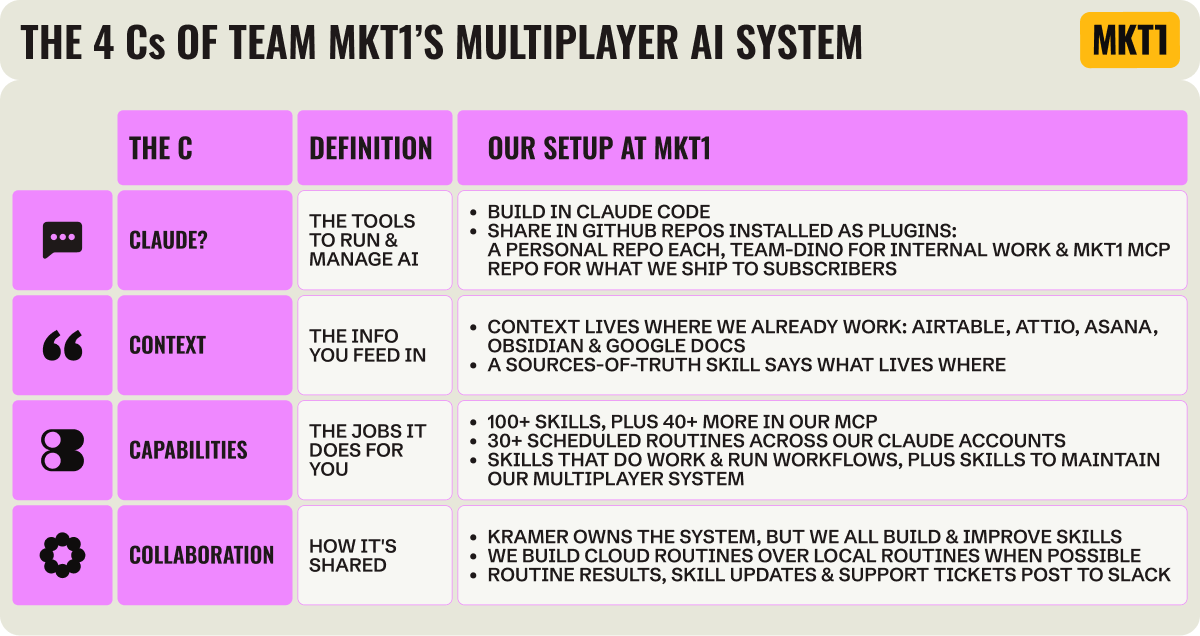
In Part 2 of this series, I broke down the multiplayer setups at Buffer, LangChain, and Mintlify by the 4 Cs: Claude? (where you build), Context (the info you feed in), Capabilities (the skills and routines that do the work), and Collaboration (how the team shares and maintains it all).
A bit more background on our team...
We aren't a typical marketing team (does anyone still have one of those?), but here's what the 3 of us Gen Marketers produce:
In a typical month at MKT1, we ship 2 newsletters, 20+ social posts, 10+ graphics, 5+ videos, 10+ new or heavily updated MCP skills, and ~200 vetted jobs on the MKT1 job board.
We also work with 5-10 partners per month, participate in or host 1-2 events, run our website, handle support for our MCP server and subscribers, and everything else it takes to keep the business going (unfortunately that means invoices, payroll, etc., but this newsletter isn't about that, it's about the marketing pieces).
We do all of this with a team of 1 full-time and 2 half-time Gen Marketers. This breakdown might not make sense to others (like any good marketing org chart!), but it works with our skillsets and we have (mostly) clear ownership internally:
I, Kramer, am the main builder, author, and decision maker
Halley builds most of our internal systems and subscriber tools and helps on content and creative
Katie handles partnerships, a lot of our back-office operations, and recruiting for startups
Claude automates workflows, helps us research, and does most of our basic copy-editing.
What’s a Gen Marketer? A marketing generalist for the AI & agentic era, who can flex across functions, stitch together AI and human work, and orchestrate end-to-end campaigns. When I wrote about this role a year ago, I predicted marketers would be able to do way more on their own due to AI. We can all agree that’s very true.
Now I’ll break down our setup with the 4 Cs “Kramework” for multiplayer AI (more about the 4Cs in Part 1 of this series).
Claude?
We build in Claude Code, share everything through 2 GitHub repos installed as plugins, and connect to other tools via (too many) MCPs.
We build skills and workflows exclusively in Claude Code, but each of us uses a different mix of Chat, Cowork, and Code for day-to-day work: I rarely leave Code, Katie recently moved from Cowork to Code, and Halley uses all 3. We're also planning to try other agent-building tools this fall so we're less tied to one model—stay tuned for how that goes here and on LinkedIn.
Each of us has our own Claude Max account (we do not have a team Claude account). This gives us the most usage and lets us keep personal projects separate (especially since we all have stuff going on outside of the shared work at MKT1, like advising).
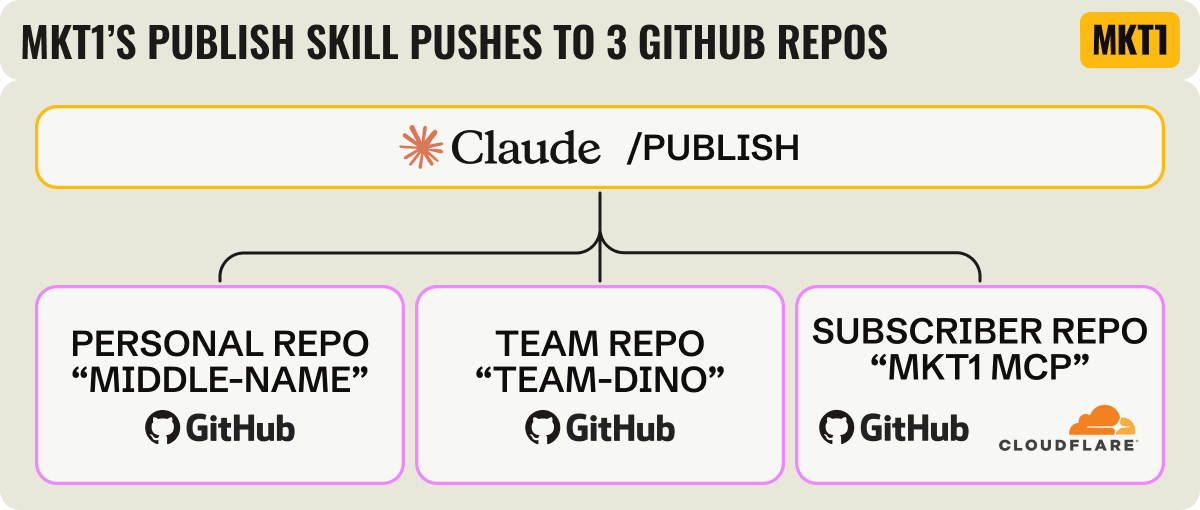
We have 2 shared GitHub repos for team use: one for internal workflows, one for subscriber-facing tools including our MCP.
Each repo is installed as a plugin on all 3 of our machines, so when anyone pushes a change, the other 2 get it in their next Claude session without re-installing anything.
A note on GitHub nomenclature: The repo is a folder of files on GitHub, and our skills are the files in it. You then install that repo as a plugin in Claude Code, so Claude can access it on your laptop.
↓ More on how our plugin works in the capabilities sectionWe bias toward keeping everything in the repo so anyone can read, fix, or improve anyone else's work.
↓ More on how we structure this in the context sectionWe each have a personal GitHub repo too, so we all pass the New Computer Test.
On naming: In general, we try to name the repos things we don't say all the time so it's super clear to Claude what we mean. It's also more fun that way.
I call my personal repo by my middle name, which is a secret you'll have to ask me IRL, so for this newsletter we’ll call it the Middle-Name repo.
And we'll call our internal repo "Team-Dino" (named after my 10 pound dog, Dinosaur, who co-hosts all MKT1 virtual events).
We have 30+ scheduled routines running across Halley's, Katie's, and my Claude accounts. We make them cloud routines whenever possible, so they run while we're on vacation and we can kick them off from a browser on our phones.
We also rely heavily on connections to other tools. In addition to the MKT1 MCP, the MCPs we use regularly: Airtable, Attio, Substack, Slack, Asana, Granola, Plain, Google Drive, Profound, Framer, Descript, Riverside, Softr, Clay, Figma, Zapier. (Note: This is probably too many, but we are in the literal business of trying a ton of GTM tools, so it's par for the course. Some of these companies are kind enough to give us discounts, and several of those are in our Perk Stack for you too!)
If this all sounds complicated, it's true. A lot of this was built for engineers, not for how a marketing team works. There are agentic tools that are designed more specifically for marketers, but in our opinion they aren't as powerful as what you can do in Claude Code, so that's why it's our hub.
💰 Steal this from our MKT1 setup: Have a repo for your team and one for yourself, both installed as plugins. The team repo means whatever one person builds, everyone has the next time they open Claude Code. The personal repo means you can switch computers and have everything back in a few minutes (I speak from recent experience that this will save you a ton of time someday).
Context
We learned how to build a context layer for MKT1 the hard way. When we started building in Claude Code, we used skills to document most of our written context and pulled in additional data from tools via MCP connections every time a skill ran.
Over time, we learned this breaks:
Claude sometimes ignores or misinterprets context or data points in a skill. And if the skill is long, forcing Claude to read the whole thing each run has its higher token costs.
Context changes, so your source of truth info has to stay current and live somewhere Claude and the team can reach it easily. A number buried in a skill is technically readable, but not as easy for everyone to update anytime.
Pulling full context from many tools on every run hits plan usage limits fast, even when most of that context wasn't actually needed for that run. Having a more curated context layer works much better.
Different people might own updating skills and updating context, so it's best that context be in an accessible place your team already works. That's less true for us, since all 3 of us build, but it matters on most teams.

So now we lean on skills for what they are best at: documenting instructions. And our context lives outside of Claude and GitHub, in places like Airtable, Asana, and Obsidian.
Our team can quickly update context via Claude or the old-fashioned way, aka directly in the tool.
Or we can look at the info in a visual format, e.g. I still love looking at an Asana project, guess I'm just brand loyal as an ex-employee.
Claude reads our source-of-truth details "agentically" via MCP, only when a skill needs it. These are separate distinct bases, so Claude isn’t trying to parse through too much unneeded context. e.g. the subscriber base in Airtable when a support ticket comes in, or the job board base when the weekly scrape runs.
The gray area on where to store things: Rules Claude has to follow every time, for every skill, is both "context" and "instructions." We put rules like this in skills, referenced by the CLAUDE.md (overarching instructions), including voice & tone, design, and skill writing guidelines, plus ground rules for handling sensitive things like subscriber data.
Where we differ from other teams I've talked to is that we don't have one source of truth per se. We have sources of truth for different things, and all of that is documented in a sources-of-truth skill that points our other skills in the right direction. So I guess our one source of truth is the sources-of-truth skill?
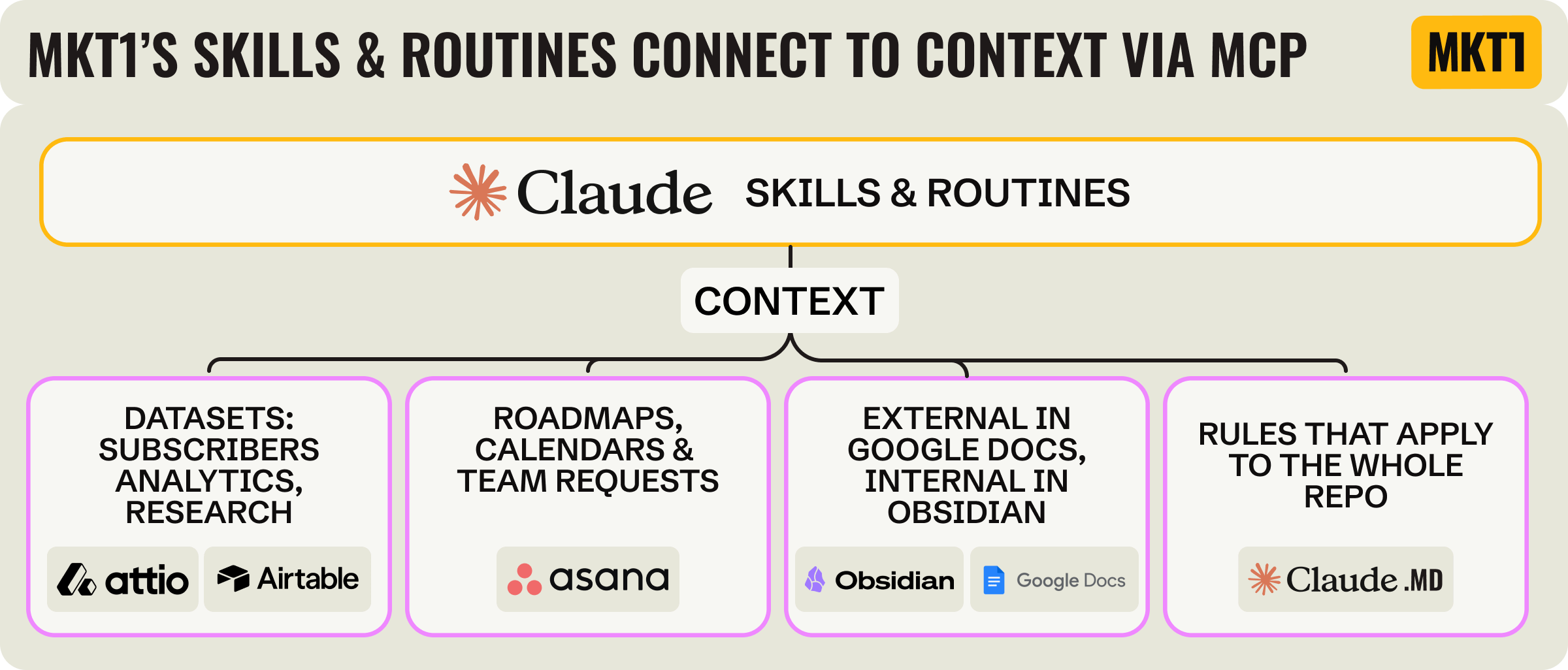
Here's how that breaks down for us:
Airtable and Attio for any critical dataset: Subscribers, job board, data from our research. This is the backend for most of our workflows.
Asana for anything to-do list related: Our project roadmap, newsletter and sponsor calendars, and requests between team members. We also sync critical dates from Asana to a team Google Calendar with a skill.
Google Docs and Drive for docs shared externally: For us this is mostly partner briefs and sponsor copy.
Obsidian for newsletter and other internal drafts: I recently switched from Docs to Obsidian for newsletter drafting, because it plays nicer with Claude as it's entirely markdown. Claude and I can both write into it like we are teammates (maybe we are now, but that concept still creeps me out), and it makes editing really smooth. But it lacks team and commenting features, so we can't move everything here.
CLAUDE.md for the rules that apply to everything in the repo: This is for the instructions that aren't about any one skill. Ours says things like what the repo is for, to choose a skill's instructions over CLAUDE.md if they conflict, and which skill to go to for a given kind of question.
💰 Steal this from our MKT1 setup: You don't need to get rid of your favorite collaboration or productivity tools, just make sure agents can use them too. You can build a more robust system faster when you leverage these tools. A sources-of-truth skill helps here: one place that says where every dataset lives and which tool is the fallback, so Claude stops guessing (and honestly, so we can keep track!).
Here’s a clip about this from our MCP Showcase:
Capabilities
We have 100+ skills across our 2 repos that we use alongside the 40+ skills we've shipped to subscribers in the MKT1 MCP. Most of them help us create content, run our subscriber tools (Perk Stack, MCP, templates, job board, etc.), or manage our partnership processes. We also have a growing number of skills to help us maintain our overall multiplayer system, and a few hold key context (see above).
I'll give an overview of some of the skills here, and focus a bit on our job board workflow so you can see how a set of skills and MCPs comes together for one of our "products" or workflows. Later on, I'll get into whether you should publish an MCP like we did.
Team MKT1’s skills that do the work
Newsletter:
/newsletter-copy: I draft in Obsidian and Claude edits in the same file, using a copy edit skill written for the newsletter. It also reads my overarching/voice-guideskill./newsletter-pre-send: Before sending, the skill runs through a checklist to verify links, sponsor copy, SEO descriptions, etc./newsletter-after-publish: After the newsletter goes out, one skill handles the rest: It indexes the post so the MKT1 MCP newsletter skill can find it, swaps the homepage banner on mkt1.co to promote it, tells the sponsors and contributors it shipped, and puts promo post topics on the LinkedIn Roadmap.
We write the vast majority of content ourselves and always keep a human in the loop. Partially because writing is our main business, partially because we’re control freaks, and partially because AI still kind of sucks at writing. I’m not saying that to reassure you this newsletter isn’t AI slop (I know it’s not, ha). I’m saying it because if writing is the main way your team uses AI, I think you’re doing it wrong. AI is best at automating mundane and repetitive work. It’s not good at craft.
Video:
/riverside-download&/descript-clips: A set of skills pulls recordings from Riverside, cuts clips in Descript with captions, and checks that the titles, captions, thumbnail, etc. are right. Video is still hard, but this helps!/youtube-publish: Claude suggests the title, description, and thumbnail text, which I review and edit before publishing. It publishes as unlisted to YouTube, we review, then set it public.
Web & design:
/framer-site: We edit the MKT1 site through Claude Code using the Framer CLI (like an MCP, but a program Claude runs), with a skill that holds the rules. Our components live in Framer itself and the skill tells Claude to only use those, which keeps the design across the site way more consistent./figma-edit&/design-check: I still love to design in Figma and make most of my diagrams "by hand" (it's very relaxing for me!). But I do have Claude help fill in content in tables and diagrams, and do final checks for things like consistent padding using my Figma-specific skills./compress-image-from-file: Claude compresses every image export automatically. It looks in a folder, makes the files smaller without blurring them, and puts them right back. Bonus: I just shipped this to the MKT1 MCP!/claude-chat-mockup: We have Claude skills that bypass Figma altogether to make screenshots that look MKT1-ified (round corners, outlines in our colors) and to make animated GIFs to show off our lists of MCP skills or to scroll through newsletters.
Research & data:
/general-research: Any research or data analysis we do starts by looking at our general-research skill, built from what we learned making the State of Marketing report. Its rules include leaving a field blank rather than guessing, and spot-checking every batch./company-taxonomy: Another research skill holds our definitions for things like company type, funding stage, and B2B vs B2C, so every research skill sorts companies the same way instead of each one deciding on its own./150-company-research-list: We also have a 150-ish company list that powers research. We use this as a starting place to find things like web examples, scrape for our job board, begin any data research we are doing, etc.We have a version of this list for you in the MKT1 MCP called
/high-growth-b2b-company-list, and the 100-company dataset behind the State of Marketing report is there too as/state-of-b2b-marketing-data, if you want to run your own analysis on it.
Reporting:
/reports-dashboard: Every number we track for our own business lands in one Airtable base, with a dashboard on top of it. A summary of numbers gets pushed to our Slack from this skill too, everything from a weekly payments summary to how our LinkedIn posts did./substack-snapshot-to-airtable: For Substack writers: Substack only reports lifetime totals per post, so we save a snapshot every month to see how our archive is doing.
💰 Steal this from our MKT1 setup: Use AI for the repetitive work, not the writing. And just get started! We started with just a few skills back in February.
Here’s an overview of these skills:
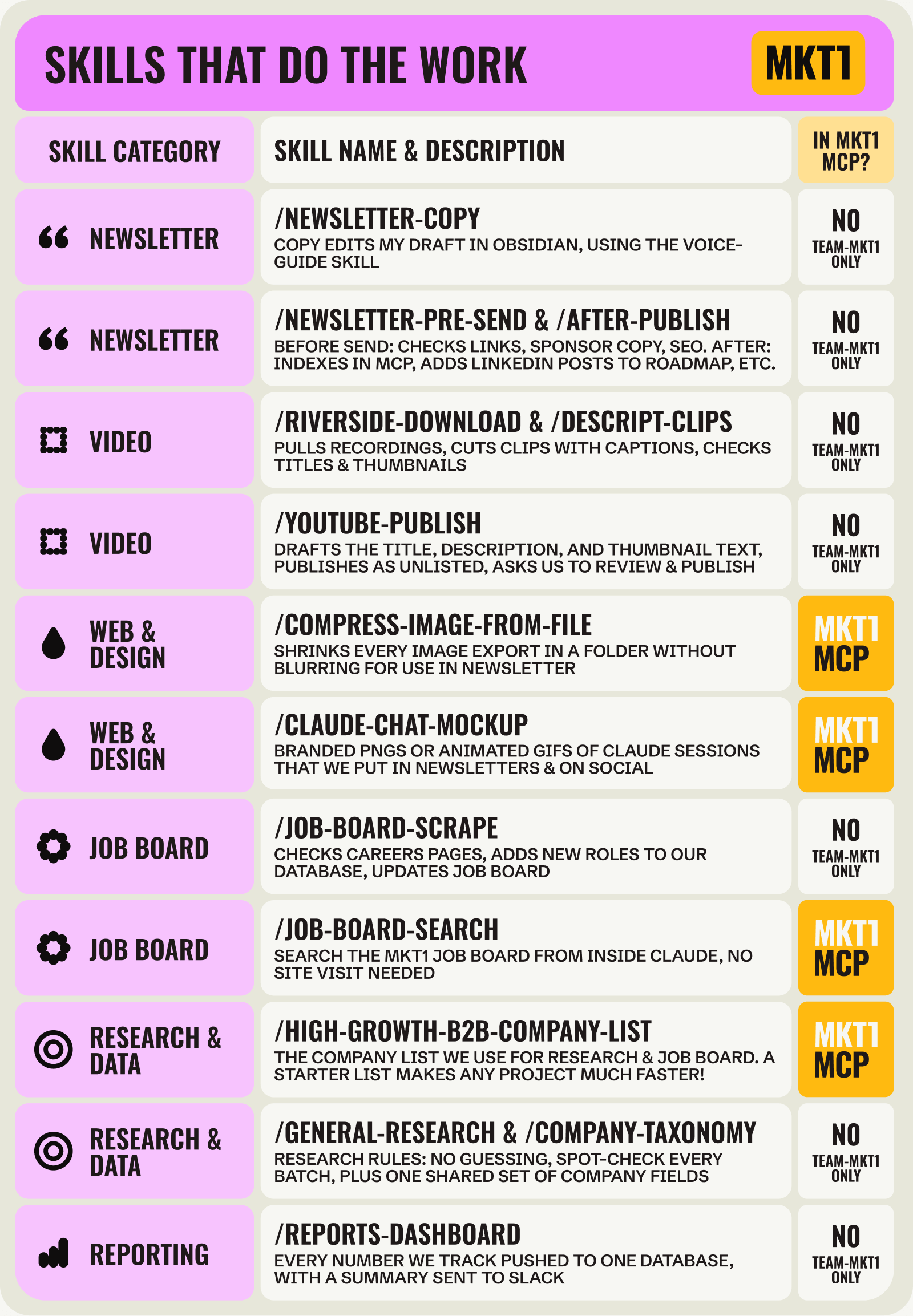
A closer look at our job board skills
I wanted to describe one always-on MKT1 workflow start to finish, so you can see how the skills and routines hand off to each other. I chose our job board, a product that (mostly) runs itself.
/job-board-scrape: I keep a list of companies to pull from for open roles in Airtable; these are startups that are growing fast, many of which we have personal ties to. Each week Claude checks the careers pages for each company in the base. Then it adds new roles to our job board site and job board MCP skill.Job approval process: The same scrape skill sorts each role in Airtable into Approved, Not Approved, or Flagged, then pings us in Slack about the ones that need a human (like 2 openings with the same title). Nothing Flagged shows up until one of us okays it.
/job-board-link-check: Every 2 days another routine rechecks each live listing and pulls down the ones that have closed. We don't want any candidates getting excited about a role and then let down that it no longer exists!/job-board-validate-submission: Paid subscribers can submit roles through a form, and a routine checks each submission every few hours: Is the link active, is the title right, which region is it in? These submissions are also pushed to the same Airtable base with the scraped jobs.Jobs LinkedIn post routine: 3 mornings a week, a routine drafts a LinkedIn post about the newest roles and pushes it to our Slack. Katie posts them on LinkedIn often (here's one of her posts).
/job-board-search: Finally, we have a skill in the MKT1 MCP that lets you search these jobs from Claude, so you never have to open the site.
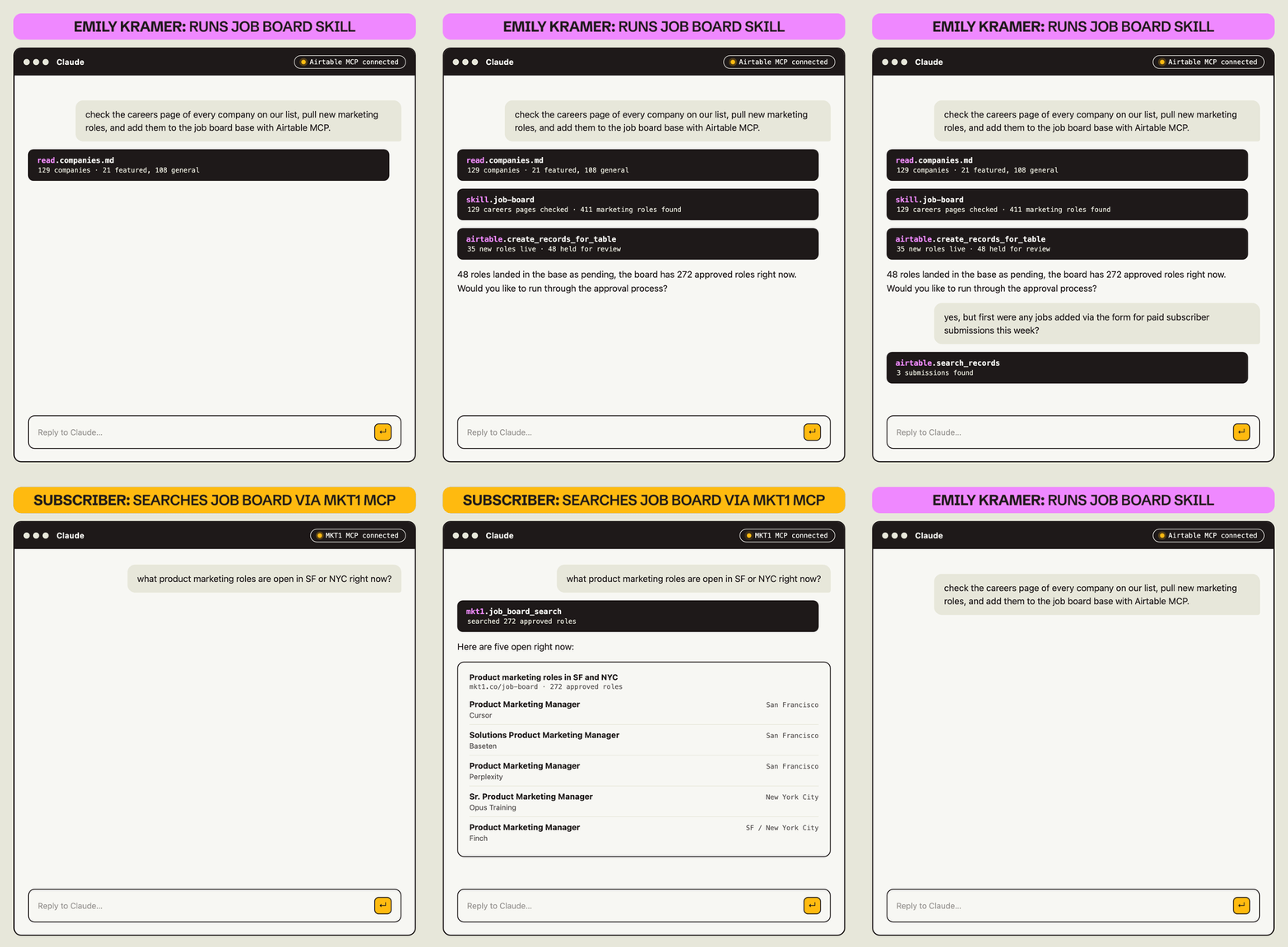
Like this GIF? You can make your own just like it with a skill in our MKT1 MCP called /claude-chat-mockup.
💰 Steal this from our MKT1 setup: You can use a workflow like this for any form submission: submission lands, a routine checks it, and flags things it can’t parse for human review.
Skills that maintain MKT1’s AI system
Our skills live in 3 places, as I laid out in the "Claude?" section above. Given this multi-repo setup, the skills that help us maintain our system have to keep an eye across all of those locations, not just one. This adds a bit of complexity, but it's pretty straightforward once you have the right maintenance and publishing skills built out.
As I wrote in Part 2, the skills that maintain your system need to cover 3 jobs:
Build new skills the right way
Catch fixes and duplicates as you work
Check the whole system on a schedule
Here's how our MKT1 skills handle each of these jobs:
Build & publish:
We run the skill-building system I laid out in part 1 of this series:
/skill-build&/skill-dupe-check: Asks a few questions to kick off the skill build and writes a new .md file with everything a skill needs: A name, a one-line description to summarize what it does, and the basic instructions.Our build skill calls
skill-dupe-checkto make sure something similar doesn't already exist (on the local computer, either repo, or the MCP). Dupe checking is critical in a multiplayer system!
/skill-review: Tests a skill before it ships by running "evals" on the skill. An eval compares the output of a skill against an ideal result. Our skill comes up with 3 real inputs and Claude evaluates the responses. We can help craft and/or see those runs, or Claude can do it in the background without input. Claude then fixes the skill until it comes back with a good result./skill-publish: One publish skill for all 3 destinations. We tell it which skill we’re publishing and where it goes, it runs the checks that apply, then hands off to the sub-skill for that destination./publish-internal: This is a sub-skill of/skill-publishfor shipping to our internal repos, either the “Middle-Name” repo or the “Team-Dino” repo! It checks that the skill isn't already in a different repo, bumps up the repo's version number so everyone's computer knows it's new, syncs the plugin copy to our own laptop (so the skill works in your next session), and clears out old cached plugin versions./publish-mcp-skill: This is the sub-skill of/skill-publishfor shipping to the MKT1 MCP, and it has stricter requirements because these skills go out publicly to subscribers. It scrubs out anything MKT1-internal, checks the skill doesn't depend on a file, skill, MCP, etc. that a subscriber probably won’t have, tests the skill in Claude Code, Chat, and Cowork, runs a copy edit, and runs the evals again on the cleaned version.
Pro tip: Plugins don’t update themselves automatically. Claude keeps a local copy of each plugin, and doesn’t automatically refresh it. All three of us have routines running that refresh our plugins at least daily and our publish skills update the skill creator’s plugin after each publish. You can also manually run the
/reload-pluginscommand within a session to pick up the latest version. This trips us up regularly at MKT1 and it’s one reason we built an MCP for our audience instead of a plugin)
Audits:
We built a set of skills that catch what needs updating or fixing, and monitor the whole system on a schedule. Here's what that includes:
/skill-update: When I finish using a skill in a session, I run this to determine if any updates are needed based on what Claude did and learned during the session. This could be based on a correction I made ("always show the draft first"), a new rule I stated, or an error we (Claude and I!) hit and solved. Claude proposes each edit, and on my okay pushes it to the original skill. This makes our system improve over time with out a lot of effort./session-audit&/claude-md-audit: These skills read my past Claude sessions and my CLAUDE.md files for potential updates and improvements.The session audit does a lighter-weight version of
skill-update(above) for all my sessions that week, as backup.A monthly
/claude-md-auditchecks my CLAUDE.md files for rules that have gone stale or doubled up. Halley, Katie, and I each run our own version, because it reads the Claude sessions on your own laptop, so we can't share one, sadly.
/skill-audit: A weekly sweep runs a dupe check across everything: the same skill living in 2 repos, or a copy on my laptop that already shipped. In combo with thedupe-checkthat runs when we build and publish skills, we rarely end up with 8 versions of the same thing or stale copies!/team-repo-stats: Reads the Team-Dino repo's git history and reports which skills got built, which got updates, and which are going stale. Unfortunately it can't report on usage, since skills run in each person's own Claude and there's no central record. That is possible for what we ship to the MCP, which may make a case for some teams to run an MCP internally!
Scheduled routines & tasks:
Our routines are nothing more than a shared skill running on a schedule. Ours keep our job board, MCP server, and subscriber support (in Plain) running, and handle a few daily chores.
Pro tip: You can build a routine that doesn’t reference a skill, but it will fail the vacation test. A routine runs in one person’s account, so if the instructions live inside it, nobody else can run it or rebuild it easily. To pass the vacation test, put the routine’s instructions in a skill that’s shared in a repo. Then just tell the routine to run that skill on a schedule, so anyone can replicate the same routine in their own Claude.
Routines can be either cloud or local in Claude, and they run in one person's account no matter the type:
Local routines run on your laptop, so they can access and use local files and tools, but only while the laptop is awake.
Cloud routines run on Anthropic's servers even when your computer is closed, but can only access what's in a repo and your connectors. Nothing local to your computer can be used. This is one of the reasons we encourage you to use GitHub repos!
Local routines don't pass the Vacation Test or the New Computer Test, because they can't run if your computer is closed (which is why we prefer cloud routines).
Pro tip: If you have local routines set up, ask Claude whether they can be converted to cloud routines and whether they rely on anything local. If one part of the routine requires local files, ask Claude to split the routine in two: a cloud routine, and a local one just for that part.
Here are some of our routines that keep our multiplayer setup humming along:
/daily-connection-status: We each run a morning check on the connections we depend on. Mine checks whether email, Asana, Zapier, and Slack are still connected, whether my laptop has the latest version of our skills, and that files are backed up. It only notifies me when something's broken./kramer-to-dos: A daily routine reads Slack, Granola meeting notes, email, and support tickets in Plain and turns anything that needs me into a task on my Asana list. I also get a digest of things I need to respond to across email, support, and partnerships—yet I'm still notoriously bad at responding to emails and DMs, I'm sorry if you've been on the other side of this!Halley and Katie have their own versions of this so collectively we all stay on top of our tasks and have shared visibility through Asana.
Lots of marketers use off-the-shelf agents for this (like Viktor or Town), but I like this process to be tied together with everything else I have going on in Claude.
/calendar-sync: A weekday routine keeps our team Google Calendar, the Asana roadmap, and the sponsor grid in Airtable on the same dates, so if a date changes in one, it shows up in the other 2. This used to be so hard, and it should be easy, and now it is!
Here’s an overview of this set of skills and routines:
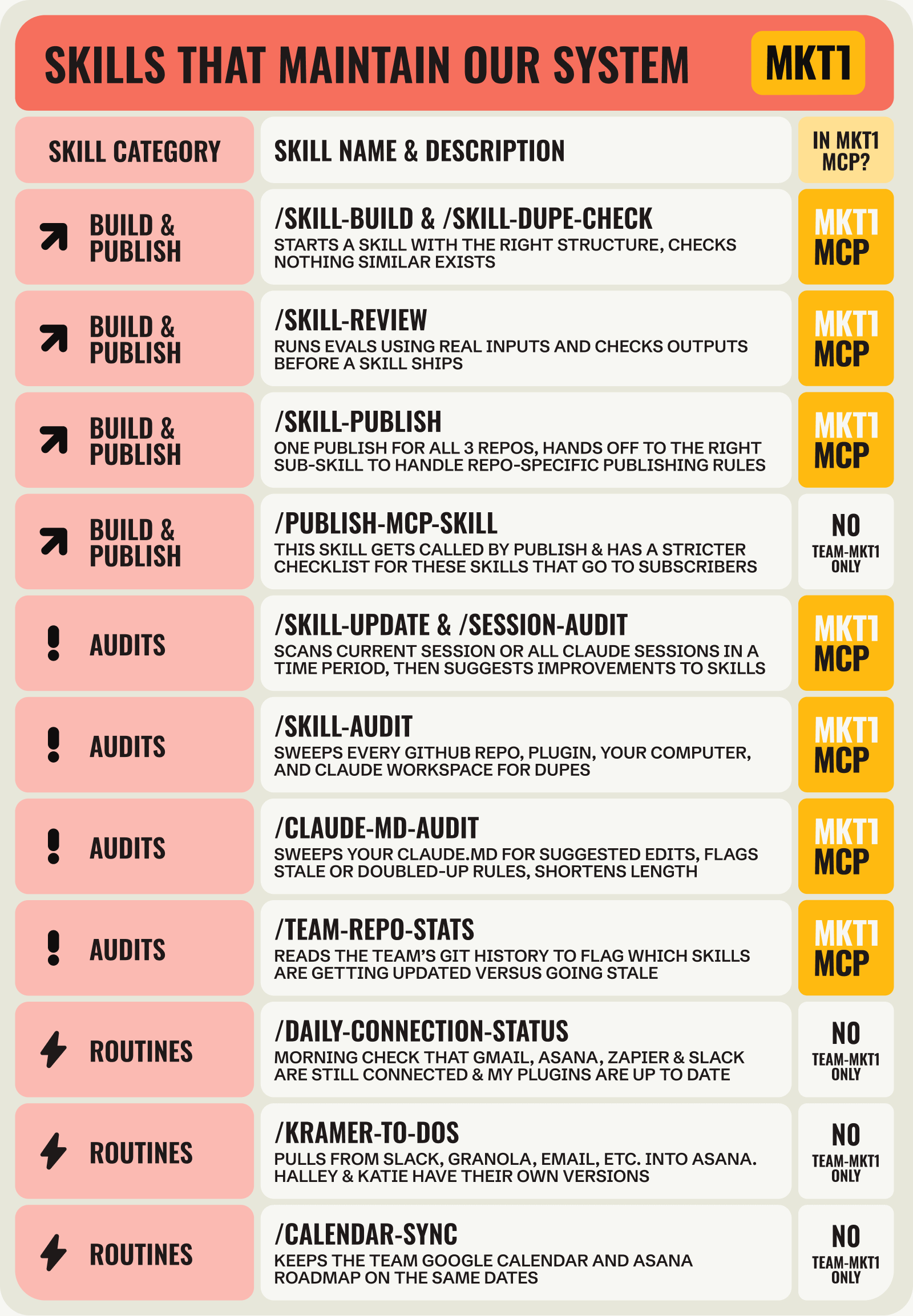
💰 Steal this from our MKT1 setup: Let Claude maintain your system, not just do the work. The skills we use for this (build, review, publish, dupe check, update, session audit, repo stats) are all in the MKT1 MCP.

Collaboration
Our team is small so we all build, but I (Kramer) own the system. Since I'm the only one working full-time on MKT1, this just makes sense! I also love to build and love systems thinking, so I'm having a really great time over here. If you read Part 2 of this series, this is probably closest to Buffer's collaboration model.
As Gen Marketers, we all feel like we can jump in anywhere and help out. We all have our lanes and things we are best at, but we are all ready when someone goes on vacation. (I should really take a vacation to make sure this multiplayer system is working!)
How we decide what to build and who builds it
We keep one big roadmap for all of MKT1 in Asana, and we have different owners and collaborators for the Claude portions of each.
Examples will help: Right now Katie is working with me on partner workflows, to make buying sponsorship spots a little less manual (but still highly vetted). Halley is working with me on MKT1 MCP v2 and a bunch of web work to improve paid subscriber benefits.Skills in progress live on a shared skill to-do list in the Team-Dino repo (and also pushed to Asana), so any of us can pull something off. Once a week, a routine reads the list and tells me what's to build next, so I can queue work up before my Claude usage resets.
We all improve skills as we work. When a session leads to new decisions or fixes, we make updates to the skill immediately, which get pushed, so the other 2 people on the team have it next session.
A skill headed to the MKT1 MCP gets tested by someone who didn't build it. Our
/publish-mcp-skillasks whether to add a review task in Asana and for whom. If I built the skill, that's usually Halley, since those skills go to subscribers and I'm too close to my own work to catch what's confusing.
How we keep each other in the loop
When a new skill ships or a process changes, Claude posts in our team Slack channel in a pre-defined format.
Many of our routines post what they did to Slack. Nobody has to open any other tools to get most updates.
The calendar sync posts a change log when a newsletter date moves and what got updated because of it.
The job board scrape posts a report of all the new roles and their approval status.
Open tickets in our support tool post to Slack, and a ticket checks itself off in the digest once someone replies.
Skill and MCP updates go to the team channel.
We also write newsletters like this one about our own system, which forces us to evaluate our set up and get on the same page—sharing and building in public for the win!
💰 Steal this from our MKT1 setup: Pick an owner, but let everyone build—even if they are just shipping improvements, not building new skills. Fix skills as you go, so the whole system gets better over time without a big cleanup project. And before a skill goes to anyone outside the team, have someone who didn't build it test it.
Should you publish an MCP?
You might have read about our MCP and thought, do we need one of those? So we thought we'd be remiss not to talk about our MCP setup since it's so core to what we do. Like in the LangChain example in Part 2, we "open source" things we build to marketers via our MCP. It's really an extension of our Team-Dino repo, shared with all of you.
A few scenarios where it makes sense:
Publish an internal MCP instead of using a GitHub repo + plugin for your shared capabilities
Launch an MCP that serves as a "sidecar product" for your audience
Add content to the MCP your eng team ships with product functionality to make it a richer experience
Using an internal MCP instead of a GitHub repo (scenario 1)
While most teams can get pretty far with a shared repo and a plugin, an MCP server can be worth it in a few cases. When...
You don't want to deal with plugins going stale
Your skills need to read from sources not everyone has connected individually (like your CRM)
Your team isn't all in Claude Code; e.g. if people want to use the same set of skills in Codex because they are hearing great things about Astra
You want better analytics on skill usage, which a GitHub repo barely gives you
Launching a public MCP (scenarios 2 and 3)
An MCP can also be a product for your audience, not just a way to ship skills to your own team. Ramp does this with Ramp Data MCP: a separate MCP from the one for users that gives anyone benchmarks on software spend across 50,000+ businesses, with no access to your own Ramp account. The same idea applies if your company already ships an MCP for its product: Marketing can add the docs, templates, and frameworks your audience would want in there, so it's more than a feature list.
You might consider making an MCP sidecar product if...
You already ship data, frameworks, or templates to your audience, and your audience would use them via MCP
You built a sidecar product, micro-tool, etc. somewhere else and you want to bring that into Claude too
Nobody has built good skills for your audience yet, and you can fill the gap
Someone on your team wants to build things for your audience that aren't part of your product
If you're interested in building an MCP as a sidecar product for your audience, or an internal tool with an MCP, come to our MKT1 x Lovable Buildathon. You can now build not only apps, but MCPs in Lovable! Build with us on Wednesday 10/28 at 10am PT.
Here’s how our MCP server works:
40+ of our skills go to nearly 2,000 subscribers through the MKT1 MCP, in whatever version of Claude they use. Shipping a skill to the MCP now involves a few questions back and forth with Claude Code and boom, published.
Setup: We built the MCP server in Claude Code, GitHub, and Cloudflare.
An MCP server has to be "running" all the time so subscribers can reach it, so we use Cloudflare for this.
Cloudflare also redeploys itself whenever we push something new to the MKT1 MCP GitHub repo.
When someone connects to our MCP, the code in Cloudflare looks up their email against the Airtable subscriber base (our source of truth) and answers if they are paid or free to determine what skills they have access to.
Every hour, a routine compares who's paying on Substack with who has MCP access, so a new paid subscriber can use it within the hour, and someone who cancels loses access the same way (sorry, we can't give everything away for free). Substack doesn't make this easy, but we've hacked around their limited API functionality!
Building a skill: Usually I start with something I've already built for our team and repurpose it for the MCP.
I ask Claude for help with this, and it reads our
/publish-mcp-skillskill, which holds the rules a skill has to meet before it can go to subscribers.The rules are the ones I listed in Capabilities, plus a description that says what it does and when to use it (so Claude picks the right skill when a subscriber asks for something) and a one-line changelog entry.
Publishing: When it's ready, I push it to our MKT1 MCP GitHub repo, using our publish skills described in the Capabilities section above.
GitHub tells Cloudflare something changed, Cloudflare redeploys with the new skill in it, and a few minutes later it's live for every subscriber, changelog entry included.
Help docs & support: We prefer people ask the MCP itself for help, but if not, we respond to tickets via Plain, our support tool.
Our MCP has help docs built in (a skills list, a help skill for common fixes, and a changelog), but we don't write these by hand or have to remember to update them. Claude drafted the originals and we edited them. When we publish a skill, we review its changelog line then.
A ticket lands in Plain whether someone emails us, uses the form on our site, or comments on Substack. The same help docs feed the knowledge base we answer from in Plain, and a monthly routine checks it still matches what the MCP does.
Plain also shows a "person" card that we built for each ticket: Plain asks our code in Cloudflare about that email, and the code answers with paid or free, last connection, and what's broken. A Claude agent labels and prioritizes each ticket within minutes. Our
/plain-operateskill gives us the open tickets anytime in Claude.
Analytics: Every morning, a bot posts MCP stats to Slack.
Cloudflare provides an analytics database, and we included code that logs a row for any event. That code was written by Claude Code, btw. The report gives us active users, new installs, tool call count, and top skills, with a weekly roll-up on Mondays.
I look every day to understand what people are using. It's very informative, you all love your audit skills!
💰 Steal this from our MKT1 setup: Once a skill works for someone who isn't the builder, you can share it with anyone (a teammate, a subscriber, or a partner), whether via MCP or just GitHub. Open sourcing what you are building is a great way to learn and get more mileage out of what you've already built!
RSVP: MKT1 x Lovable Buildathon on Wed 10/28
Speaking of MCPs, come build your own at our Lovable Buildathon.
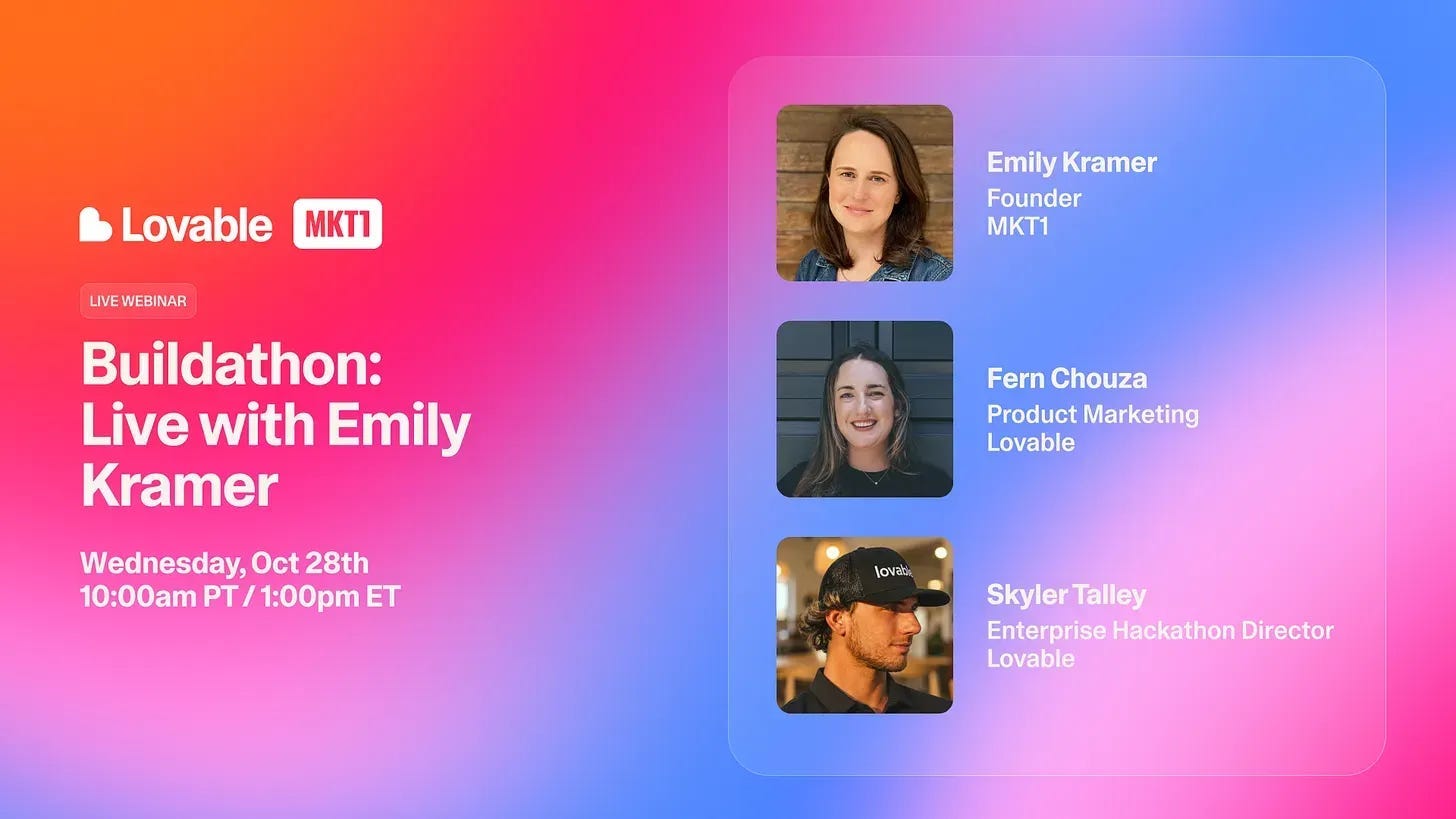
What: We’re hosting a buildathon with Lovable, the easiest place to build apps—and now MCPs that bring those apps to Claude, ChatGPT, etc.
I’ll build 2 apps live:
A brand guide app that checks your marketing assets against your guidelines
A benchmark tool for your customers built from real report data
Then you’ll start on your own build, with 20 prompts to pick from. Fern and Skyler from the Lovable team will answer questions.
When: 10/28 at 10am PT / 1pm ET, 45 minutes.
This concludes our 3-part series on "Multiplayer Claude"
We've spent much of the summer building our own multiplayer AI systems and talking to other teams about how they did it. We hope we've inspired you to spend some of your fall doing this!
I get most of my work done straight from Claude Code now, and I already can't remember how I used to work. And we're putting the time we're no longer spending on manual workflows back into building out the MKT1 MCP (plus some other things in the works at MKT1).
To be honest, the multiplayer stuff is a real investment, and it gets addicting, so be warned! But I think it’s all worth it…if you have a robust set of skills and routines, and can pass the Vacation and New Computer Tests, you’ll know you’ve made it.
Some more things to keep in mind...
Does your multiplayer AI setup pass the vacation test?
Here's the test one more time: If a person or computer is offline, can the work run? Can you update the AI workflow? We didn't pass it in July. In August we moved everything into shared repos, moved the routines that matter to the cloud, and put our context in the tools the whole team already uses. Now we pass for almost everything!
Try it on your own team. Take the 3 AI workflows your team relies on most, and for each one ask: If the person who built it was out, or their laptop was closed, would it still run? Could someone else change it?
And whether you have a multiplayer setup yet or not, does your own setup pass the New Computer test?
Becoming a Gen Marketer means learning how to build all 4 Cs of a multiplayer system
When I wrote about the Gen Marketer a year ago, the pitch was a marketer who can flex across functions, enabled by AI. A year in, the Gen Marketer skillset also means building skills, agents, and the context layer they run on.
Between the 3 of us, we've been the first marketer at a lot of companies. First marketers are generalists whether they like it or not, and every one of us kept a list of things we'd love to build if only we could get a little help from engineering! This year we got to build the list ourselves.
At team MKT1, none of us are engineers...but we are kind of now. We run a newsletter, a job board, and an MCP server on this setup, all because we are willing to use AI to help us and push our own boundaries. We started with a few skills in February and now have 100+ skills and 30+ routines. You can do it! And your job might depend on it (fortunately/unfortunately).
Steal use the skills we already built; it’s in the MKT1 MCP
I'd be remiss if I didn't tell you one more time: We have so much of this built out for you. We built our MCP to give marketers a head start on building with AI. Why start from scratch when you can copy our playbook?
That's all for this series. I hope you learned as much as I did writing it, interviewing people, and spending over 8 weeks thinking about it all.
More from MKT1
Upcoming changes to MKT1 pricing for new paid subscribers
On October 1, 2026, we are increasing prices for new paid subscribers: $16/month or $144/year (that's 3 months free for annual subscribers!). For existing paid subscribers, nothing is changing right now.
Why:
We haven't changed prices in almost two years, and we've added a lot to the paid plan since.
We're investing more in the MKT1 MCP, which is included in every paid plan. This requires more MKT1 resources dedicated to development and support.
Other newsletters with similar perks and extensive archives charge $18 to $20 a month. Our perks include $40K+ in discounts on GTM tools, the full MKT1 archive, our 100+ template library, free posts to our job board and job search MCP skill, and more coming soon.
If you have any questions please let us know.
🙏 Brought to you by: Appcues, an AI-powered customer engagement platform; Omni Lab, a paid media & demand gen agency; and Framer, the AI canvas for the web.
💬 Bring this newsletter to Claude: Chat with this newsletter with this pre-built prompt—this is a long one, so this is a good way to get a refresher or summary!
🔌 MKT1 x Lovable Buildathon on 10/28 at 10AM PT / 1PM ET: Come build apps and MCPs for your team or your customers alongside Kramer and the Lovable team. Register here.
🤖 MKT1 MCP: Add MKT1 skills to your LLMs. Paid subscribers get our full library of 40+ skills and templates, including all the MKT1 team skills featured in this newsletter.
🧑🚀 MKT1 job board: Jobs from the MKT1 community (it's free to post as a paid subscriber). And our candidate form if you're looking for a new role (option to remain anonymous included!).
🥞 MKT1 Perk Stack: Exclusive discounts worth $40K+ on our favorite GTM tools. For annual & superfan paid subscribers only.
🧰 Template & resource library: We have 100+ templates and resources available to paid subscribers in our template & tool library.
🔒 Paid subscribers only: RSVP below the paywall for Multiplayer AI Office Hours with Kramer
Come hang with me in Zoom for an hour on Friday 9/25 at 10am PT. I’ll be answering questions on getting your team set up for multiplayer AI with Claude Code, GitHub, MCPs, and more. I’ll also have a couple of Claude Code scenarios built out to walk you through. This is for paid subscribers only and requires a promo code to access, RSVP details are below the paywall: