


👋 This is a free edition of MKT1 Newsletter brought to you by Sequel, AI agents for webinar & video marketing; Conversion, the agentic marketing automation platform; and Primer, B2B paid media targeting, measurement & intelligence.
Subscribers get deep dives into B2B marketing topics from MKT1 Newsletter 2 times per month. Upgrade to a paid subscription for Full access to the MKT1 MCP | 100+ templates & resources | Post to MKT1 Job Board | MKT1 Newsletter Archive | $40K+ in discounts in the MKT1 Perk Stack
Marketers need to be builders. I know that’s an overused word, but bear with me as I BUILD my point.
Just chatting with an LLM doesn’t cut it. You are expected to use new tools, understand new lingo like “AI harness,” learn new marketing tactics, and build skills, agents, apps, and even MCPs. You need to figure out how to balance speed and scale with taste and judgment. You must keep pace with how fast product and engineering are shipping. You are basically required to relearn your job, while doing it.
I recognize how overwhelming this can feel. The learning curve is steep. It feels like running up a San Francisco hill, with AI billboards staring you straight in the face as you go. I really gotta get out of town this holiday season, can you tell?!
But the way through it is to become a builder. And the best way to be a builder is to start building—or start cooking, which will make more sense in a moment.
This is where I can help. In 2026, I hosted 4 Buildathons and Showcases to help inspire you to build. Most recently I co-hosted the MKT1 x Lovable Buildathon to teach you how to go beyond building basic skills or simple apps (watch the full video below). The next week, I gave a Lovable SheBuilds talk to share how I approach my own AI builds, and the responses (like these 2 posts) were really motivating.
I want to pass those vibes on to MKT1 readers, and I figured the best way to do that was to give you some actual ideas. So, this newsletter has 30 ideas you can build right now across internal apps for your team, external apps for your audience, skills to help you get real work done, and agents to improve your team’s processes.
As the holidays approach, I hope you spend some time building something it wasn’t even possible to build this time last year.
Recommended products & agencies
We only include sponsors we’d recommend personally to our community. If you are interested in sponsoring our newsletter, email us at sponsorships@mkt1.co

Conversion is the agentic marketing automation platform that replaces Marketo, Pardot, Eloqua, or HubSpot. AI agents run campaigns, workflows, and custom sequences. Used by Profound, ClickHouse, & Plaid.
Offer: Marketo customers: Use this link to get a $100 gift card when you book.
—
Sequel: Run webinars from your website. Then use Sequel Agents to personalize follow-up emails for every attendee, make clips, and brief your sellers. Used by Datadog, Clay & ElevenLabs—and now MKT1!
Offer: 25% off Sequel Annual Plan + Unlimited Sequel Agents credits through Feb ’27. Mention MKT1 when you book.
—
Primer: The all-new Primer is the AI teammate for B2B ads. It helps you build the right audiences across LinkedIn, Meta, Google & Reddit, then tells you what to test, fix, or invest in next. Used by Rippling, Confluent, and Apollo.
Offer: Get 10% off an annual subscription with code MKT110.
In this newsletter:
A breakdown of what you can build with AI, plus 30 ideas of things to build across 5 categories:
Holiday builds (’tis the season!)
Help getting started:
What you should be building with AI
The build ideas in this newsletter fall into a few categories: Apps, MCPs, skills, and agents, but don't get hung up on the type of AI build you start with. You'll learn what works by just building, so get in there and try things without worrying about whether you're doing it the exact right way.
And no matter what you build, it’s pretty easy to change your mind and transform what you’ve built. If you build a skill and later realize you want it to run on a schedule and talk to another skill, you can build an agent that connects all the dots. If you build a standalone app and want it to be usable in Claude, build an MCP that connects.
Analogies help here...and since it’s the holiday season (aka eating season), here’s the best metaphor I’ve got:
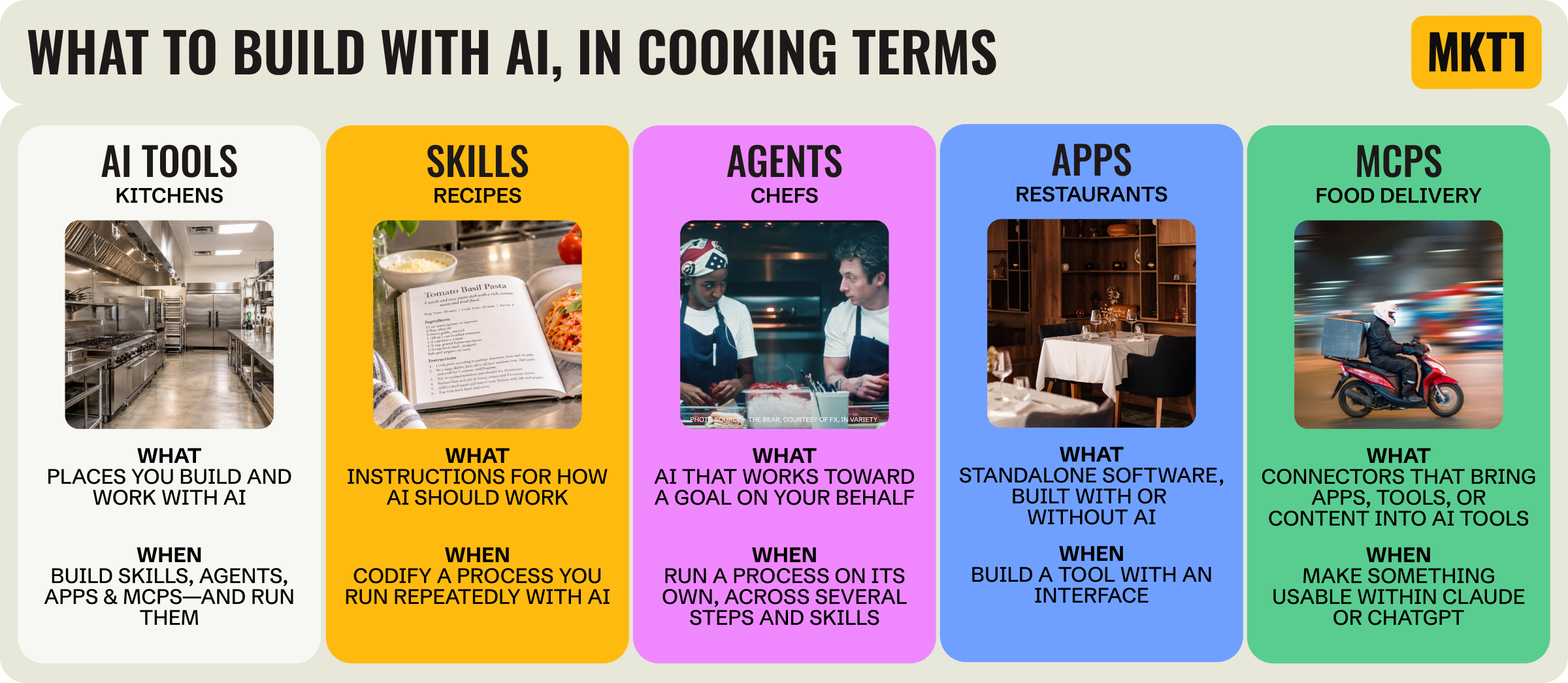
AI tools (like AI assistants, app builders, AI coding tools, and AI harnesses) are kitchens where you cook stuff up. Some come with a dishwasher, an air fryer, and a fancy wine fridge, and some come with just the basics and let you do your thing without all the bells and whistles.
Skills are the recipes. Write them down once, and you're more likely to get the meal made your way every time.
Agents are the chefs. Tell them the “meal” you expect and give them some recipes, and they'll cook for you so you don't have to stand over the stove.
Now do you get why agents are so popular? Who wants to cook—not me, that’s for sure!Apps are restaurants. Sometimes you just want to go out to eat in a lovely setting. But this does mean you're stuck with what's on the menu...
MCPs are food delivery. Whether you're ordering just the ingredients or the full meal, what you need comes straight to your kitchen so you can do what you please without leaving the house.
Before you start building, some advice...
Connect your context first: Load in docs, sheets, skills, links, and MCPs (aka “connectors” in Claude or “plugins” in ChatGPT) to give context for the thing you are building.
Start in plan or chat mode: Explore ideas and ask AI for help before the “building” starts. And if you get stuck as you are building, need better prompts, need to know what tools to use, etc., just ask AI for help again.
Change one thing at a time: Build systematically, reviewing or testing results each time. Going step by step leads to better outcomes and speeds up learning (especially at first).
Use the MKT1 MCP to get a head start (shameless plug): We built an MCP with a collection of skills and tools made just for B2B startup marketers. Once our MCP is connected, just ask your AI tool to use our skills as a starting place. Add the MKT1 MCP or learn more about it here.
Watch me build 2 apps with MCPs at the MKT1 x Lovable Buildathon...
I built an internal brand & voice checker and a salary report live at an event I co-hosted with Lovable on 10/28.
We also kicked off with a presentation from me, Fern, and Skyler from the Lovable team and ended with Q&A.
We cover what's possible in Lovable, why you should build your own apps and MCPs, how to use design systems and skills in an app build, and how to handle permissions and plan for scale when building.
You can also view the slides and the rest of the event resources, including the build prompts here (both built in Lovable as well).
Internal app + MCP ideas
All teams have docs, data, and knowledge that aren't easy to access or put into action. That's where an internal tool or app might help. Building an app is valuable when what you're making will be used by multiple people, needs a visual, and/or is something you might otherwise buy software for.
But don’t just build an app. Build an app with an MCP. Rather than just giving your team another URL for yet another app, the MCP enables them to bring the functionality of that app to their AI tool of choice, like Claude or ChatGPT. Once you build the MCP, it’s as easy as pasting a link in your AI tool to connect.
To go back to my meal analogy, I think of internal apps as a polished place for your team to get something done, kind of like a restaurant. But sometimes we don’t want to leave our house, so a restaurant that delivers is an even better option. Building a custom MCP alongside your app is the AI version of food delivery.
📍 Where to build: Since Lovable gives you a built-in database, hosting, sign-in and permissions, and an easy way to make MCPs or Slack apps too, it’s a one-stop shop for app building. You can also build apps with AI coding tools like Claude Code or Codex, but you'll have to set up things like hosting with another tool.
App idea: Brand, voice & messaging checker
Watch me build this during the MKT1 x Lovable Buildathon at 13:27 and see what I built here ➜
🤷♀️ Why build it:
Enable the marketing team—and even other teams—to check that their work is on brand, on voice, and on message and get a list of suggested fixes without waiting on marketing.
👷♀️ Who should build it:
Design, brand, product marketing, and/or content marketing
🧱 What to build:
Move your guides (brand and design; voice, tone, and style; and positioning and messaging) into one visual “hub” or site. Then add the ability to review a file or URL against these guidelines and get suggestions back, in the app itself or in their own AI tools (via an MCP).
Make sure your build includes:
A web version of your marketing guides: Add requirements, examples, logos, files, etc. so anyone can review the guidelines easily.
AI checker: An input box to paste text, share a URL, or upload a file to audit against the requirements and guidelines, plus suggestions on what to fix.
Examples of good vs. bad outputs: Improve the checker’s accuracy by sharing examples of what on brand and on message looks like (and what not-so-great looks like).
MCP connected to the app: Let anyone check a draft, a headline, or an image from Claude or ChatGPT. To add the MCP in Lovable, use this prompt:
Publish this app as an MCP server by adding agent integrations to this project.Note: You can decide to include all of these things in one app, or make separate apps for brand and design, voice and tone, and positioning and messaging.
🏎️ How to get started: Pick the ones that help.
Copy everything above into the app builder of your choice and ask it to plan your build. Pre-load it with any relevant skills or design systems. For this app, tell it to start from the docs you already have for brand, voice, etc.
Use prompts written for the MKT1 x Lovable Buildathon for the brand checker and the messaging checker.
Start with the MKT1 MCP to build out positioning if you don’t have this yet, use the positioning skill. This skill is available to paid subscribers only.
Reminder: You can watch me build an MKT1 version of this at the MKT1 x Lovable Buildathon (starts at 13:27).
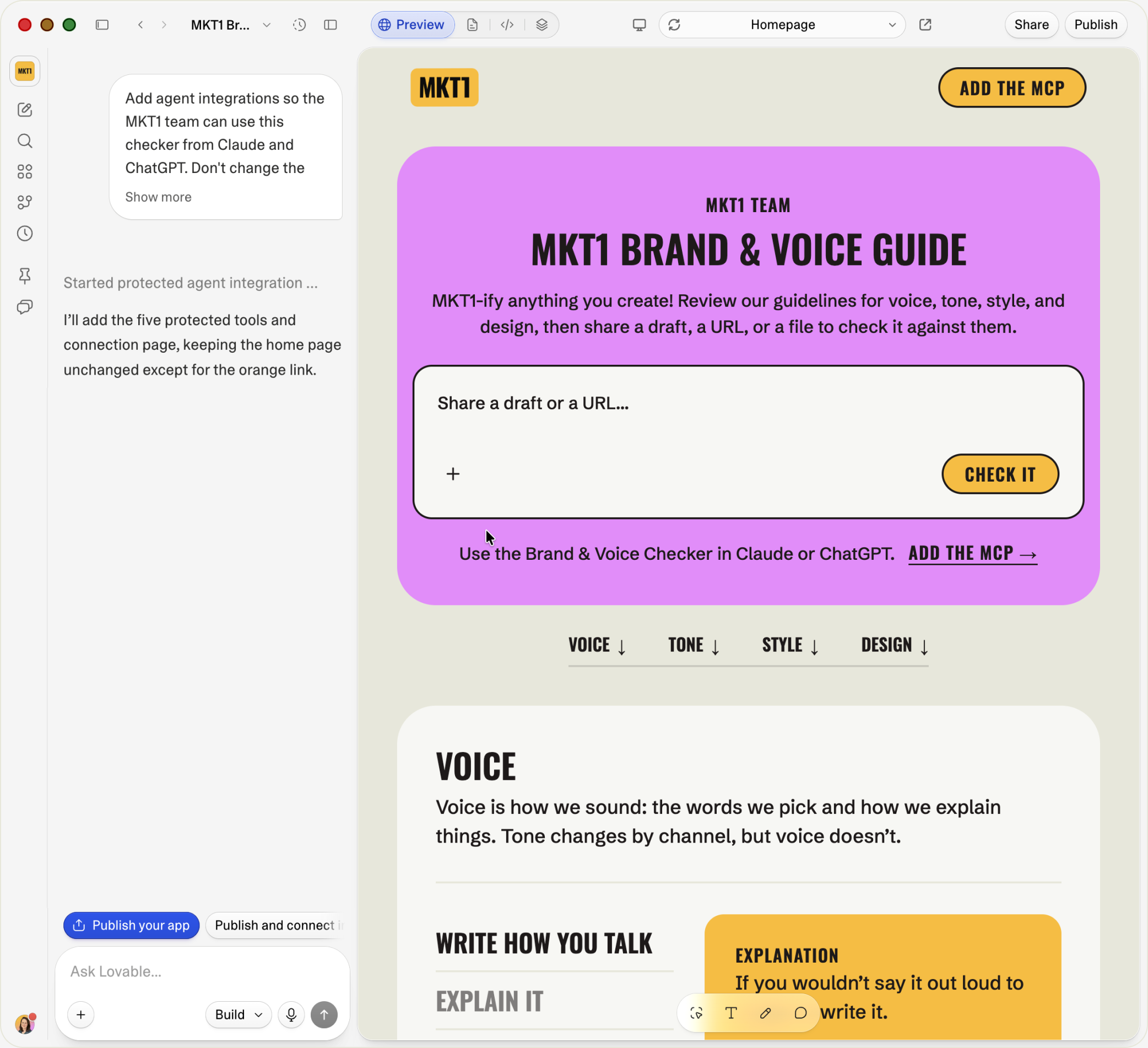
Try the MKT1 brand & voice checker, made during the Buildathon ➜
App idea: Marketing request queue
🤷♀️ Why build it:
Keeping track of requests and answering them on time gets chaotic. When you use an app (either standalone or via MCP), it's easier to collect the same info every time, use AI to prioritize them, and let everyone see where their request stands.
👷♀️ Who should build it:
Marketing leader, producer, or ops
🧱 What to build:
An intake form for other teams to request work from marketing, plus a list of prioritized and sized marketing requests. Both work in the internal app or through the MCP.
Intake form: Asks for the goal (including the problem they’re trying to solve), audience, format or creative requirements, channels, stakeholders, and deadline. This follows MKT1’s GACCS brief format, but just in question form!
Database or sheet: Store the requests in Lovable’s built-in database, or connect a Sheet to your app builder with a connector and use that as your database.
AI for sizing and prioritizing: Give AI a rubric to prioritize and size each request—you can even build a skill for this and load it into the app! More on skill building below.
Shared queue: A list of every request, with its status and priority.
MCP connected to the app: To fill out the “form” and submit requests from Claude or ChatGPT. Alternatively, you can build a skill for this.
🏎️ How to get started: Pick the ones that help.
Copy everything above into the app builder of your choice and ask it to plan your build. Pre-load it with any relevant skills or design systems.
Use this prompt from our Lovable Buildathon if building there.
Start with the MKT1 MCP: Use the GACCS skill to build your intake questions.
Other internal app ideas
Real-time forecasting dashboard: Show your spend against your goals and budget, pulled from your CRM and ad tools, plus an MCP to pull the latest numbers into Claude or ChatGPT. This solves a pet peeve of mine: Pasting a screenshot of a report into a slide, and doing it every week. Why is this still happening?!
Start from the marketing budget and forecast skills in the MKT1 MCP, or read our past newsletters on budgeting and forecasting.Customer insights library: A dashboard of what customers say in interviews, support tickets and reviews, and your approved quotes and proof points. Add in an MCP to pull customer proof into things you are building or writing in AI tools easily.
Bonus: Keep it updated on its own by layering in a skill or agent that pulls from the sources automatically.UTM or tracking link generator: A tool that builds tracking links that follow your conventions. Add an MCP to build links with the right codes while editing your work in Claude, ChatGPT, etc.
Subject-line previewer: A tool that shows how a subject line will look in Gmail, Apple Mail, and Outlook. I borrowed this idea from Tom Orbach, his newsletter is great!
Goal tracker: An app that lists your team’s goals or OKRs each year, quarter, and/or month with the owner and the latest status (pulling from live sources where possible).
Start from the KPO goals skill in the MKT1 MCP.
Not sold on building an MCP? Here’s why MCPs matter for marketers
It goes without saying that more and more work is happening inside AI assistants like Claude and ChatGPT. MCP Servers (aka simply “MCPs” or connectors) make this possible. It’s the protocol for integrating with AI agents and tools. Here are 3 reasons marketers need to care about MCP:
Both your team and your audience (prospects, customers, and even partners) will want to be able to use everything your company makes, from your product to your content, in their AI tools.
Your company won't just build a standalone product, but also an MCP, and you'll need to market both.
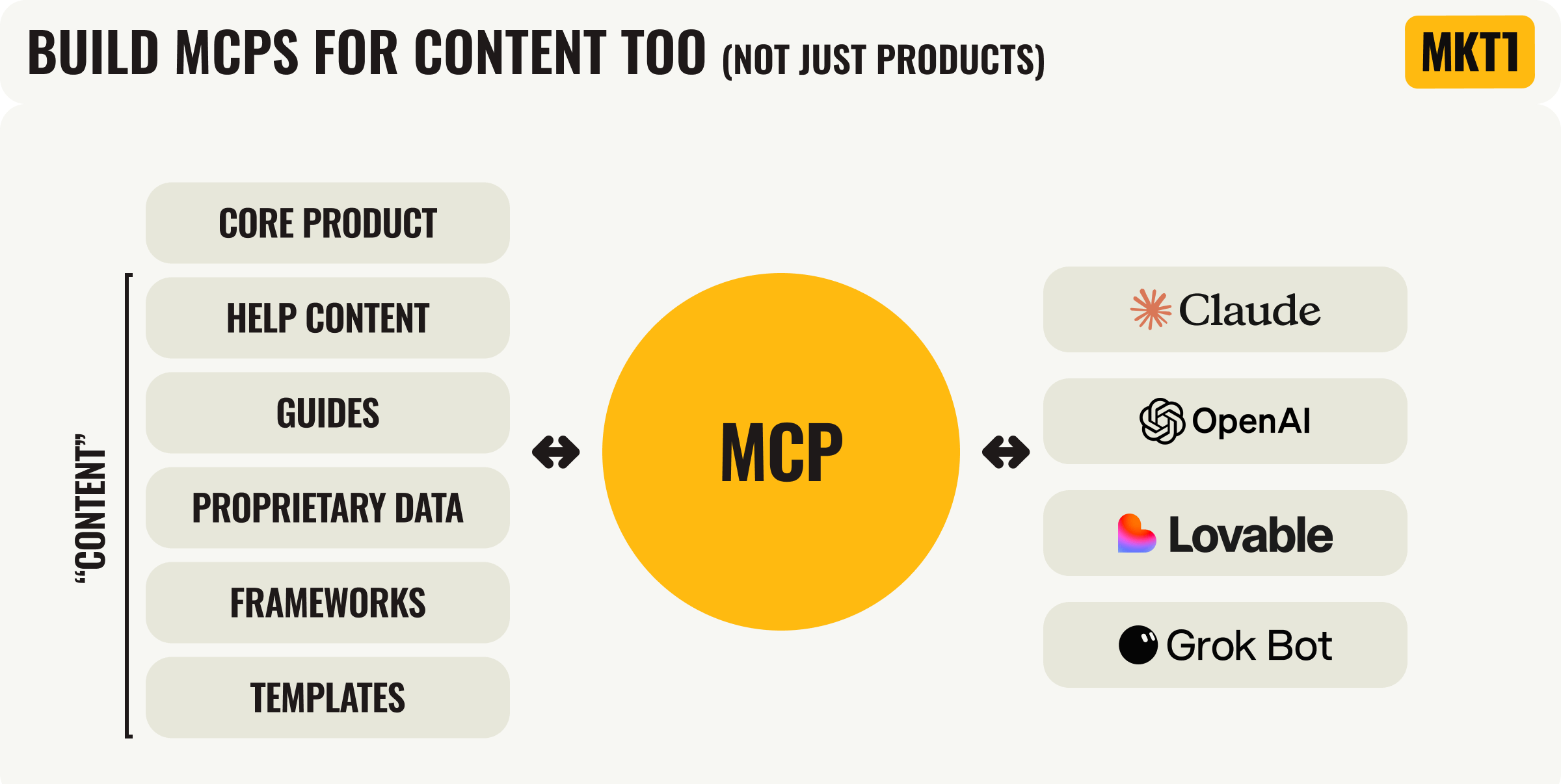
Instead of sharing content with customers on traditional channels, you can also distribute it through an MCP.
Making an MCP for content means your audience can pull things like official help content, guides, data reports, templates, frameworks, and advice into their AI tools.
This might feel like a stretch right now, but this is exactly what I'm doing at MKT1 with the MKT1 MCP. Ramp also does this with Ramp Data, which puts Ramp's spend data across companies and AI Index in Claude.
So it’s time to get familiar with how MCPs work. The first step is adding connectors/plugins to Claude or ChatGPT. IMO, the next step is to build your own. You’ll learn faster that way.
External app + MCP ideas
Remember always wanting engineers to spend time on marketing stuff, and being jealous of things like Spotify Wrapped?
While I've long been an advocate of building useful tools for your audience (aka sidecar products), admittedly this was easier said than done as marketers never really got the resources. But, now you can do so much of this yourself. And yes, this means there's really no excuse anymore for PDF downloads, static reports, and other lead magnets of yesterday. Ready for another meal analogy? These are the frozen dinners of marketing, and no one really wants them. Instead, build external apps for your audience, and even add an MCP...you are free of limitations.
📍 Where to build: You can build in the same places you build internal apps, like Lovable.
App idea: Report & benchmark checker
Watch me build this during the MKT1 x Lovable Buildathon at 24:17 and see what I built here ➜
🤷♀️ Why build it:
Reports do well compared to other types of content, even when presented in an old-school PDF. But an interactive report is even more useful, especially when people can benchmark their own numbers against the data and explore the data on their own.
👷♀️ Who should build it:
Content marketing
🧱 What to build:
A web version of your report, with a way for people to input their own numbers and compare them to your benchmarks. Extend it with an MCP so they can run the same exercise and reference your data in their AI tools. Make sure your build includes:
A web version of your report: Include graphs, explanations, and methodology.
Database: Add the data from your report to a database. This will enable the benchmarking tool and MCP to work!
If you use Lovable like I did for my example, you can do this with their built-in database.Benchmarking tool: An input box for people to type in their own numbers and compare them against the overall data in the report. With Lovable, you can use built-in AI to make this pretty slick, and have the flow ask follow-up questions until it has the info it needs to compare against your benchmarks.
E.g. in my salary report example, someone can include their info, like “Head of Growth at a Series B startup in NYC, $250K base,” to see how it compares to similar roles in the report.MCP connected to the app: Build an MCP that lets people explore the data in ChatGPT or Claude. E.g. MKT1 shares the data from our reports in the MKT1 MCP.
To add the MCP in Lovable, use this prompt:Publish this app as an MCP server by adding agent integrations to this project.
More inspo: Brendan Hufford built a LinkedIn Ads scorecard from Dreamdata’s benchmarks report during our MKT1 x Lovable Buildathon. You plug in your numbers and get a score you can compare to thousands of B2B companies. Thanks for sharing Brendan.
🏎️ How to get started: Pick the ones that help.
Copy everything above into the app builder of your choice and ask it to plan your build. Pre-load it with any relevant skills or design systems. For this app, you can start by sharing a link from a report you've already published.
Use prompts written for the MKT1 x Lovable Buildathon for the benchmark tool and the interactive research report.
Reminder: You can watch me build an MKT1 version of this at the MKT1 x Lovable Buildathon (starts at 24:17).
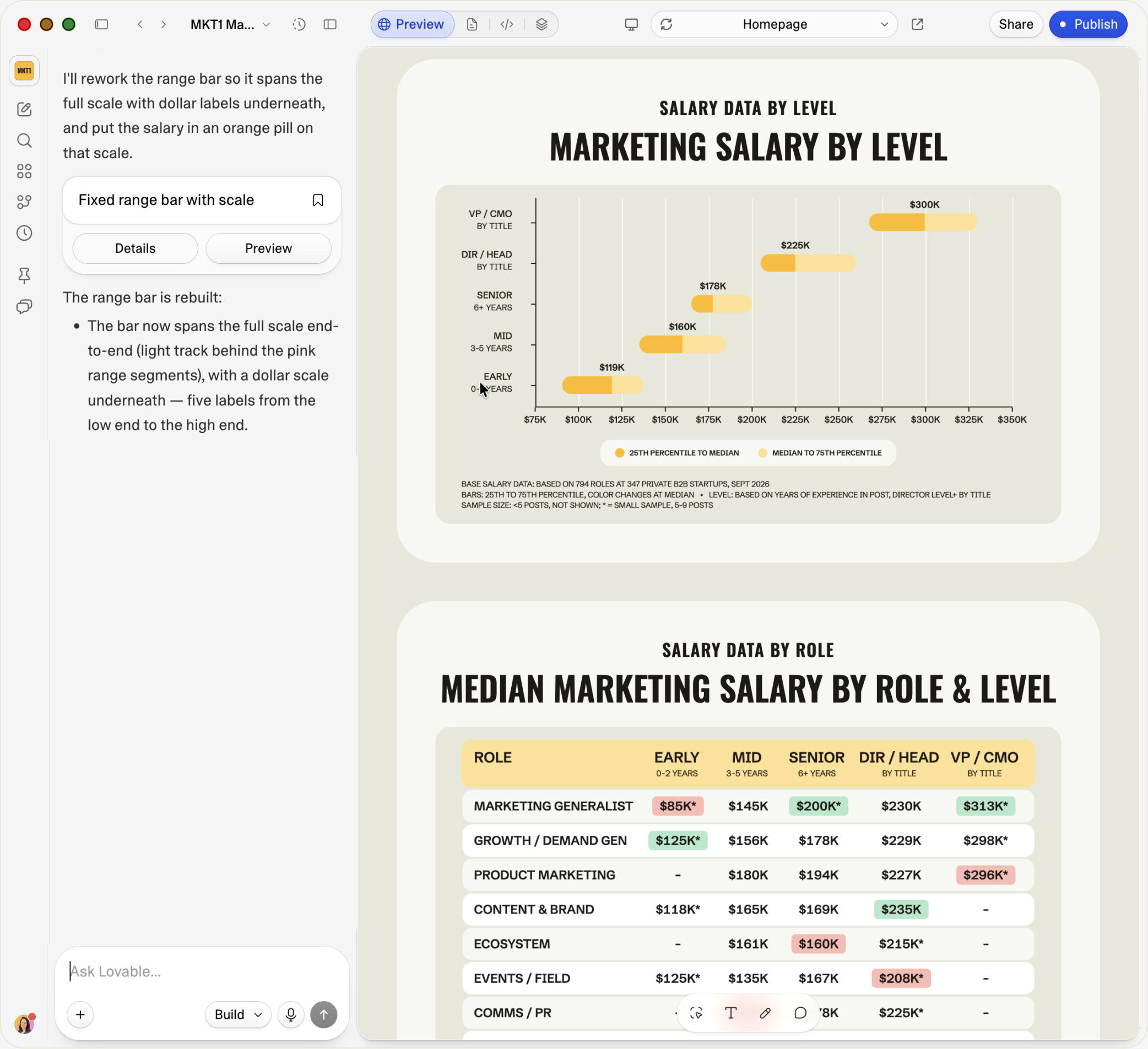
Try the MKT1 marketing salary report, made during the Buildathon ➜
App idea: Social asset builder
🤷♀️ Why build it:
Everyone wants attendees, speakers, and partners to post about your event. The trick is making it easy without spoon-feeding them a generic post. Do this by giving them a way to make a branded graphic that's still their own.
👷♀️ Who should build it:
Event marketing or partner marketing
🧱 What to build:
An app where attendees, speakers or partners fill in their details and get a branded graphic to post on LinkedIn.
Graphic builder: People type in their name, title and company, add a photo, and pick a version (like attending, speaking, or partnering). The app makes the graphic in your brand.
Brand templates: Load your event or brand design so every graphic looks the same. You can reuse standard templates or customize the graphics to each event.
Suggested post copy: A short post people can copy, with your event link, so they don’t have to write their own, unless they want to of course.
MCP connected to the app: Build an MCP that lets your internal team make graphics for a whole list of speakers or partners in ChatGPT or Claude.
🏎️ How to get started: Pick the ones that help.
Copy everything above into the app builder of your choice and ask it to plan your build. Pre-load it with any relevant skills or design systems.
Add the link to your event confirmation email so people see it right after they sign up.
Other external app ideas
Calculator: An app that turns a spreadsheet you’ve built for prospects, customers, or your team into a tool where visitors plug in their own numbers and get a result—even better if they can compare it to benchmarks right there. Don’t just do this for ROI calculators for your product. Build calculators for things your audience might actually use: Like a forecasting tool for marketers, a paint calculator for contractors, or a staffing calculator for restaurant managers.
Interactive framework: A version of a proprietary framework that people can fill in for their own company.
Grader or auditor: A tool that scores your audience’s work against your best practices (E.g. a sales deck if you sell to sales teams, or a careers page if you sell to recruiters) and says what to fix first.
Template generator: A tool where people answer a few questions and get a finished doc, like a launch plan, built from your templates and examples. Add an MCP if this is something your customers might use over and over again.
Event hub: A page that puts your event’s agenda, slides, and resources in one place, so attendees have one link to come back to before, during, and after. E.g. for the Buildathon with Lovable, we built the hub and the slides.
Skill ideas
Most of us are now familiar with using skills, which are just transferable markdown files, to improve how we work with AI. You can use skills built into LLMs, find skills in shared GitHub repos, build them yourself, get one from a teammate, etc.
To really personalize what you're doing with AI and improve outputs, build your own skills to transfer your knowledge and processes to AI. Remember, this is like saving your own cookbook of recipes, so when others cook for you, you get what you want!
But you don't have to come up with these recipes yourself. When AI does a task and really wows you, you can ask it to codify what it did into a skill. Save the knowledge and instructions, rinse and repeat that process yourself, or hand over the skill to others to use. Now you don't have to repeat yourself to AI (or to your teammates).
If you aren't building or using skills yet, you're doing things on hard mode. Make sure you have the basics covered, or just get the MKT1 MCP. It's really just a big folder of skills made by us for you.
📍 Where to build: Claude Cowork is the easiest place to start, or use Claude Code if you're already in it and bought in (that's where I build). Once you've built a skill, you can use it across AI tools, from Lovable to Claude to other AI tools.
Here are some skill ideas you might not have thought of yet...
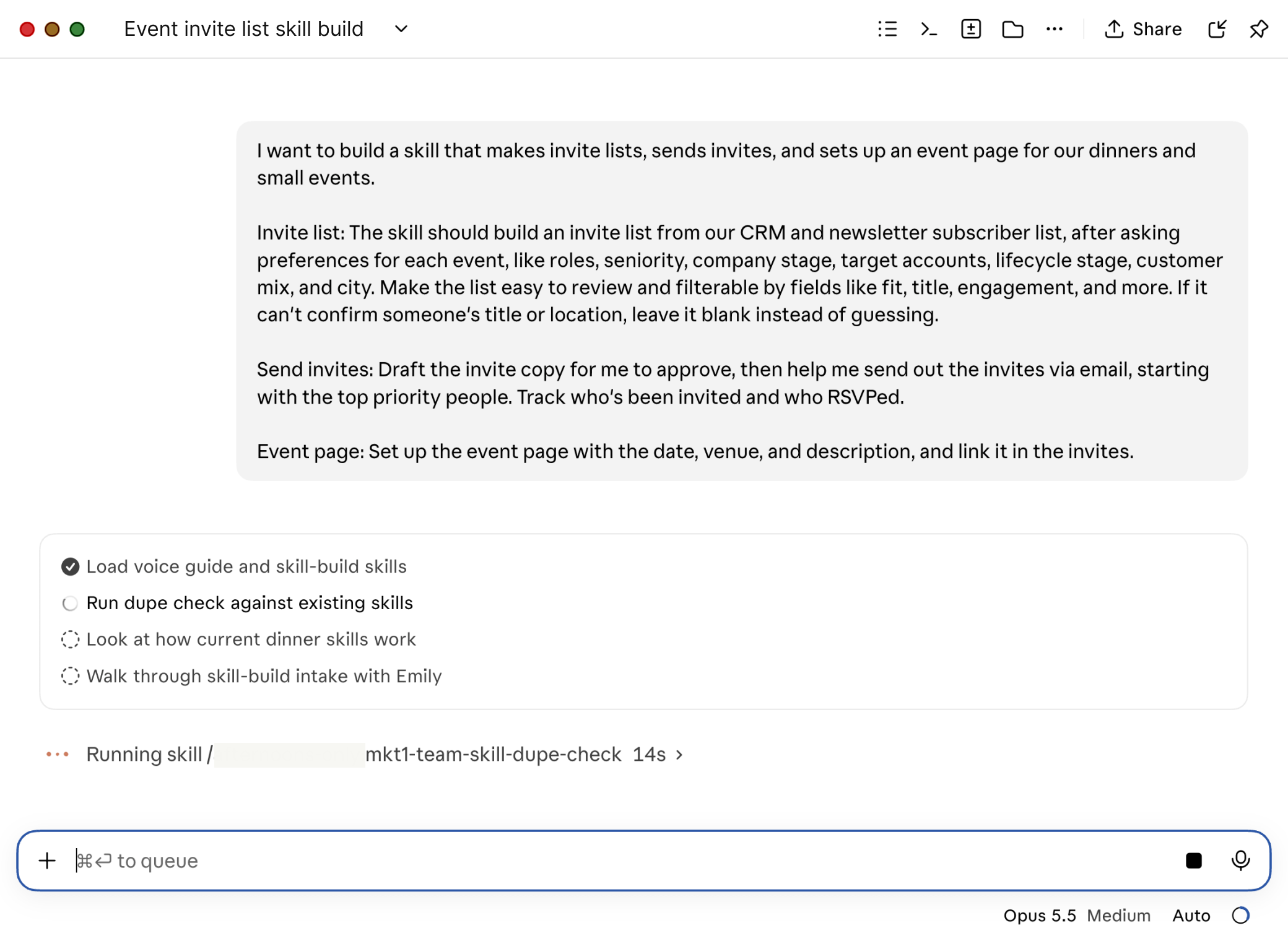
Skill idea: Manage exec dinner or small event invite lists
🤷♀️ Why build it:
You likely run the same process across the same sources to build invite lists for your small events or dinners. And having a shared skill lets anyone from marketing to sales make a list the same way.
👷♀️ Who should build it:
Event marketing, field marketing, or demand gen
🧱 What to build:
A skill that builds an invite list from your CRM based on your preferences for each event, sorts everyone by fit, and saves the list where your team can review it.
Skill goal: Build an invite list for each event with the right people, based on the roles, seniority, company stage, target accounts, lifecycle stage, customer mix, and city.
Connected sources: Your CRM, social followers, email list, and past event lists.
Steps: (1) Asks for details about the event and who should be invited, (2) proposes a list with a suggested priority for each person, (3) asks you to review each person one by one, and (4) saves it all to a list.
Other rules or guidelines to include: Include how to enrich a contact or profile to get the info needed to see if they’re a fit. Include in the skill that if it can’t confirm someone’s title or location, it should leave it blank instead of guessing.
Output: A sheet or a list in your CRM shared with your team, with columns for approval status, priority or invite tier, and the reason for approval.
🏎️ How to get started: Pick the ones that help.
Copy everything above into your skill-building tool of choice and ask it to help you plan and build the skill.
Feed in your past event invite lists as examples of who should attend.
Check if you already have skills for enriching contacts or pulling from your CRM. Your new skill can “call” or “run” them as one of its steps, or copy how they work.
Skill idea: Test readers
See how I set up my 36 test readers in this LinkedIn post from last week ➜
🤷♀️ Why build it:
Getting real people in your ICP to read and review everything before you ship isn't realistic, but it sure would be helpful. A test reader skill gives you a quick, honest take from AI readers who match your audience before you pass a draft to a human on your team. It's not the same, but I find it super valuable—and yes, my test readers are (brutally) honest with me.
👷♀️ Who should build it:
Content marketing, product marketing, or anyone who writes and creates for your audience
🧱 What to build:
A skill that sends a draft to a panel of AI readers based on your ICPs, then brings their feedback back in 1 table.
Skill goal: Get honest feedback on a concept, a full draft, or even a hook idea from a bunch of readers during the drafting process.
Connected sources: Your ICP definitions and wherever you save doc drafts, like Google Drive or Notion.
Steps: (1) Sets up your test readers that cover different roles, company types, and lifecycle stages by building a profile for each one, (2) asks which readers to include and what you want to ask them, like "Which of these 4 post ideas would make you more likely to sign up for this event?", (3) sends out a subagent for each reader with only its profile and the draft, so it reads it fresh, and (4) puts the feedback in a consolidated table and asks if you want to work through it one by one.
Other rules or guidelines to include: Sample test reader profile, from our list: "You're the Head of Marketing at a Series B B2B startup with 150 people. Your CEO keeps asking how the marketing team is using AI. You've read 1 MKT1 newsletter and 1 of Emily Kramer's LinkedIn posts."
Output: A consolidated table of feedback from every reader.
🏎️ How to get started: Pick the ones that help.
Copy everything above into your skill-building tool of choice. You may want to build the test reader profiles first, then the skill, especially if you're new to skill building.
If you don't have ICPs built out yet, start with the ICP prioritization skill in the MKT1 MCP.
Reminder: You can see how I set up my 36 test readers in this LinkedIn post from last week.
Other skill ideas
Content archive search: Build a skill that catalogs your company's past posts (LinkedIn, X, blog, newsletter, etc.) and then sorts through them to find what you've already said on a topic. To do this, have AI scrape your posts into 1 database, then ask it to "vectorize" them so they're searchable by meaning, not just by keyword.
We built 2 (free!) skills in the MKT1 MCP the same way, the MKT1 Newsletter and MKT1 LinkedIn posts skills.Campaign brief generator: A skill that writes a campaign brief with you in chat, in your format, and saves it where your team works. You can make a version just for launches. Start from the GACCS skill in the MKT1 MCP.
Skill suggester based on how you work: A skill that finds patterns in your work and tells you what skills, routines, or agents could help. This is a little meta, but start by asking Claude to look at your open tabs, recent sessions, most used docs, etc. to come up with ideas. E.g. I have a routine that runs weekly and suggests new skills based on all my Claude Code sessions that week.
Project and task prioritizer: A skill that checks a project or task against a 1-page marketing strategy overview and/or your goals to determine priority level. Start with the marketing strategy agent in the MKT1 MCP if you don't have a 1-page strategy yet.
More inspo: We broke down 38 of the many skills we use at MKT1 in this newsletter on our team’s AI setup ➜
Agent ideas
“Agent” is an overused term these days—it’s on every billboard and every homepage hero. It’s kind of like the title “growth,” which means everything and nothing. Even if it’s all a bit confusing and a bit much, you can’t really ignore it. You need to build agents, they’re increasingly how work gets done.
The definition of an agent is an AI “program” that works autonomously toward a pre-determined goal. Agents can plan their own steps, run skills, and get things done. That may sound a lot like an app or a skill. But unlike an app, an agent doesn’t have a clickable UI; and unlike a skill, an agent can adapt on each run.
It’s a bit easier to wrap your head around when you go back to my analogy, agents are the “chefs” of AI. They cook up meals for us so we can spend time on other things (like building more agents?). I’m not personally one to give my agents human names, but if that’s your thing, you might even consider naming your next one something like Guy Fieri, Carmy, or Emeril.
There are a handful of ways to build agents, so start wherever you feel most comfortable:
Build agents inside tools you already use, like Conversion, Sequel, or Profound.
Build agents in agent-building platforms like Dust, Gumloop, n8n, or Grok Bot.
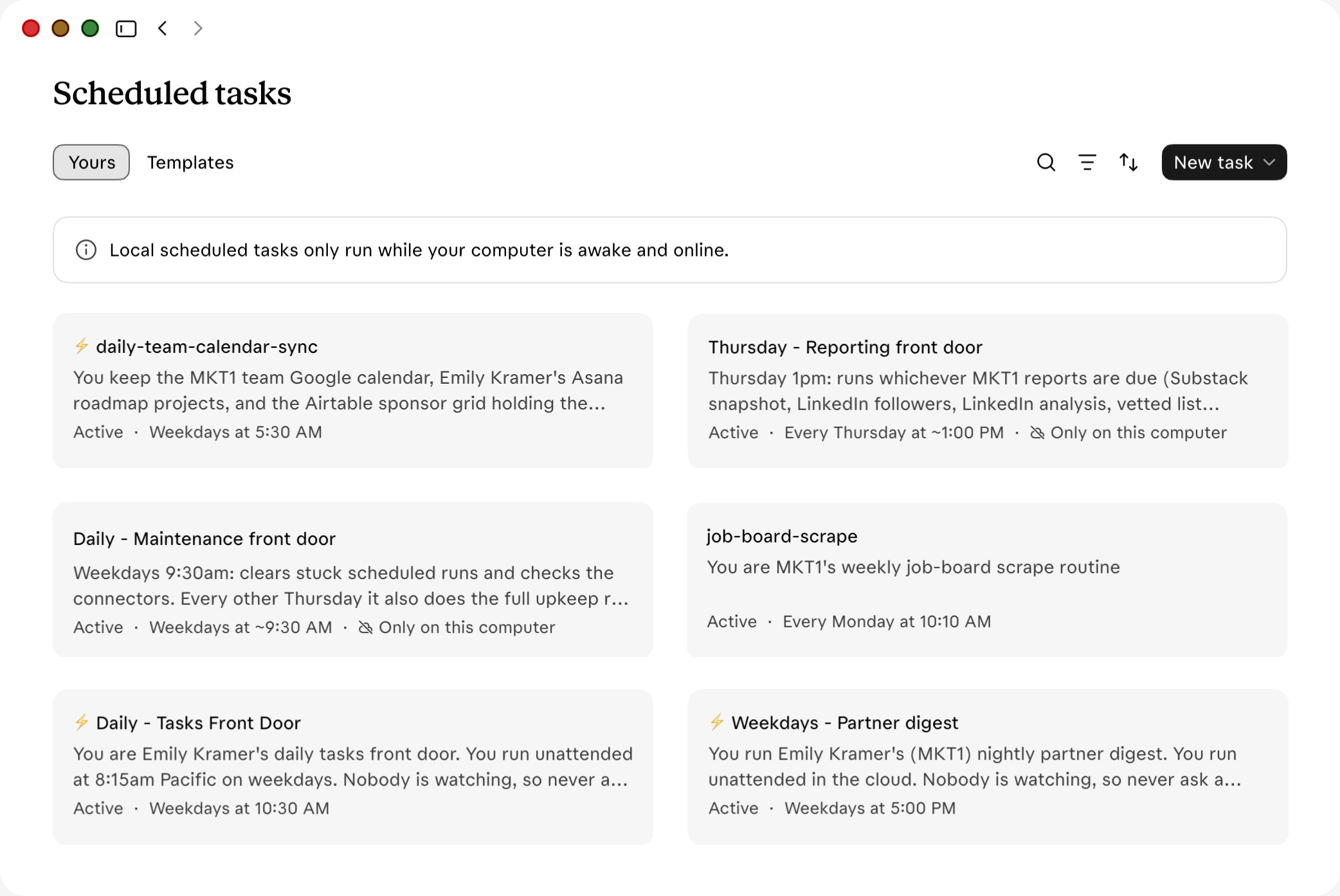
Build skills that work together and run on a schedule in an AI coding tool like Claude Code.
This is the primary way I build agents, and here are some actual “agents” in the form of scheduled sets of skills I have running, I like to call them front doors:
Agent idea: Recruiting agent
🤷♀️ Why build it:
Recruiting takes a ton of time, and not always on the right things, like spending time with the candidates. The steps are predictable, so you can automate the repetitive parts of the flow with an “agent.”
👷♀️ Who should build it: Hiring manager
🧱 What to build:
An agent that runs recruiting skills for each role you open and every candidate who goes through the process.
Connect the right sources & context: Connect your applicant tracking system with an MCP, and save candidates’ LinkedIn profiles or resumes to a file. Then connect your past job descriptions and, if you have one, your interview question bank.
Build these steps & skills: Build a skill for each piece of the process. Each piece should then be called by your recruiting agent as needed.
Scorecard skill: Define the core job responsibilities, then the candidate’s must-haves and nice-to-haves.
Job description skill: Pulls your company’s past job descriptions and scrapes job descriptions for similar roles at other companies. Then the skill references your scorecard and makes a draft job description for you to review.
Candidate review skill: Checks each candidate’s LinkedIn profile or application against the scorecard, provides feedback, and suggests who to review first.
Interview questions skill: Suggests questions for the role by interviewer, based on the scorecard. It can write them from scratch or pull from a premade question bank.
Orchestrator: Build the “agent” that runs all these other skills for each role or candidate as needed. It gives you a scorecard and job description for each role, and a review and custom interview questions for each candidate. Make sure it also saves all progress to the right place (like your ATS or job description doc).
Note: You can add more skills for the orchestrator to call. E.g. for a homework assignment, add a rubric and have AI review the assignment and compare it to your own review notes.
Other rules or guidelines to include: The agent can review and rank candidates, but make sure a person decides who moves forward. Have it keep a clear record of the decision on every candidate, so a human can review it too.
🏎️ How to get started: Pick the ones that help.
Copy everything above into your agent-building tool of choice and ask it to help you build the agent and subskills.
Start with the MKT1 MCP: We have skills for nearly all of these things! Use the job description and scorecard, candidate LinkedIn check, and interview questions skills, and have Claude “copy” and customize them.
Agent idea: Competitor watch
🤷♀️ Why build it:
Staying on top of competitor changes across multiple sources is one of the most obvious uses for agents, but so many teams don’t have this running in the background. Put the monitoring on autopilot, and spend more time thinking about how to position yourself in the market.
👷♀️ Who should build it:
Product marketing
🧱 What to build:
An agent that checks your competitors across sources every month and pulls the changes into one report for your team.
Connect the right sources & context: Connect your list of competitors and your prospect and customer call recordings.
Build these steps & skills: Build a skill for each source of information. Each skill should then be called by your competitor agent as needed.
Competitor list skill: Keep a running list of your competitors. Work with AI to categorize and tag them by ICP, use case, size of company, etc. Have the agent run monthly to suggest any new entrants, or run this manually to update.
Web check skill: Browses each competitor’s website, records what’s on the homepage, pricing page, and other key pages, and lists any major changes.
Review site check skill: Does the same across review sites, like G2, Capterra and TrustRadius.
Customer call mentions skill: Connects to your call recorder, like Sybill or Gong, and pulls out where competitors come up, plus how mentions of them and what’s said about them change over time.
AEO and SEO check skill: Pulls AEO and SEO citations and rankings for each competitor. (Your skill can connect to your tool of choice for this. I use the Profound MCP.)
Orchestrator: Build the “agent” that runs these skills each month and delivers a report with consolidated feedback. You review it, then share it with the broader team. It also saves every individual insight, so you can pull it up anytime.
Other rules or guidelines to include: You can do this for your entire ecosystem and your complements too, to get a sense for what’s going on in the market overall. Use our ecosystem mapping template to build the list.
More inspo: You could also build a competitor insights app in Lovable that pulls from your sources and shows the results on a polished, always-on site, then turn it into an MCP so your team can pull those insights into Claude or ChatGPT.
🏎️ How to get started: Pick the ones that help.
Copy everything above into your agent-building tool of choice and ask it to help you build the agent and subskills.
Start with the MKT1 MCP: Use the competitive research skill, and have Claude “copy” and customize it.
Set your competitor agent to run monthly (most AI tools let you schedule this, whether they call it a routine, a scheduled task, or a cron job).
Other agent & routine ideas
Team calendar sync: An agent (or a skill on a schedule) that checks for date changes daily across your calendars, project management tools, and Slack and meeting conversations, reconciles them, flags conflicts, and posts what changed in Slack…because keeping all of these in sync by hand is tedious.
Weekly or daily report highlights to Slack: An agent that pulls your numbers from a few sources and posts the highlights to Slack for your team…and/or adds them to a dashboard (see internal app ideas!)
What your team has shipped: An agent that checks your team’s shared skills repo or app or agent-building tool for updates each week, checks for conflicts or mishaps, and posts a roundup to Slack to keep everyone in the loop. If you don’t have a shared repo where everything lives, everyone on your team can use their own skill that pushes their updates to one central place, and the agent can pull out the highlights and share those.
Final thoughts + some holiday build ideas
I hope these ideas inspired you to get in the AI kitchen and make something new before the year is out. But if you need a break from work stuff, here are some fun holiday build ideas.
Big-ticket item gift picker: Build an app that shows a few product options and lets the person rate them and pick the one they want. This gives them something to do when you give them the gift, shows that you thought about it, but still lets them decide on the big purchase themselves. I did this for my partner for her birthday, when she needed a new dresser—but it could work for jewelry, electronics, clothes, or anything for someone very picky (that would be me!).
Memory-a-day app: Build an app where friends or family upload photos and memories, then have it send 1 back per day. This is the modern version of a calendar or photo book (I do get a calendar of my nephew every year though, and if it stopped coming there'd be a huge gap on the side of my fridge!). Inspired by Dajana Eder's Lovable SheBuilds post, who built this for herself before moving continents.
Restaurant matchmaker for friends: Meeting up with friends over the holidays is always fun, but picking a restaurant as a group is always brutal. So, build an app where everyone swipes on nearby spots until you get a match (kind of like Tinder, for dining with friends). Inspired by Leah Sass's Lovable SheBuilds post, who built this for her friends.
Family newspaper: Build a skill that runs on a schedule to make a Sunday family newspaper. Let your kids help design it, from the masthead to the sections (like a joke, a puzzle, a family memory that pulls from a list, and a countdown to family events). Then have Claude write it based on the sections you've picked, and print it out for you every week. Inspired by Halley on the MKT1 team, who made this with her son and has it print daily on a receipt printer.
An MCP for a loved one (warning: this is probably a terrible idea...depending on the person): If you have a partner or family member who loves building with AI too, make an MCP of shared skills. If you have a loved one who's behind the curve on AI, make an MCP with skills and then force them to learn how to use them during a lull in a holiday gathering. Inspired by my LinkedIn post, where I was kind of joking.
Now go forth and get building!
Full disclosure: The MKT1 x Lovable Buildathon was a sponsored partnership, and Lovable paid to participate. Emily Kramer completed the builds she demoed personally, and they’re available here: brand & voice checker and marketing salary report.
More from MKT1
🙏 Brought to you by: Conversion, the agentic marketing automation platform; Sequel, AI agents for webinar & video marketing; and Primer, B2B paid media targeting, measurement & intelligence.
💬 Bring this newsletter to Claude: Chat with this newsletter with this pre-built prompt and start planning your next build.
📺 Watch the Lovable Buildathon replay: See full breakdowns of the brand & voice checker and marketing salary reports I built, plus the questions we answered live.
🤖 MKT1 MCP: Add MKT1 skills to your LLMs or AI harness. Anyone can search MKT1 resources for free (plus a few bonus skills!). Paid subscribers get our full library of 50+ skills and templates.
🧑🚀 MKT1 Job Board: Jobs from the MKT1 community (it’s free to post as a paid subscriber). And our candidate form if you’re looking for a new role (option to remain anonymous included!).
🥞 MKT1 Perk Stack: Exclusive discounts worth $40K+ on our favorite GTM tools. For annual & superfan paid subscribers only.
🧰 Template & resource library: We have 100+ templates and resources available to paid subscribers in our template & tool library.